
stage 11
分发与展示
Distribution & Display
Engrave Everything · Stage 11
Distribution & Display
Published · Last updated: 2026-05-08 Recommended tools: SuperSplat / Spark (Three.js) / PlayCanvas
Core Thesis
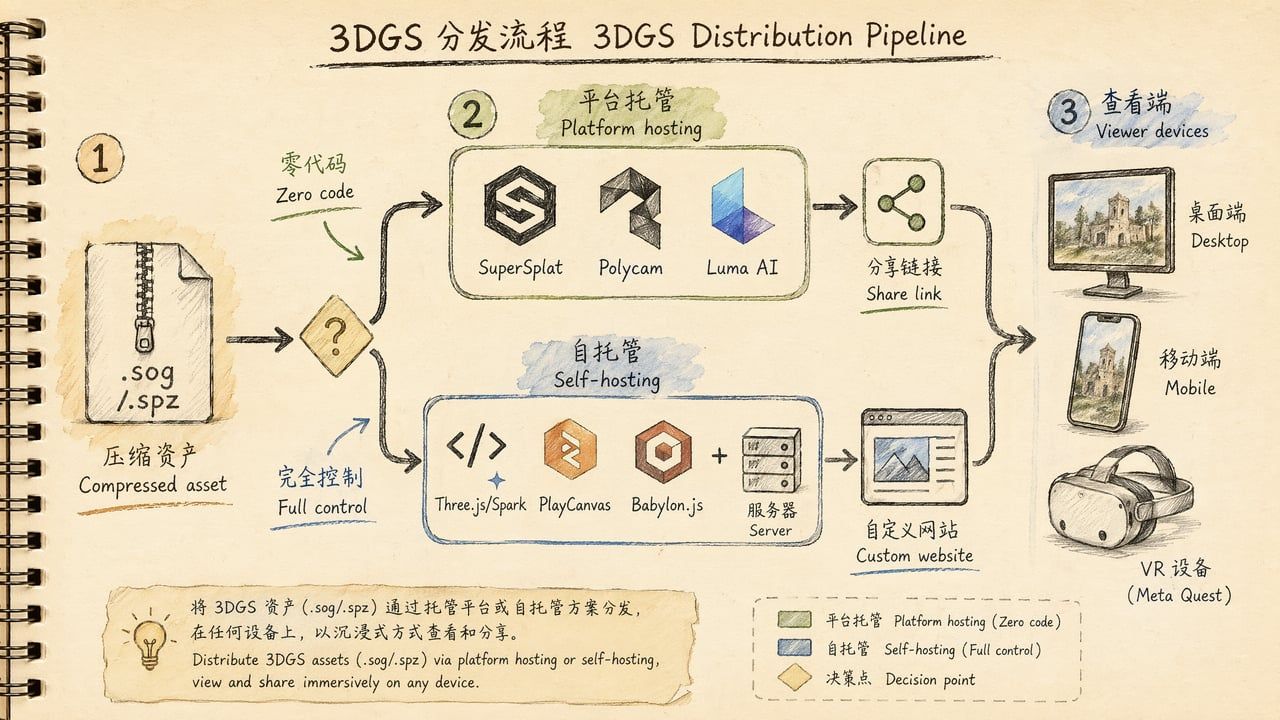
A 3DGS work that only exists on your hard drive doesn't exist at all. Distribution is the last mile of the entire pipeline—turning a compressed file into a link anyone can open. The 2026 ecosystem has matured to the point where "zero code can publish, writing code gives full control."
Distribution has two paths: Platform hosting (zero code—upload to SuperSplat/Polycam/Luma, get a share link) and Self-hosting (write code—build your own viewer with Spark/Three.js/PlayCanvas, deploy to your own domain). Which path depends on whether this is personal showcase or commercial delivery.
What This Chapter Answers
• How do I let others see my .sog / .spz file?
• Platform hosting vs. self-hosting—how to choose?
• Which platforms are free? Which cost money?
• How much code does self-hosting require?
• What should a B2B project delivery include?
• How to integrate WebXR / VR?
Concepts & Positioning
Where Distribution Fits in the Pipeline
Capture → Frame Extract → Color → SfM → Training → Post-Process → [Distribution]
↑ You are here (finish line)
After 10 stages, you have a clean, compressed 3DGS file (.sog / .spz / .splat). The question now: How do you let others see it?
This isn't a technical challenge—2026 has abundant ready-made solutions. The real decision point: how much control do you want?
Two Routes
| Route | Best For | Advantages | Disadvantages |
|---|---|---|---|
| Platform hosting | Personal creators, quick sharing, social showcase | Zero code, instant publish, built-in share links | Limited customization, possible watermarks, platform dependency |
| Self-hosting | Commercial projects, brand websites, deep customization | Full UI/UX control, no watermarks, integrates with existing sites | Requires frontend dev skills, manage your own CDN |
Decision Points
Platform Hosting Options Compared
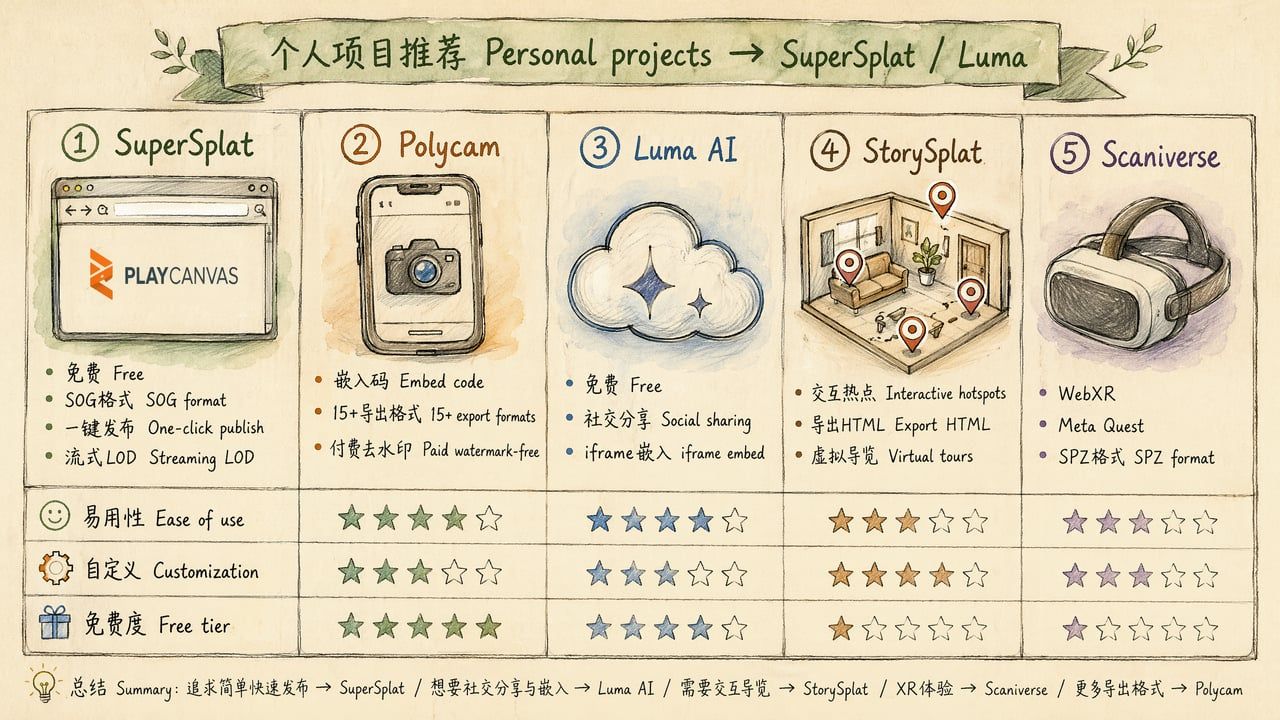
| Platform | Free Tier | Supported Formats | Embed Method | Special Features | Use Case |
|---|---|---|---|---|---|
| SuperSplat | ✅ Fully free | PLY, SPLAT, SOG, SPZ, KSPLAT | Direct link / iframe / HTML export | Studio mode (annotations/camera paths/post effects), Streaming LOD, Walk Mode | Personal showcase, client preview, education |
| Polycam | Free basic | PLY + 15 export formats | iframe embed code | LiDAR scanning, floor plans, UE5 integration | Architecture/real estate, product showcase |
| Luma AI | ✅ Fully free | PLY | iframe / social sharing | Cloud training, social gallery, one-click share | Social sharing, quick prototyping |
| StorySplat | Free basic | PLY, SPLAT | Export standalone HTML | Interactive hotspots, virtual tours, click events | Virtual tours, museums, education |
| Scaniverse | ✅ Free (Niantic) | SPZ | WebXR / Meta Quest | VR immersive experience, Into the Scaniverse | VR showcase, immersive experiences |
| vid2scene | ✅ Free | Direct video upload | Web viewer | End-to-end (video → training → viewing) | Quick prototyping, no local training needed |
Self-Hosting Options Compared
| Solution | Engine | Supported Formats | Highlights | Best For |
|---|---|---|---|---|
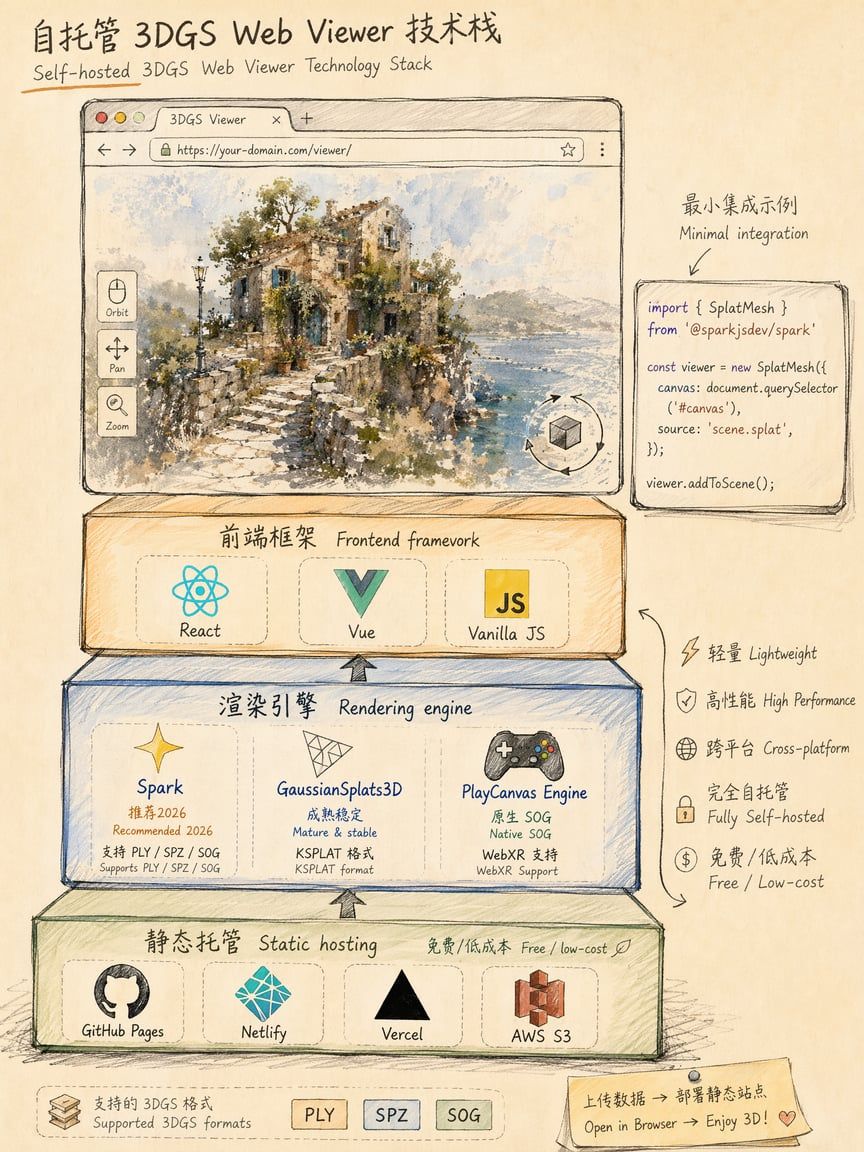
| Spark ⭐ | Three.js | PLY, SPZ, SOG, SPLAT, KSPLAT | 2026 production pick, World Labs, GitHub's most influential 2025 | Commercial websites, product pages |
| GaussianSplats3D | Three.js | PLY, SPLAT, KSPLAT | Mature & stable, widest community, Mark Kellogg | General web projects |
| PlayCanvas Engine | PlayCanvas | SOG (native), PLY | Native SOG, WebXR, game-level performance | Interactive experiences, VR/AR |
| Babylon.js | Babylon.js | SPZ, SOG, PLY | Microsoft ecosystem, shadows, orthographic camera | Enterprise apps, industrial visualization |
| antimatter15/splat | Native WebGL | SPLAT | Ultra-lightweight (single file), best mobile compat | Minimal embeds, mobile-first |
| SplatTransform HTML | None (standalone) | PLY → HTML | One command generates standalone viewer | Quick sharing, no deployment needed |
Inktoys Judgment
Personal showcase → SuperSplat one-click publish. Commercial project → Spark + own domain.
Decision tree:
What's your distribution goal? ├── Quick share to friends/social → Luma AI (free, social-optimized) ├── Portfolio / personal site → SuperSplat publish (free, professional) ├── Client preview / project report → SuperSplat Studio (annotations + camera paths) ├── Embed in existing website → Spark self-hosted (full control) ├── VR/AR immersive experience → PlayCanvas + WebXR or Scaniverse ├── Virtual tour (real estate/museum) → StorySplat (interactive hotspots) └── B2B formal delivery → Complete delivery package (see below)Step-by-Step Operations
Route A: Platform Hosting (Zero Code)
Option 1: SuperSplat One-Click Publish (Recommended)
The simplest, most professional free publishing method in 2026:
-
Open superspl.at/editor
-
Drag in your .ply / .sog / .spz file
-
(Optional) Trim, color grade, add annotations
-
Click Publish → Get share link (e.g., superspl.at/s/xxxxx)
-
Share link / embed iframe in your website
Embed code:
<iframe src="https://superspl.at/s/your-splat-id" width="100%" height="600" frameborder="0" allow="xr-spatial-tracking"></iframe>Option 2: Luma AI Social Sharing
For quick social media sharing:
-
Complete training in Luma AI (or upload PLY)
-
Click Share → Get Luma gallery link
-
Supports iframe embedding
Option 3: StorySplat Virtual Tours
For interactive guided experiences:
-
Upload .ply / .splat file
-
Add interactive hotspots (text, images, links)
-
Set tour paths
-
Export as standalone HTML (self-hostable)
Option 4: SplatTransform One-Click HTML
Fastest "zero-deployment" sharing—one command generates a standalone HTML:
npx splat-transform input.sog -o viewer.htmlThe generated viewer.html is a complete viewer with embedded splat data. Double-click to open in browser, or upload to any static host.
Route B: Self-Hosting (Write Code)
Option 1: Spark (2026 Production Pick) ⭐
Spark is World Labs' Three.js 3DGS renderer, named one of GitHub's most influential libraries of 2025:
Minimal code (< 20 lines):
<script type="module">
import * as THREE from "three";
import { SparkRenderer, SplatMesh } from "@sparkjsdev/spark";
const scene = new THREE.Scene();
const camera = new THREE.PerspectiveCamera(60, innerWidth / innerHeight, 0.01, 1000);
camera.position.set(0, 1.5, 3);
const renderer = new THREE.WebGLRenderer();
renderer.setSize(innerWidth, innerHeight);
document.body.appendChild(renderer.domElement);
const spark = new SparkRenderer({ renderer, camera });
const splat = await SplatMesh.load("./scene.sog");
scene.add(splat);
function animate() {
requestAnimationFrame(animate);
spark.render(scene, camera);
}
animate(); </script>
Spark advantages:
• Supports PLY, SPZ, SOG, SPLAT, KSPLAT—all formats
• Fully compatible with Three.js ecosystem (mix mesh and splat)
• Programmable dynamic splat effects
• High-performance sorting (WebGL 2.0)
• Actively maintained (continuous 2026 updates)
Option 2: GaussianSplats3D (Mark Kellogg)
Most mature Three.js community solution:
import * as GaussianSplats3D from '@mkkellogg/gaussian-splats-3d';
const viewer = new GaussianSplats3D.Viewer({
cameraUp: [0, -1, 0],
initialCameraPosition: [0, 2, 5],
initialCameraLookAt: [0, 0, 0],
sphericalHarmonicsDegree: 2 });
viewer.addSplatScene('./scene.ksplat', {
progressiveLoad: true }).then(() => viewer.start());
Option 3: PlayCanvas Engine
For game-level interactivity (collision, NPCs, physics):
const asset = new pc.Asset('scene', 'gsplat', { url: './scene.sog' }); app.assets.add(asset); app.assets.load(asset);
asset.ready(() => {
const entity = new pc.Entity();
entity.addComponent('gsplat', { asset: asset });
app.root.addChild(entity); });
PlayCanvas unique advantages:
• Native SOG format support
• Native streaming LOD
• WebXR (VR/AR) one line to enable
• Mix 3D models, UI, physics colliders with splat scenes
Option 4: Babylon.js
For enterprise applications:
import '@babylonjs/loaders/SPZ';
BABYLON.SceneLoader.Append("./", "scene.spz", scene, () => {
scene.createDefaultCameraOrLight(true, true, true);
engine.runRenderLoop(() => scene.render()); });
Babylon.js 2025–2026 3DGS updates: SPZ native support, SOG support, Gaussian shadows, orthographic camera, Inspector integration.
Where to Deploy?
| Service | Free Tier | CDN | Custom Domain | Best For |
|---|---|---|---|---|
| GitHub Pages | ✅ Fully free | Global | ✅ | Personal projects, open source |
| Netlify | 100 GB/mo | Global | ✅ | Small-medium projects |
| Vercel | 100 GB/mo | Global | ✅ | Frontend projects |
| Cloudflare Pages | ✅ Unlimited bandwidth | Global | ✅ | High-traffic projects |
| AWS S3 + CloudFront | Pay-per-use | Global | ✅ | Enterprise |
Recommended combos:
• Personal → GitHub Pages (free, simple)
• Commercial → Cloudflare Pages (unlimited bandwidth, global CDN)
• China users → Alibaba Cloud OSS + CDN (fast domestic access)
Performance Optimization
Loading Performance
| Optimization | Effect | Implementation |
|---|---|---|
| Use SOG format | 12–20× smaller files | npx splat-transform input.ply -o output.sog |
| Streaming LOD | First screen < 3 sec | --lod parameter to split chunks |
| CDN acceleration | Fast global access | Cloudflare / AWS CloudFront |
| gzip/brotli | 20–30% less transfer | Server Content-Encoding config |
| Preload hints | Browser fetches early | <link rel="preload" href="scene.sog"> |
| Service Worker cache | Instant on revisit | PWA caching strategy |
Rendering Performance
| Optimization | Effect | Implementation |
|---|---|---|
| Lower SH degree | Less GPU computation | --sh-bands 1 (post-training prune) |
| Morton sort | Better GPU cache hits | npx splat-transform -M |
| Frustum culling | Only render visible | Built into Spark/PlayCanvas |
| Dynamic resolution | Mobile adaptive | renderer.setPixelRatio(devicePixelRatio * 0.75) |
| Fewer Gaussians | Less sorting overhead | Set max_num_splats during training |
Mobile Adaptation
Mobile is the biggest challenge for 3DGS web distribution—weak GPU, limited memory, unstable bandwidth:
Must-do:
• Use streaming LOD (first screen < 5 MB)
• Lower render resolution (devicePixelRatio * 0.5)
• Limit Gaussian count (< 2M preferred)
• Test iOS Safari (more WebGL restrictions than Chrome)
Optional:
• Provide "low quality mode" toggle
• Detect device performance, auto-select SH degree
• Use IntersectionObserver for lazy loading
B2B Project Delivery Checklist
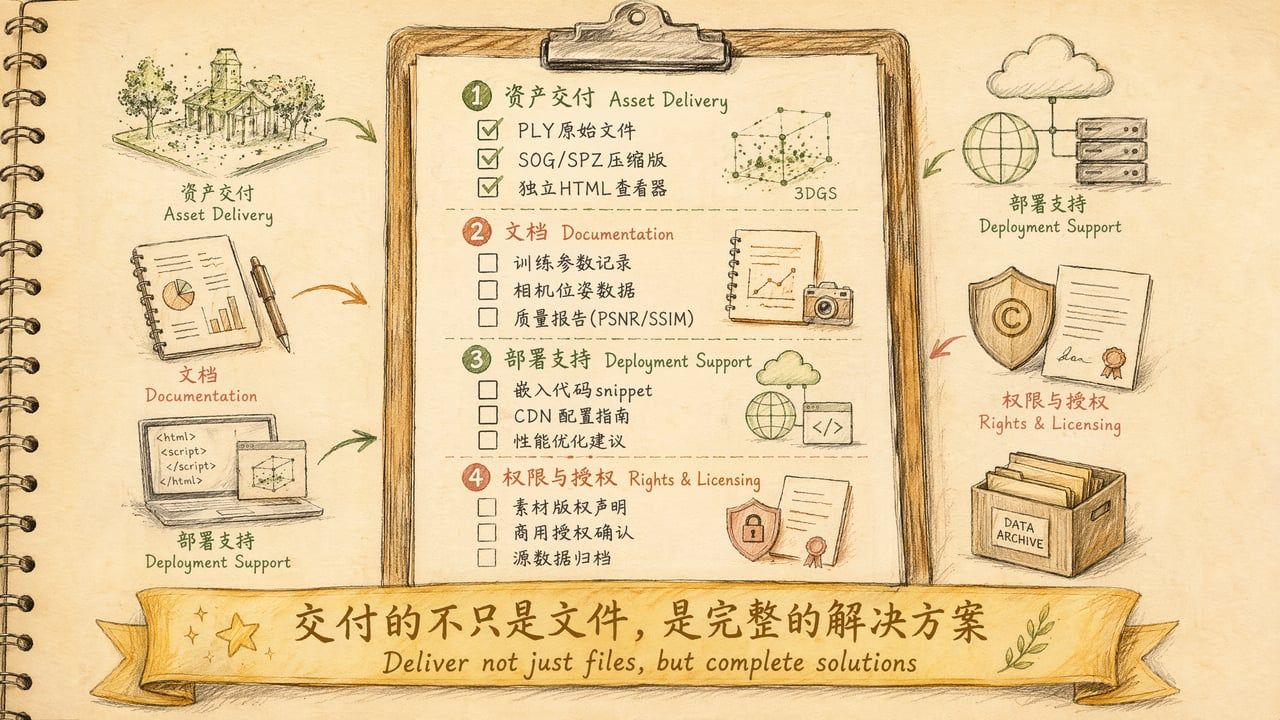
For client 3DGS projects, deliver a complete solution—not just a file:
1. Asset Files
| File | Format | Purpose |
|---|---|---|
| Raw training output | .ply | Client archive, future re-editing |
| Web publish version | .sog | Website embedding, online display |
| Archive compressed | .spz | Long-term storage, cross-platform |
| Standalone viewer | .html | Offline viewing, no deployment needed |
| Thumbnail | .jpg / .png | Social sharing, preview image |
2. Technical Documentation
| Document | Contents |
|---|---|
| Training parameters | Iterations, learning rate, density control, tools & versions used |
| Camera pose data | transforms.json / cameras.json (enables retraining) |
| Quality report | PSNR, SSIM, Gaussian count, file size, training time |
| Source photo manifest | Photo count, resolution, capture device, date |
3. Deployment Support
| Deliverable | Description |
|---|---|
| Embed code snippet | HTML/JS code client can copy directly into their site |
| CDN configuration guide | CORS settings, cache policy, gzip configuration |
| Performance optimization advice | Specific recommendations for client's target platform |
| Browser compatibility report | Tested browsers/devices and known limitations |
4. Rights & Licensing
| Item | Description |
|---|---|
| Source material copyright | Photographer, venue authorization, portrait rights |
| Commercial use confirmation | How client may use (web display/app embed/resale) |
| Source data archiving | Whether original photos are delivered, retention period |
| Third-party tool licenses | Open source licenses used (MIT/Apache etc.) |
5. Delivery Structure
project-delivery/ ├── assets/ │
├── scene-original.ply │
├── scene-web.sog │
├── scene-archive.spz │
├── scene-viewer.html │
└── scene-thumbnail.jpg ├── source/ │
├── photos/ │
├── transforms.json │
└── training-config.yaml ├── docs/ │
├── quality-report.md │
├── deployment-guide.md │
├── embed-code.html │
└── browser-compatibility.md ├── LICENSE.md └── README.md
WebXR: VR/AR Distribution
VR Viewing (Meta Quest)
Simplest VR distribution path in 2026:
Option A: Scaniverse "Into the Scaniverse"
• Niantic's WebXR app designed for Meta Quest
• Upload SPZ → Open in Quest browser → Immersive VR
• Free, zero code
Option B: PlayCanvas + WebXR
app.xr.start(camera, pc.XRTYPE_VR, pc.XRSPACE_LOCAL);Option C: Spark + Three.js WebXR
renderer.xr.enabled = true; document.body.appendChild(VRButton.createButton(renderer));AR Viewing
Android (Chrome + ARCore): Full WebXR AR support iOS (Safari): As of early 2026, Safari still doesn't support WebXR AR. Alternatives:
• Export to USDZ → Apple AR Quick Look
• Use 8th Wall (Niantic) Web AR SDK
VR/AR Performance Requirements
| Metric | VR Requirement | AR Requirement |
|---|---|---|
| Frame rate | ≥ 72 FPS (Quest 3) | ≥ 60 FPS |
| Gaussian count | < 1M (Quest 3) | < 500K (phone) |
| File size | < 50 MB | < 20 MB |
| SH degree | 0–1 (performance priority) | 0 (minimal overhead) |
Common Errors & Troubleshooting
Error 1: Embedded iframe Shows Blank
Symptom: iframe on website is blank or shows error. Root cause: CORS misconfiguration. Fix: Configure CORS headers: Access-Control-Allow-Origin: *
Error 2: Mobile Loading Timeout
Symptom: Phone shows spinner for 30+ seconds, then blank. Root cause: File too large + no streaming. Fix: Use SOG + streaming LOD (first chunk < 5 MB), add progress bar.
Error 3: WebGL Context Lost
Symptom: Screen goes black after viewing, console shows WebGL context lost. Root cause: GPU memory exhaustion. Fix: Reduce Gaussian count (< 2M safe for most devices), lower render resolution.
Error 4: iOS Safari Rendering Issues
Symptom: Incorrect display on iPhone/iPad (black blocks, flickering, wrong colors). Root cause: iOS Safari WebGL limitations. Fix: Use half-float textures, limit Gaussians per draw call, test iOS 17+.
Error 5: SEO Unfriendly
Symptom: Search engines can't index your 3DGS page. Root cause: Pure Canvas rendering invisible to crawlers. Fix: Add text descriptions, Open Graph tags, static thumbnail as <noscript> fallback.
Error 6: Client Says "I Can't Open It"
Symptom: Works for you but not the client. Root cause: Client's browser doesn't support WebGL 2.0, or corporate firewall blocks CDN. Fix: Provide compatibility check page, prepare fallback (static images/video), offer standalone HTML.
Advanced Techniques
Technique 1: Embed in React/Vue
function SplatViewer({ url }) {
const containerRef = useRef(null);
useEffect(() => {
const scene = new THREE.Scene();
const camera = new THREE.PerspectiveCamera(60, 16/9, 0.01, 1000);
const renderer = new THREE.WebGLRenderer({ antialias: true });
const spark = new SparkRenderer({ renderer, camera });
SplatMesh.load(url).then(splat => {
scene.add(splat);
const animate = () => { requestAnimationFrame(animate); spark.render(scene, camera); };
animate();
});
return () => renderer.dispose();
}, [url]);
return </code><div ref="{containerRef}" style="{{" width:="" '100%',="" height:="" '600px'="" }}=""><code class="jsx">; } </code></div></pre><h3>Technique 2: Loading Progress Bar</h3><pre class="javascript"><code class="javascript">const splat = await SplatMesh.load('./scene.sog', {
onProgress: (progress) => {
progressBar.style.width = `${progress * 100}%`;
if (progress === 1) loadingOverlay.style.display = 'none';
} });
Technique 3: Mix Mesh and Splat
const sphere = new THREE.Mesh(
new THREE.SphereGeometry(0.1),
new THREE.MeshBasicMaterial({ color: 0xff0000 }) ); scene.add(sphere);
// Same scene as splat
Technique 4: Multi-Scene Switching
const scenes = {
'living-room': await SplatMesh.load('./living-room.sog'),
'bedroom': await SplatMesh.load('./bedroom.sog'), }; function switchScene(name) {
Object.values(scenes).forEach(s => scene.remove(s));
scene.add(scenes[name]); }
Technique 5: Social Share Preview
<meta property="og:title" content="My 3D Scene"><meta property="og:image" content="thumbnail.jpg"><meta property="og:description" content="Interactive 3D Gaussian Splatting scene">Technique 6: Analytics Tracking
const startTime = Date.now(); window.addEventListener('beforeunload', () => {
navigator.sendBeacon('/api/analytics', JSON.stringify({
scene: 'my-scene',
duration: (Date.now() - startTime) / 1000
})); });
2026 Distribution Ecosystem Overview
Format × Platform Compatibility Matrix
| Format | SuperSplat | Polycam | Luma | Spark | GaussianSplats3D | PlayCanvas | Babylon.js | Scaniverse |
|---|---|---|---|---|---|---|---|---|
| PLY | ✅ | ✅ | ✅ | ✅ | ✅ | ✅ | ✅ | ❌ |
| SPLAT | ✅ | ❌ | ❌ | ✅ | ✅ | ❌ | ❌ | ❌ |
| SPZ | ✅ | ❌ | ❌ | ✅ | ❌ | ❌ | ✅ | ✅ |
| SOG | ✅ | ❌ | ❌ | ✅ | ❌ | ✅ | ✅ | ❌ |
| KSPLAT | ✅ | ❌ | ❌ | ✅ | ✅ | ❌ | ❌ | ❌ |
Standardization Progress
• Khronos glTF: KHR_gaussian_splatting + KHR_gaussian_splatting_compression_spz reached Release Candidate
• Expected: Official release before end of 2026
• Impact: Once glTF standard lands, format fragmentation will significantly decrease
Future Trends
• 4D Gaussian Splatting: Capturing dynamic scenes (motion, performances)
• AI single-image 3DGS: Apple SHARP (early 2026), generating 3DGS from one photo
• WebGPU rendering: 2–5× faster than WebGL, Chrome supports, Safari/Firefox following
• glTF standardization: Unified format, ending fragmentation
• Splat + Mesh hybrid: Placing virtual objects in real scenes—key to AR commercialization
Inktoys Judgment
Distribution is the "last mile" of the 3DGS pipeline, and the only stage that faces the audience. No matter how well the previous 10 steps were executed, if distribution experience is poor (slow loading, won't open, incompatible), the audience perceives "poor quality."
The 2026 distribution ecosystem is highly mature:
• Zero-code solutions are good enough—SuperSplat one-click publish, free, professional, streaming LOD
• Self-hosting solutions are simple enough—Spark in 20 lines of code, deploy to GitHub Pages for free
• B2B delivery has clear industry conventions—assets + docs + deployment support + licensing
You don't need to be a frontend engineer to distribute 3DGS. But if you are one, you can create experiences far beyond what platform hosting offers.
Core recommendations:
-
Personal showcase → SuperSplat publish, 30 seconds
-
Commercial website → Spark + Cloudflare Pages, half a day
-
B2B delivery → Complete package + standalone HTML viewer, professional and platform-independent
-
VR/AR → PlayCanvas + WebXR, or Scaniverse (Meta Quest)
One final iron rule: Always provide a fallback. Not everyone's device can run 3DGS—prepare a static screenshot or pre-rendered video to ensure everyone can see your work, even if not interactively.
What to Read Next
• Want to review post-processing → 10-postprocess: Post-Processing, Cleanup & Compression
• Want to start from the beginning → 00-decision: Should You Do 3DGS?
• Want someone to run the full pipeline for you → About Us · Contact
← Previous Chapter: 10 后处理、修剪与压缩 Post-Processing, Cleanup & Compression — End of Tutorial Series —