
stage 00
决策入口:你适合做 3DGS 吗
Decision Gate: Should You Use 3DGS
Before You Invest, Spend 5 Minutes Deciding
3D Gaussian Splatting is not a universal solution. It excels in specific scenarios and wastes your time in others. This chapter does not teach you how to do 3DGS. It helps you decide whether you should.
For an interactive version, go to /sop/start — answer 3 questions and get a recommended chapter sequence. Below is the text-based decision tree for those who prefer to decide on their own.
Three Questions This Chapter Answers
-
Is my use case worth solving with 3DGS?
-
If yes, should I take the "beginner cloud", "intermediate local", or "professional pipeline" path?
-
If not 3DGS, what's the better alternative?
Three-Layer Decision: Need → Conditions → Path
Layer 1: Can 3DGS Solve Your Problem?
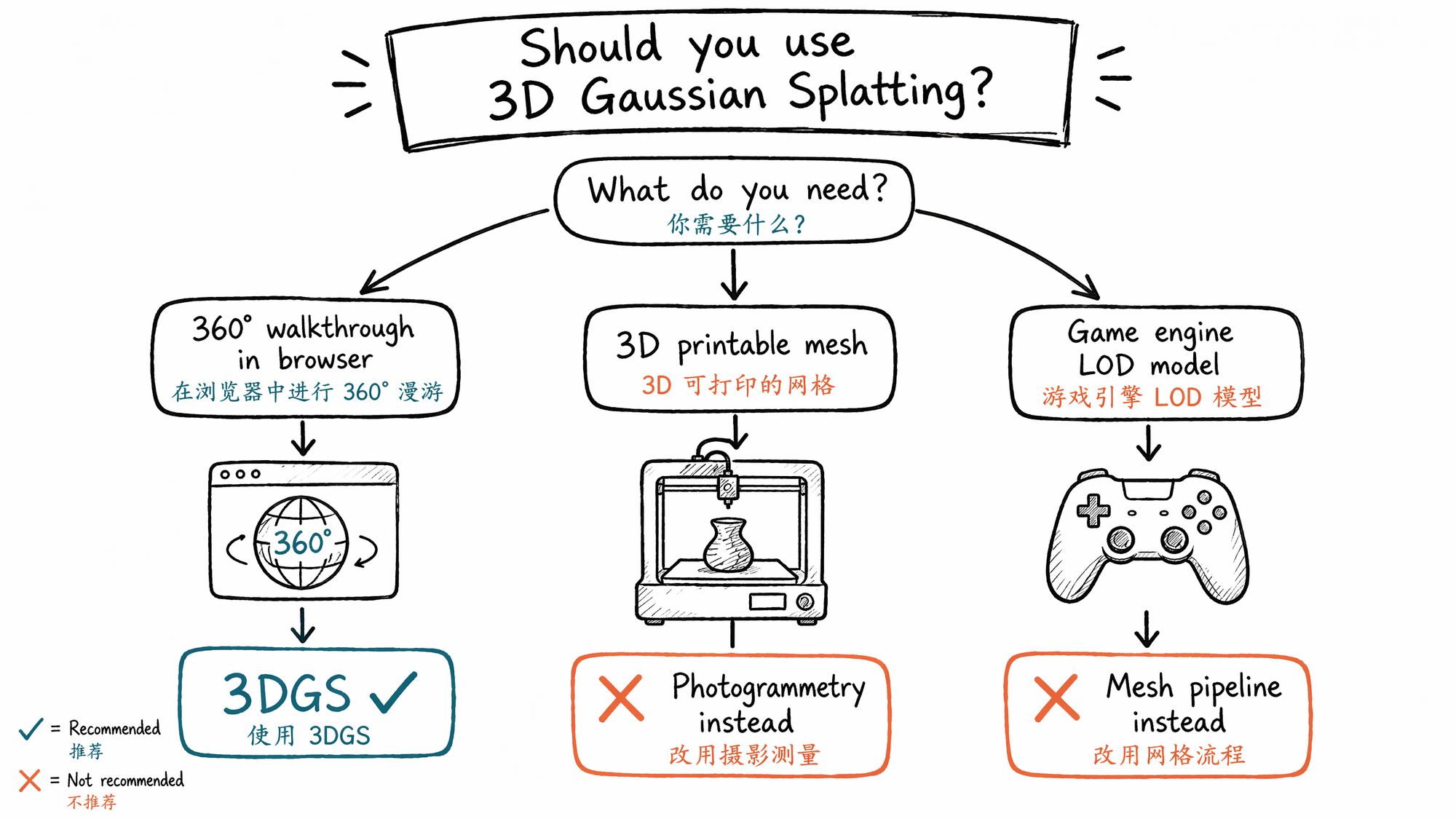
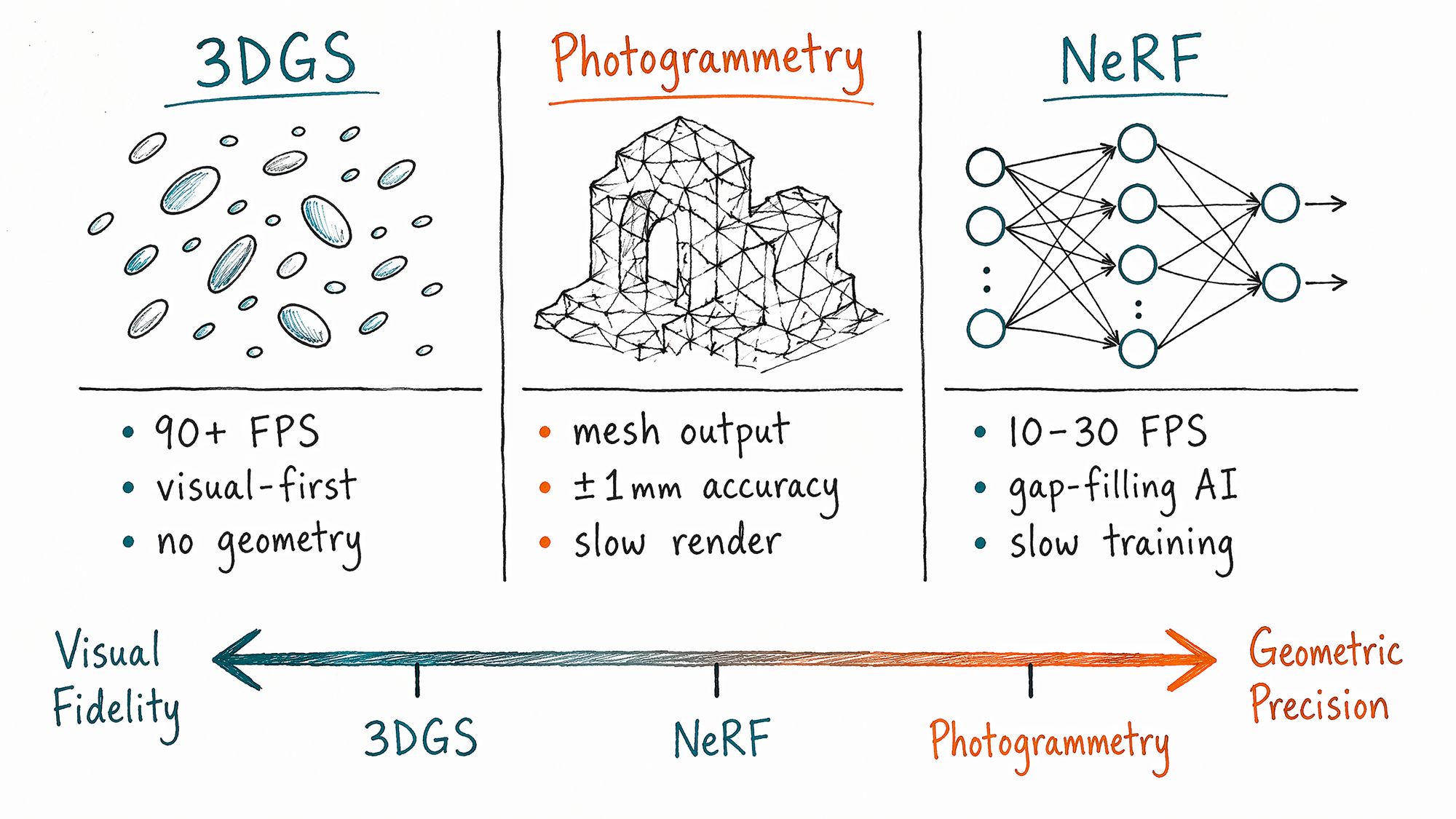
The core capability of 3DGS is visual fidelity — it renders photorealistic scenes at 90+ FPS in real time. But it does not produce geometry. This boundary defines everything.
| Desired outcome | Is 3DGS suitable? | Alternative |
|---|---|---|
| 360° walkthrough of a real space in a browser | ✓ Excellent fit | NeRF (10-30 FPS, 3-9× slower), panorama (no parallax) |
| Cinematic fly-through video | ✓ Good fit | Photogrammetry + After Effects, pure CG animation |
| E-commerce product 360° spin | △ Marginal | Photogrammetry → glTF export (~15MB, faster loading) |
| 3D-printable mesh | ✗ Not suitable | Photogrammetry (RealityCapture), laser scanning |
| Game engine LOD model | ✗ Not currently suitable | Mesh pipeline (Metashape → Blender retopo) |
| Academic research / paper reproduction | ✓ Good fit | Nerfstudio / gsplat codebase directly |
Technical Comparison: 3DGS vs Photogrammetry vs NeRF
| Dimension | 3DGS | Photogrammetry | NeRF |
|---|---|---|---|
| Render speed | 90+ FPS real-time | Depends on mesh complexity | 10-30 FPS |
| Visual quality | Photorealistic, view-dependent color | Depends on texture resolution | Photorealistic, fills missing angles |
| Geometric accuracy | Mean error ~7.82cm | ±1-4mm (survey-grade) | No explicit geometry output |
| Output format | PLY / SPZ / SPLAT | OBJ / FBX / glTF | Implicit field (requires conversion) |
| Training time (RTX 4090) | ~12 minutes | Hours to days | 30-60 minutes |
| Best for | Visual walkthroughs, spatial recording | Measurement, 3D printing, game assets | Research, missing-angle completion |
Layer 2: Your Source Material Determines Whether You Get Results
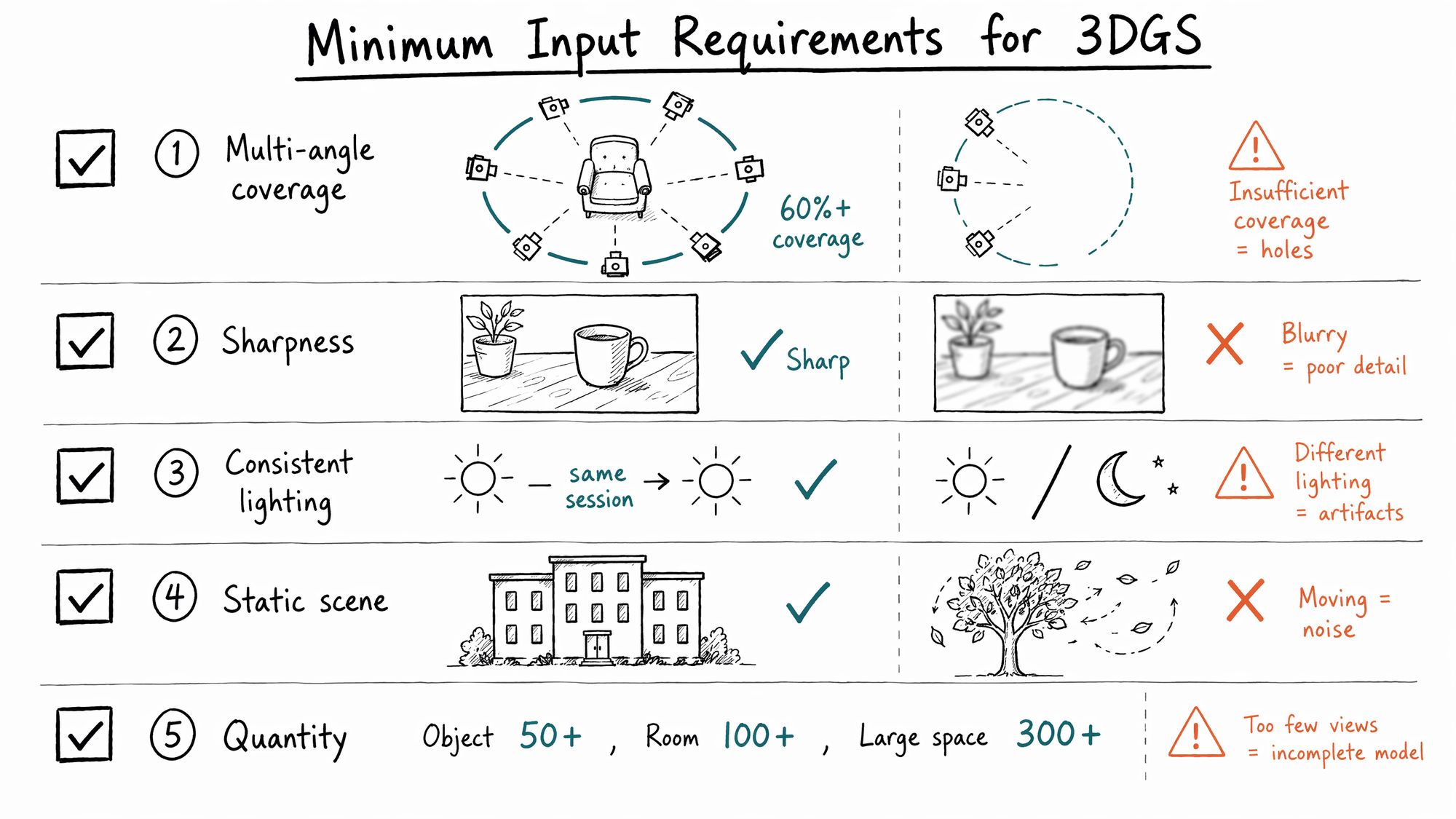
3DGS has non-negotiable input requirements. Failing any single one causes quality collapse:
5 Hard Requirements:
| # | Requirement | Minimum standard | Consequence of failure |
|---|---|---|---|
| 1 | Multi-angle coverage | ≥60% of angles around subject covered; no complete gaps on front/back/sides | Black holes or severe stretching in uncovered areas |
| 2 | Sharpness | Every photo visibly in focus; blurry frames must be removed | Blurry frames cause overall haziness |
| 3 | Consistent lighting | No dramatic lighting changes during capture (morning + noon = disaster) | Color splits, shadow misalignment |
| 4 | Static scene | People, animals, swaying leaves, flowing water = noise sources | Produces floaters (stray Gaussians in space) |
| 5 | Quantity | Objects ≥50 photos, rooms ≥100, complex large spaces ≥300 | Insufficient coverage creates holes |
If you cannot meet these conditions on-site, go to 01-Subject Classification to evaluate whether you should change your subject or adjust your capture strategy.
Layer 3: Your User Type Determines Your Path
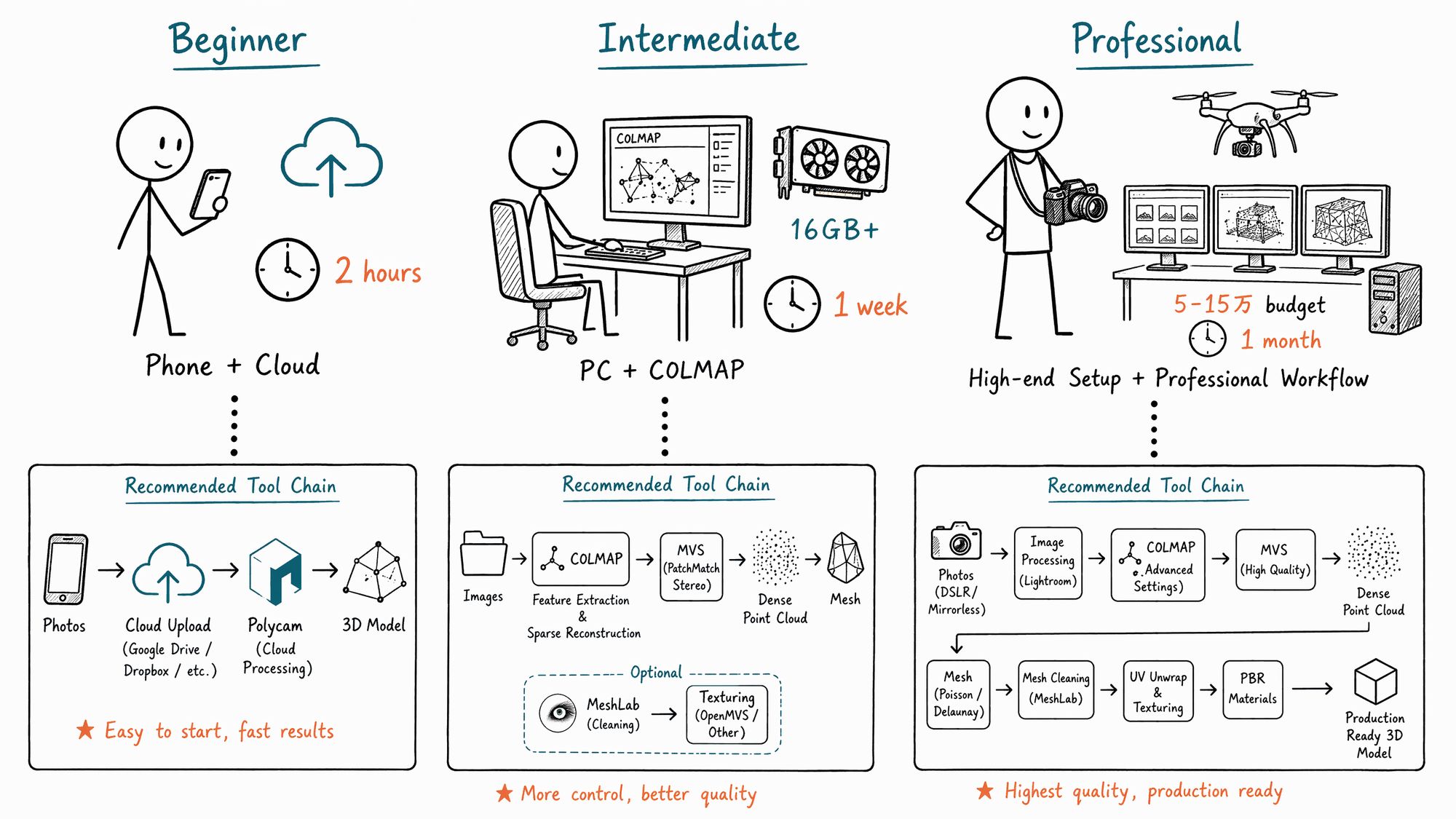
- Complete Beginner · Exploration
| Item | Details |
|---|---|
| Profile | Never touched 3DGS, may not know what SfM means |
| Goal | See a Gaussian Splat spinning in a browser tonight |
| Path | 00 Decision → 01 Subject → Skip SfM → Polycam / Scaniverse cloud → Publish |
| Time | ~2 hours (including capture) |
| Budget | Smartphone only, free (Scaniverse fully free; Polycam free tier 1 scan/month) |
| Recommended | Scaniverse: capture → tap Gaussian Splat mode → wait 5-10 min on-device → Export → SPZ |
- Intermediate · Local Workflow
| Item | Details |
|---|---|
| Profile | Wants to understand every step, can install local software, wants parameter control |
| Goal | Run a complete COLMAP + PostShot / Nerfstudio workflow, understand every knob |
| Path | 00 → 01 → 02 → 03 → 07 → 08 → 09 → 10 → 11 |
| Time | ~1 week |
| Budget | DSLR or flagship phone + GPU with 16GB+ VRAM (RTX 3060 minimum) |
| Training benchmark | RTX 3060: ~25 min/scene; RTX 4090: ~12 min/scene (30k steps) |
- Professional · Client Delivery
| Item | Details |
|---|---|
| Profile | Delivering to clients, archiving source material for reuse, writing delivery checklists |
| Goal | Build a repeatable pipeline with acceptance criteria at every stage |
| Path | 00 → 01 → 02 → 03 → 04 → 05 → 06 → 07 → 08 → 10 → 11 (review every chapter) |
| Time | ~1 month to refine |
| Budget | ¥50,000–150,000 equipment + GPU 24GB+ VRAM (RTX 4090 / A6000) |
| Tool chain | DJI Terra V5.0+ (aerial GS) / RealityCapture (pose estimation) → PostShot (training) → SuperSplat (editing) → Cesium 3D Tiles (distribution) |
Not sure which type you are? Take the 3-question assessment at /sop/start.
Three Common Misconceptions to Eliminate First
Misconception 1: "More photos = better results"
Wrong. 100 carefully captured photos outperform 500 casually shot ones. 3DGS is more sensitive to photo quality than quantity. Polyvia3D test data: 100 high-quality inputs processed via Polycam cloud in 15-45 minutes yield PSNR ~27.5 dB; 500 inputs containing blurry frames double processing time while PSNR drops 2-3 dB.
Misconception 2: "Smartphone and DSLR are roughly equivalent"
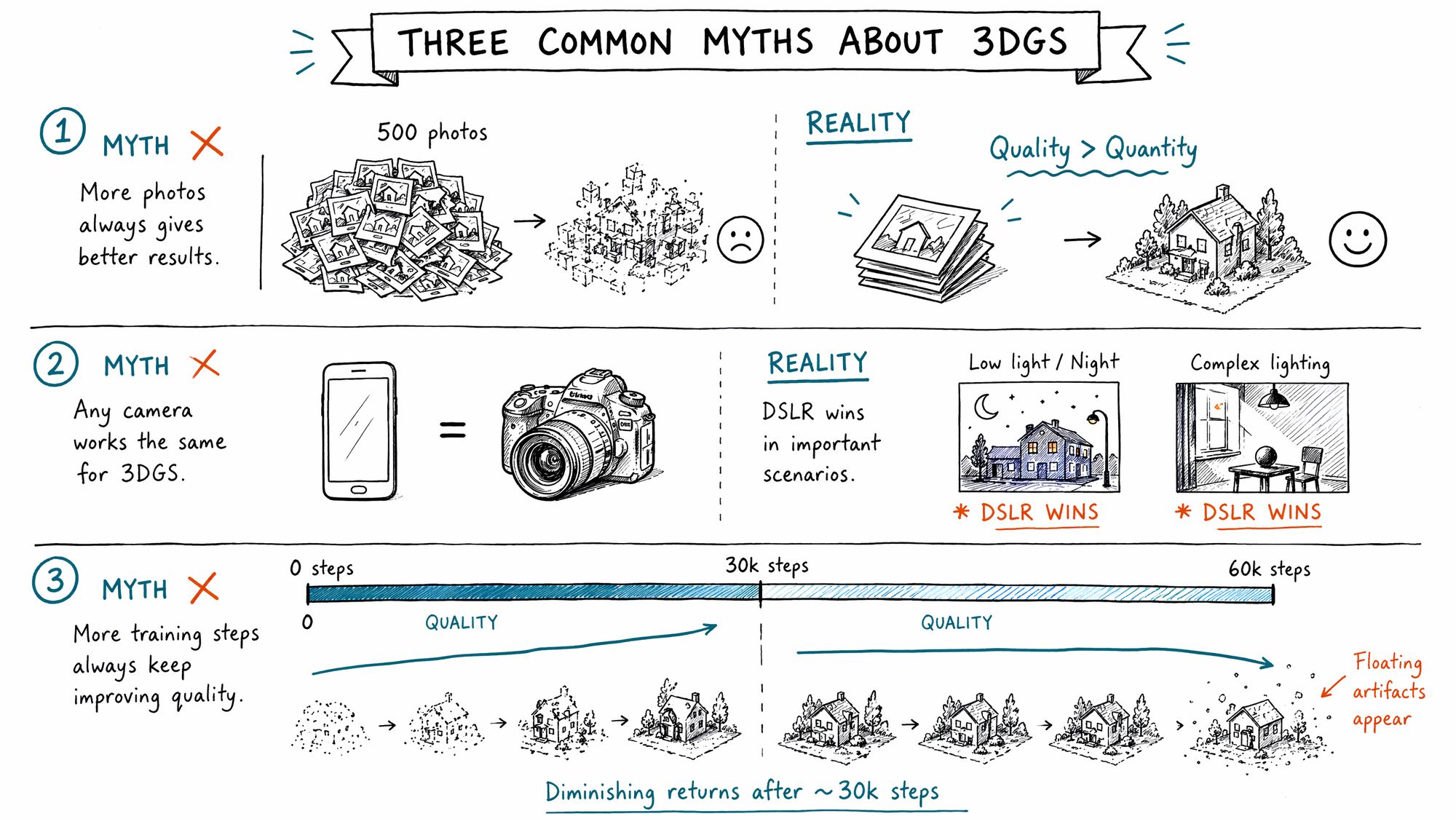
Depends on the scene. For objects, interiors, and daytime scenes, flagship phones from 2024 onward are sufficient. Scaniverse produces results in 5-10 minutes on iPhone. But for:
• Night / low-light (phone ISO increase → noise → floaters)
• Complex mixed lighting (warm tungsten + cool LED = color splits)
• Telephoto perspective compression needed
• Controlled depth-of-field for subject isolation
DSLR/mirrorless cameras retain irreplaceable advantages. See 03-Camera Parameters.
Misconception 3: "Longer training = better results"
Diminishing returns after a threshold. Gaussian Splatting typically converges around ~30k steps (about 12 minutes on RTX 4090). Training beyond 60k steps only increases floaters and overfitting — the model starts memorizing noise from training viewpoints rather than the scene itself. See 08-Training.
2026 Tool Quick Reference (Zero-Barrier Cloud Options)
| Tool | Platform | Price | Processing time | Output format | Best for |
|---|---|---|---|---|---|
| Scaniverse | iOS / Android | Free | 5-10 min (on-device) | SPZ | Quick capture, personal archive |
| Polycam | iOS / Android / Web | Free tier 1/month, Pro $8/month | 15-45 min (cloud) | PLY / SPLAT | Interior spaces, LiDAR precision |
| Luma AI | iOS / Android / Web | Free | 30-60 min (cloud) | PLY | Highest visual quality, showcase |
| KIRI Engine | iOS / Android | 3 free scans, $10/month unlimited | 30-90 min (cloud) | PLY / SPLAT / OBJ | Object scanning, 3DGS-to-Mesh |
Next Steps
• Confirmed you want to proceed → Enter 01-Subject Classification & Capture Strategy
• Unsure if your subject is suitable → Enter 01-Subject Classification for suitability assessment
• Want to try hands-on immediately → Download Scaniverse, capture a desktop object, experience the full pipeline