
stage 09
AI Agent 训练路径
Training via AI Agents
Engrave Everything · Stage 09
Training via AI Agents
Published · Last updated: 2026-05-08 Recommended tools: Cursor / Claude Code / Nerfstudio / Brush
Core Thesis
The real barrier in the 3DGS toolchain isn't the algorithm—it's the command line and Python environment. After AI Agents arrived, this barrier dropped dramatically. You no longer need to memorize commands; just describe what you want, and the Agent writes scripts, sets up environments, runs training, and reads logs for you.
This chapter doesn't teach training principles (that's Chapter 08). It teaches you how to collaborate with an AI coding assistant to complete training. Think of the Agent as a tireless assistant who never forgets command parameters—but it has no eyes and cannot judge quality for you.
What This Chapter Answers
• Which AI coding tools work for 3DGS training? How to choose?
• How to write prompts that Agents can actually execute?
• When training crashes, how to make the Agent debug itself?
• What should Agents never touch—things you must do yourself?
Concepts & Positioning
What Is "AI Agent Training"
The traditional 3DGS training workflow requires: open Terminal → read README → configure conda/pip → type training commands → watch logs → Google errors → modify parameters → retry. This loop is a nightmare for non-programmers.
AI Agents (led by Cursor and Claude Code) change the interaction model. You describe your goal in natural language, and the Agent handles the entire chain: read docs → write commands → execute → parse errors → fix. Your role shifts from "operator" to "decision-maker"—you only need to say Yes or No at key checkpoints.
Why 2026 Is the Inflection Point
From late 2025 to early 2026, several key changes made AI Agents truly capable of handling 3DGS training:
-
Claude Code launched (2025.02): First AI Agent that can directly execute Bash commands and read/write the filesystem from any terminal
-
Cursor's Agent Mode matured (2025 Q3): Evolved from "code completion" to "autonomous plan execution" with multi-step terminal operations
-
OpenAI Codex CLI (2025.04): Lightweight command-line Agent for one-off tasks
-
Context windows expanded: Claude 200K, GPT-4 128K let Agents read an entire NerfStudio README + your error logs in one pass
-
3DGS tools matured: NerfStudio's splatfacto, Brush's one-click install shortened command chains to lengths Agents can reliably execute
Agents Are Not Magic
Clear capability boundaries:
| Agent CAN do | Agent CANNOT do |
|---|---|
| Read READMEs, set up environments, write commands | Judge whether a scene is suitable for 3DGS |
| Parse error logs, suggest fixes | See training results with human eyes |
| Batch-process multiple datasets | Decide shooting angles and lighting |
| Turn repetitive tasks into scripts | Spend your money (nor should it) |
| Explain PSNR/SSIM values | Make aesthetic judgments: which version looks better |
Decision Points
Tool Selection: Four Candidates
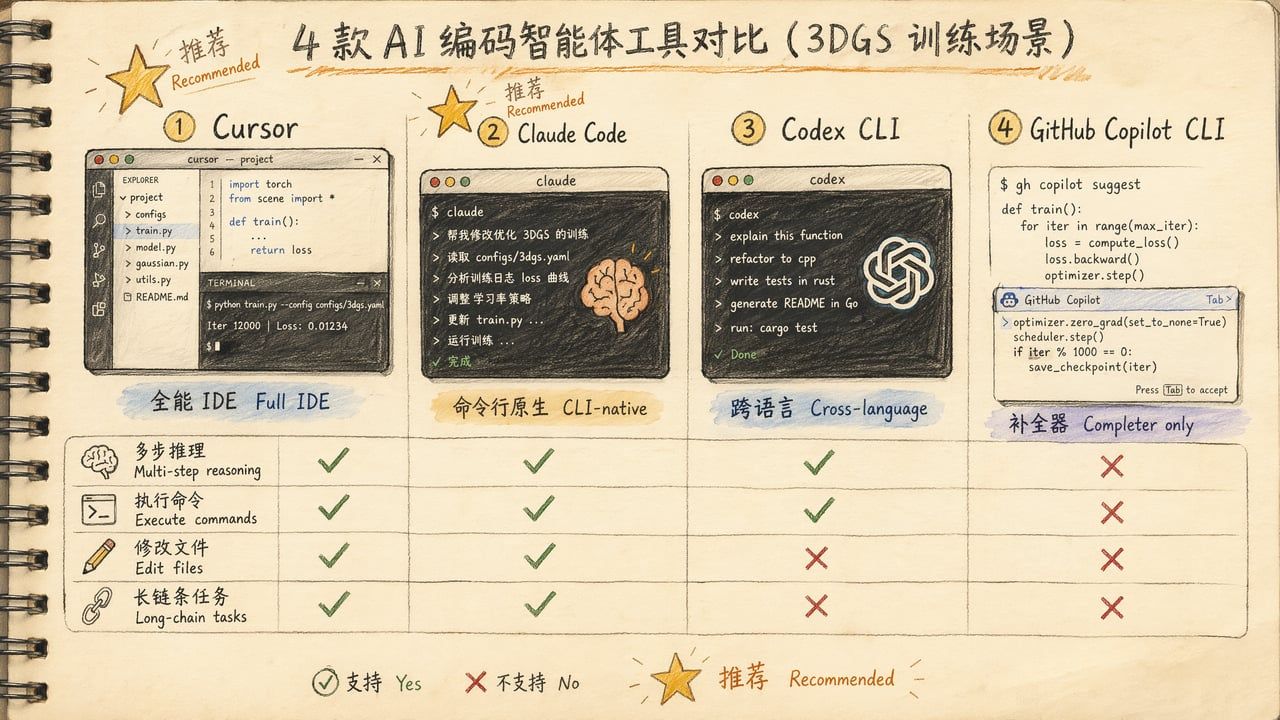
| Tool | Best For | Strengths | Weaknesses | Price |
|---|---|---|---|---|
| Cursor | Full IDE workflow | File tree/git/terminal integration, Agent Mode | Heavy, slow startup | $20/mo Pro |
| Claude Code | Terminal-native | Direct Bash execution, file I/O, 200K context | No GUI file tree | $20/mo Pro |
| Codex CLI | One-off queries | Cross-language, lightweight | Small context window, poor at long chains | API pay-per-use |
| GitHub Copilot CLI | Command completion | Lightweight, free tier | No multi-step reasoning, just a completer | $10/mo |
Inktoys Judgment
Recommend Cursor or Claude Code. Both can "read your project directory + execute commands + modify files"—exactly the three capabilities 3DGS training loops require.
Selection logic:
• You prefer IDE interfaces → Cursor. Visual file tree, git diff at a glance, embedded terminal
• You prefer terminals / remote SSH → Claude Code. Launch with claude in any terminal, perfect for SSH to remote GPU servers
• You just want to ask one question → Codex CLI. Quick in, quick out
• Zero budget → VS Code + GitHub Copilot Chat works, but one tier worse (can't auto-execute commands)
When You Don't Need an Agent
If you're using PostShot (pure GUI tool), the entire workflow is: drag photos in → click button → wait → export. No Agent needed. Agent value lies in command-line tool automation; GUI tools are already designed for non-programmers.
Similarly, Polycam / Luma / KIRI cloud services don't need Agents—you upload photos, the server runs everything, no command line involved.
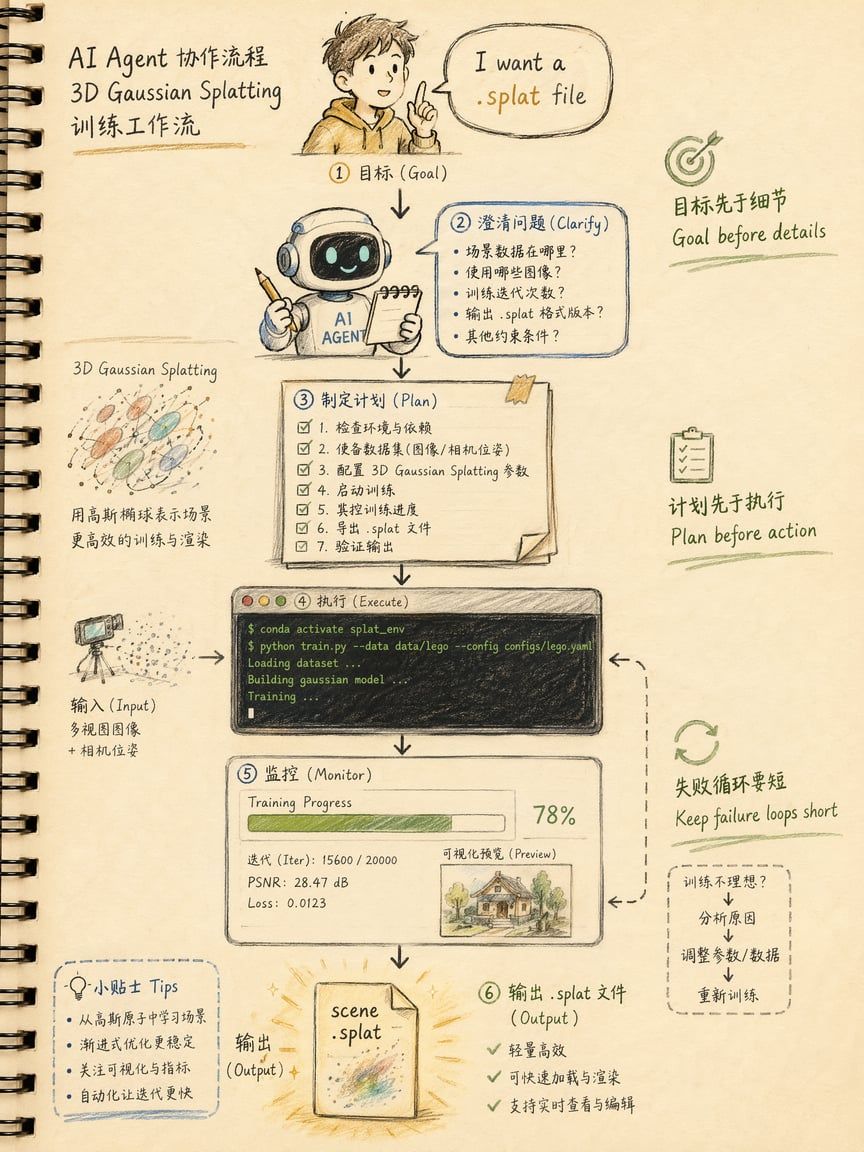
The Overall AI-Collaborative Training Workflow
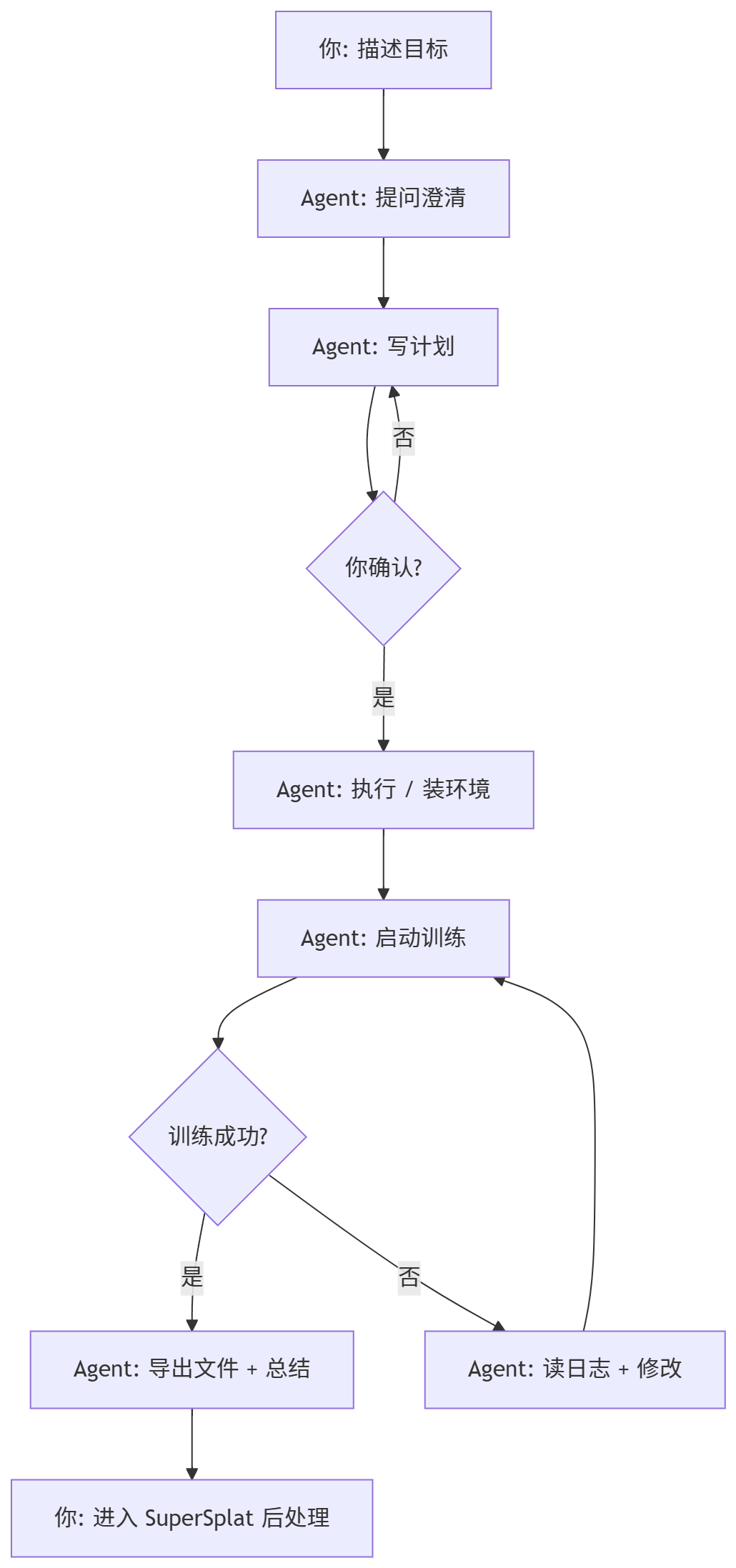
Five Iron Rules of the Workflow
-
Goal Before Details Start with "I want a .splat file," not "I want to install NerfStudio." Let the Agent choose the path based on your goal.
-
Clarification Over Guessing A good Agent will ask: GPU model? Dataset path? Output format? If the Agent starts executing without asking, it's guessing—proactively provide information.
-
Plan Before Execution Have the Agent output a plan first ("I'll do these 5 steps, confirm?"). This prevents the Agent from installing wrong environments or running wrong commands without your knowledge.
-
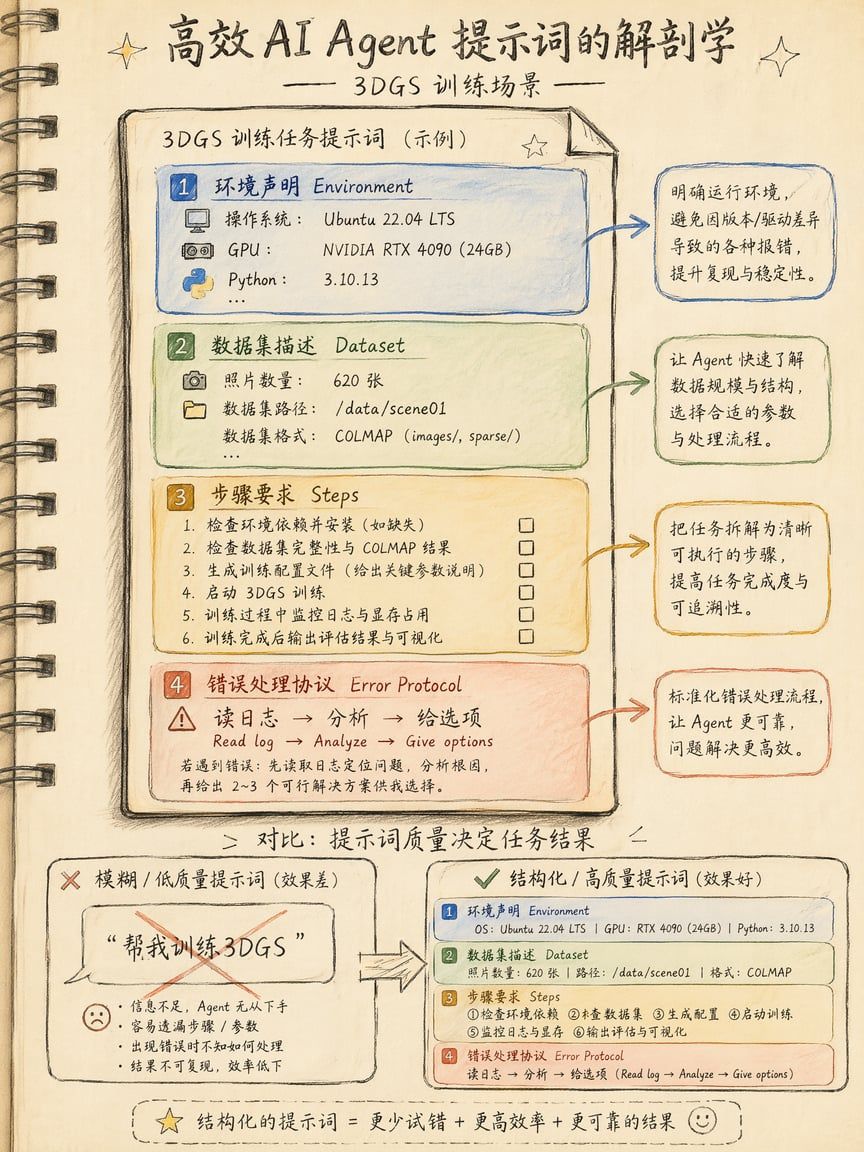
Keep Failure Loops Short When training crashes, don't let the Agent blindly retry. Correct flow: read logs → analyze root cause → give you options → you choose → then act. If the same error appears twice, stop and intervene manually.
-
Clear Human-Machine Division Agent handles execution and explanation; you handle judgment and decisions. Three versions trained—which is best? You look. Spend more on GPU rental? You decide.
Step-by-Step Operations
Preparation: Configure Agent System Prompts
Whether using Cursor or Claude Code, place a persistent rules file in your project root so the Agent always knows "you're doing 3DGS training."
Cursor: Create .cursor/rules/3dgs.mdc in project root:
# 3DGS Training Rules
## Context This project trains 3D Gaussian Splatting models. Tools: NerfStudio (splatfacto), Brush, gsplat.
## Execution Rules - Before running ANY command, tell me what you're about to do and wait for OK - After any command failure, read the last 50 lines of stdout/stderr - Identify ERROR / Traceback / SIGKILL keywords - Tell me the root cause in ONE sentence - Do NOT retry blindly. Give me 2 fix options and let me choose - If the same error appears twice, STOP and let me intervene
## Environment - OS: [your system] - GPU: [your GPU] - Python: 3.11 - Package manager: conda
Claude Code: Create CLAUDE.md in project root:
# CLAUDE.md - 3DGS Training Project
## What this project does Train 3D Gaussian Splatting models from photo sets.
## Rules 1. Always show your plan before executing 2. On error: read log → analyze → give 2 options → wait for my choice 3. Never auto-retry the same failed command 4. Export format: .ply or .splat (ask me which) 5. If VRAM OOM: suggest reducing num_points or batch_size before anything else
These files persist—the Agent reads them automatically every session.
Practical Prompt Templates
Template 1: First NerfStudio Run
I want to run a splatfacto training with NerfStudio.
My environment: - OS: Windows 11 - GPU: RTX 4090 (24GB VRAM) - Python: 3.11 - Current directory: C:\Users\me\3dgs-projects\my-first-scene
My dataset: - 100 photos in ./data/images - SfM not yet run
Please execute these steps: 1. Check if conda, CUDA Toolkit, ffmpeg, colmap are installed 2. For anything missing, tell me first and ask if I want to install 3. Create conda env nerfstudio-3dgs, install NerfStudio + dependencies 4. Run ns-process-data to convert photos to NerfStudio dataset 5. Start splatfacto training, 30000 iterations 6. Export .splat to ./out/
Before each step, tell me what you'll do and wait for my OK. On errors, read logs first, analyze, give me two fix options to choose from.
Template 2: Brush (No COLMAP, Pure Rust)
I want to train a 3DGS model with Brush because I don't want to install COLMAP.
Environment: - Windows 11, RTX 4070 (12GB VRAM) - No Rust or ML tools installed
Dataset: - 60 object photos in D:\photos\my-vase\
Please: 1. Install Rust (rustup) and Brush (cargo install brush-app) 2. Launch Brush GUI (not CLI) 3. Tell me how to drag photos in and start training 4. Export .ply
If VRAM is insufficient, remind me to reduce max splat count. If cargo build fails, check Visual Studio Build Tools first.
Template 3: Debug a Crashed Training
The splatfacto training you just ran crashed.
Error log: [paste last 30 lines of terminal here]
Please: 1. Read the log, tell me root cause (one sentence) 2. List 3 possible fixes, ranked by recommendation 3. Don't execute anything—wait for my choice
If you determine it's OOM, suggest reducing batch_size or switching to splatfacto-lite. If it's CUDA version mismatch, tell me which CUDA Toolkit version is needed. If it's a dataset issue (corrupt images/wrong paths), write me a check script.
Template 4: Batch Training Multiple Datasets
I have 5 datasets: - D:\datasets\room-a\ - D:\datasets\room-b\ - D:\datasets\room-c\ - D:\datasets\statue-1\ - D:\datasets\statue-2\
Write a PowerShell script (not bash) that sequentially: 1. Runs ns-process-data on each directory 2. Runs splatfacto training, 30000 iterations 3. Exports .splat to D:\outputs\{dataset_name}\
Echo last 5 lines of log after each dataset. Send Windows Toast notification when all complete. Don't parallelize—I only have one GPU. If any dataset fails, skip it and continue. Summarize failures at the end.
Template 5: Import Poses from RealityScan (Skip COLMAP)
I've already captured photos with RealityScan and exported cameras.json. Now I want to train with NerfStudio but skip COLMAP (poses already exist).
File structure: ./my-scan/
cameras.json
(RealityScan exported camera poses)
images/
(original photos)
Please: 1. Check if cameras.json format is NerfStudio-compatible 2. If not, write a conversion script 3. Start splatfacto training directly with converted data 4. Export .splat
This saves the 20-minute COLMAP wait.
Teaching the Agent to "Read Logs"
The most common Agent failure is ignoring logs and blindly retrying. Here's the verified "log reading protocol"—embed it permanently in your System Prompt:
On ANY command failure, do this FIRST:
1. Read last 50 lines of stdout/stderr 2. Identify ERROR / Traceback / SIGKILL / OOM / CUDA error keywords 3. Tell me root cause in ONE sentence 4. Do NOT retry. Give me 2 fix options, wait for my choice 5. If same error appears twice consecutively, STOP and let me intervene
Common error patterns: - "CUDA out of memory" → reduce num_points or batch_size - "No module named" → env not activated or package not installed - "COLMAP failed" → photo quality issue, go back to 05-frame-extraction - "NaN in loss" → learning rate too high or corrupted images in dataset - "Permission denied" → re-run with admin privileges
Real Case: Zero to .splat in 30 Minutes
A condensed real Cursor session to show the rhythm:
[Me] I have 80 cat photos in ./cat-photos/. Train a 3DGS for me. My computer: M3 Max MacBook, 36GB RAM.
[Cursor Agent] Cats are dynamic subjects—3DGS typically can't handle motion well. Are you sure this cat stayed still during the entire shoot? (If it's a sleeping cat collection, OK. If different moments of the same cat, needs separate training.)
[Me] Sleeping cat collection, shot within 5 minutes.
[Cursor Agent] Good. Your Mac has no NVIDIA GPU, CUDA unavailable, so NerfStudio won't work. I recommend two options: 1. Brush (Rust-based, supports Apple Silicon Metal/WebGPU) ← Recommended 2. Rent a cloud GPU (Vast.ai RTX 4090, $0.25/h) for remote training
Which one?
[Me] Install Brush.
[Cursor Agent] Plan: 1. Check if Rust is installed → if not, brew install rust 2. cargo install brush-app (~3 min compile) 3. Launch brush-app GUI 4. Import ./cat-photos/ 5. Train → export .ply
Execute?
[Me] OK
[Executes brew install rust] [Executes cargo install brush-app]
← 2 min 40 sec compile [Launches brush-app] [Imports cat-photos/ → auto SfM → training]
← 8 minutes [Exports ./out/cat.ply (45 MB)]
[Cursor Agent] Training complete. Exported .ply to ./out/cat.ply (45 MB). Training stats: - Iterations: 30,000 - Duration: 8 min 12 sec - Gaussian count: 1.2M - Built-in SfM match rate: 76/80 photos (4 skipped, likely blurry)
Suggested next steps: 1. Open cat.ply in SuperSplat, trim floaters 2. Convert to .splat and compress to ~12 MB Want me to run SuperSplat commands?
Total session: 30 minutes. Actual machine wait: 8 minutes. "Reading the Brush README" was completely eliminated. This is the greatest value AI Agents bring to the 3DGS workflow—shifting cognitive burden from you to the Agent.
Agent Should Do vs. Should Not Do
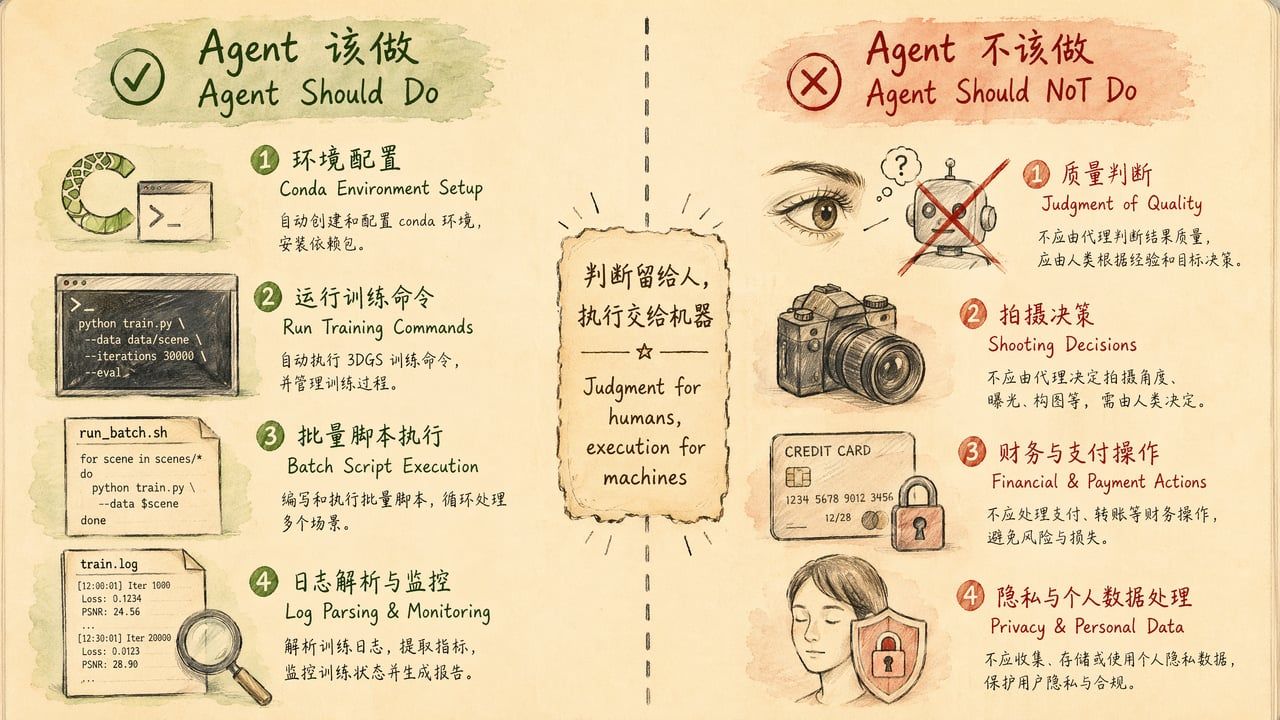
What Agents Should Handle
| Category | Specific Tasks | Why Suitable |
|---|---|---|
| Environment management | Install conda envs, fix dependencies, check CUDA versions | Pure text operations with clear right/wrong |
| Run training commands | Construct full command lines, monitor output, parse logs | Command syntax follows rules |
| Batch processing | Loop N datasets, generate reports | Repetitive labor, Agents don't tire |
| Script writing | Turn "things I do manually every time" into .ps1/.sh/.py | Agents excel at converting verbal descriptions to code |
| Explanation | What PSNR/SSIM means, whether loss curves are normal | Knowledge retrieval, Agent's strength |
| Format conversion | .ply → .splat, coordinate system adjustments, batch rename | Deterministic operations |
What Agents Should NOT Handle
| Category | Specific Tasks | Why Unsuitable |
|---|---|---|
| Subject judgment | Is this scene suitable for 3DGS? | Requires understanding physical world |
| Shooting decisions | Is lighting sufficient? Correct angles? Need more shots? | Requires human presence and eyes |
| Quality review | Three trained versions—which looks best? | Aesthetic judgment, human eyes irreplaceable |
| Privacy handling | Should face-containing material be uploaded? | Ethical decisions must be human-made |
| Payment operations | Top up GPU credits, subscribe to services | Agent should never have auto-spending authority |
| Deletion operations | Delete training data, clear output directories | Irreversible, requires human confirmation |
The Golden Rule
Judgment for humans, execution for machines.
If you find yourself asking the Agent to make "multiple choice" decisions (which version is better? should I keep training?), you've crossed the boundary. Agents should only handle "fill in the blank" tasks (how to write the command? what parameter to use? how to fix the error?).
Common Errors & Troubleshooting
Error 1: Agent Installs Wrong Environment
Symptom: Agent uses pip to install NerfStudio, but your system needs conda for CUDA dependency management, causing import torch to not find GPU.
Root cause: Prompt didn't specify package manager.
Fix: Add to System Prompt: Package manager: conda (NEVER use pip install for torch/cuda packages)
Error 2: Agent Blindly Retries
Symptom: Training OOM'd, Agent doesn't read logs and reruns immediately, failing 3 times consecutively.
Root cause: No "failure protocol" set.
Fix: Add log reading protocol (see above). Key sentence: If same error appears twice, STOP and let me intervene.
Error 3: Agent Runs Unconfirmed Commands
Symptom: You're still thinking, Agent already rm -rf'd your output directory.
Root cause: No confirmation gate set.
Fix: Add to prompt: Before each step, tell me what you'll do and wait for my OK. For dangerous commands (rm, format, drop), add: Any delete/overwrite operation requires separate confirmation.
Error 4: Agent Context Overflow
Symptom: After long sessions, Agent starts "forgetting" previous settings, re-asking answered questions.
Root cause: Session exceeded model's context window (Claude 200K tokens ≈ ~2 hour complex session).
Fix:
• Write key info in System Prompt files (CLAUDE.md / .cursor/rules/), not relying on conversation memory
• Split long tasks into multiple short sessions with clear start/end goals
• Start a new session after each dataset is trained
Error 5: Agent Gives Outdated Commands
Symptom: Agent tells you to run ns-train nerfacto, but NerfStudio 2026 changed the command to ns-train splatfacto-2.
Root cause: Model training data has a cutoff date.
Fix:
• Have Agent read requirements.txt or pyproject.toml to confirm versions
• Provide official doc links: Please reference https://docs.nerf.studio/... for latest commands
• Note your version numbers in System Prompt
Error 6: Agent Tries CUDA on Mac
Symptom: Agent detects macOS but still attempts CUDA Toolkit installation.
Root cause: Agent didn't correctly reason about hardware constraints.
Fix: Explicitly write in environment declaration: GPU: Apple M3 Max (Metal/MPS only, NO CUDA). A good Agent will then recommend Brush or cloud GPU.
Advanced Techniques
Technique 1: Have Agent Write Reusable Scripts
After a successful training, have the Agent package the entire flow:
The training just succeeded. Write all our steps into a PowerShell script train.ps1 that accepts one parameter: dataset directory path. Next time I just need ./train.ps1 D: ew-dataset\ to run everything. Include error handling: stop and print error if any step fails.First time you use the Agent; after that you have an automation script and don't need the Agent anymore.
Technique 2: Agent as Training Log Analyst
Here are summaries from my last 5 training runs: [paste last 10 lines of each log]
Please compare and analyze: 1. Which had highest PSNR? 2. Which had shortest training time? 3. Where do parameters differ? 4. Give me a "best parameter combination" recommendation.
Technique 3: Agent Monitors Training Progress
Claude Code can run continuously in terminal:
After starting splatfacto training, check logs every 5000 steps: - Report current PSNR and loss - If loss hasn't decreased for 3 consecutive checkpoints, warn me about possible overfitting - Send system notification when training completesTechnique 4: Multi-Agent Collaboration
With multiple machines or terminals:
• Terminal 1 (Claude Code): Run training, monitor logs
• Terminal 2 (Cursor): Simultaneously write post-processing scripts, ready to run when training finishes
Two Agents handle their respective tasks; you only make decisions in between.
Technique 5: Agent-Generated Training Reports
Training is complete. Generate a Markdown report containing: - Dataset info (photo count, resolution, source) - Training parameters (iterations, learning rate, density control strategy) - Result metrics (PSNR, SSIM, training time, file size) - Next step recommendations
Save as ./reports/cat-scene-report.md
2026 Tool Ecosystem Overview
Cursor 2026 Key Features
• Agent Mode: Not just code completion—autonomous multi-step planning, terminal execution, file modification
• Background Agents: Tasks continue running in background even after closing IDE
• Multi-file context: Auto-indexes project directory, understands inter-file dependencies
• Terminal integration: Execute commands directly within IDE
Claude Code 2026 Key Features
• Terminal-native: Launch with claude in any terminal, supports SSH remote
• 200K context: Read entire NerfStudio README + error logs + training config in one pass
• File system access: Direct file read/write without copy-paste
• Bash execution: Actually executes commands, not just "suggests you run this"
• Memory: Remembers preferences across sessions (via CLAUDE.md)
OpenAI Codex CLI
• Lightweight: npm install, instant use
• Sandboxed execution: Commands run in isolated environment for safety
• Good for one-off tasks: Ask one question, run one command, done
• Limitation: Smaller context window, not suited for long-chain tasks requiring extensive history
Inktoys Judgment
AI Agents are the highest-leverage efficiency tool in the 3DGS workflow. They don't change what you can do (the tools are still the same tools), but they change the cognitive cost of doing those things. A designer who has never used a terminal can complete their first 3DGS training in 30 minutes with an Agent's help—unimaginable in 2024.
But Agents aren't omnipotent. Their value has a clear boundary: Any execution task that can be described in text, Agents can do. Anything requiring physical-world perception or aesthetic judgment, Agents cannot do.
Your workflow should be:
-
Human decides what to capture and how (00-decision → 04-shooting)
-
Human + tools complete pre-processing (05-frame → 06-color → 07-sfm)
-
Agent executes training (the command-line portion of 08-training) ← This chapter
-
Human reviews results, decides whether to retrain
-
Human + tools complete post-processing and distribution (10-postprocess → 11-distribution)
Agent value is highest at step 3, completely useless at steps 1 and 4. Recognize this boundary, and you won't over-expect or under-appreciate what Agents can do.
What to Read Next
• Want local training principles → 08-training
• Done training, need to trim → 10-postprocess: Post-processing, Trimming & Compression
• Want to distribute online → 11-distribution: Distribution & Display
• Want someone to run it for you → About Us · Contact
← Previous Chapter: 08 训练 Training → Next Chapter: 10 后处理、修剪与压缩 Post-processing, Trimming & Compression