
stage 10
后处理、修剪与压缩
Post-Processing, Cleanup & Compression
Engrave Everything · Stage 10
Post-Processing, Cleanup & Compression
Published · Last updated: 2026-05-08 Recommended tools: SuperSplat / SplatTransform CLI
Core Thesis
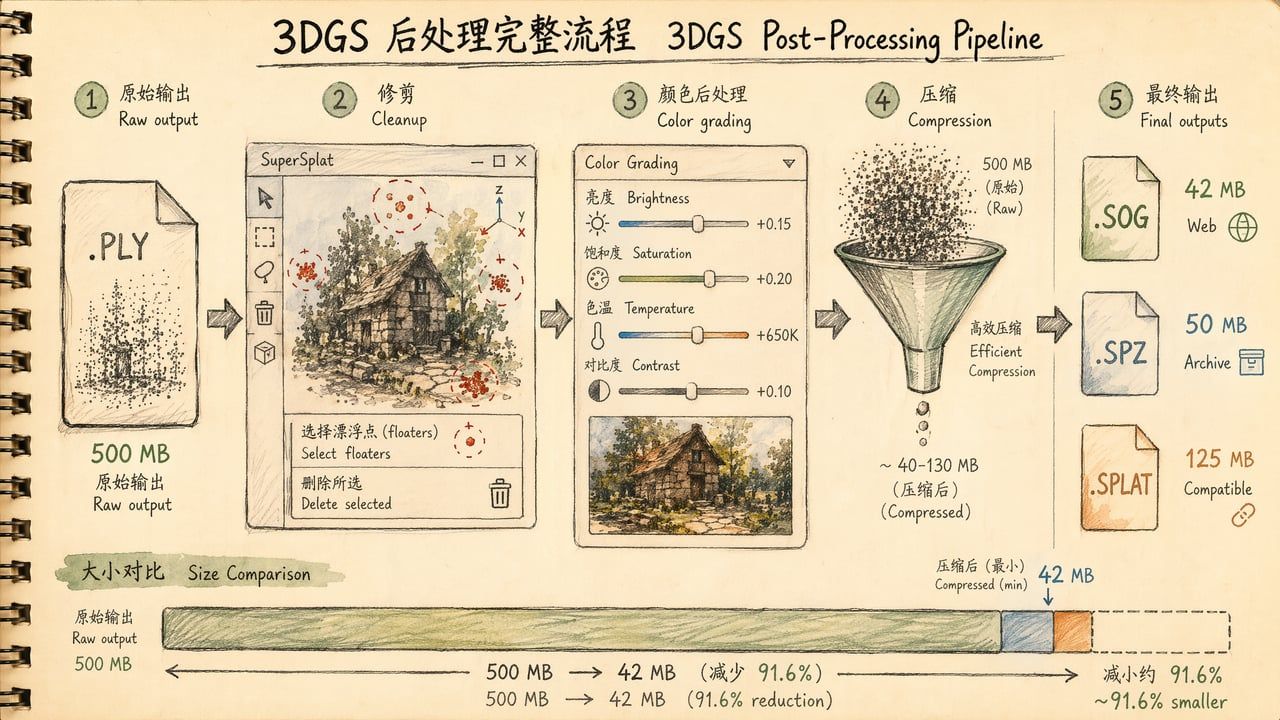
The .ply file from training is never the final product. It's an unpolished gem—carrying floaters, excess background, and bloated file size. Post-processing is the critical step that transforms "viewable" into "usable": cleanup makes the image clean, color correction makes viewing comfortable, and compression makes the file distributable over networks.
A typical training output is a 300–800 MB .ply file. Through this chapter's workflow, you can transform it into a 30–50 MB .sog or .spz file with virtually no perceptible visual quality loss—but 10–20× smaller. This difference determines whether your work can load smoothly in a mobile browser.
What This Chapter Answers
• Why can't the trained .ply file be used directly?
• How to use SuperSplat? Which operations are mandatory?
• How to choose between SOG, SPZ, SPLAT, and PLY formats?
• How to compress 500 MB to under 30 MB without visible degradation?
• How to verify quality after compression?
Concepts & Positioning
Where Post-Processing Fits in the Pipeline
Capture → Frame Extract → Color → SfM → Training → [Post-Processing] → Distribution
↑ You are here
Training (Chapter 08) produces a "raw reconstruction"—it faithfully converts all input information into Gaussians, including parts you don't want:
• Floaters: Suspended Gaussians caused by motion blur, reflections, or glass
• Excess background: You only wanted the vase on the table, but training reconstructed the entire room
• Redundant data: Many Gaussians contribute minimally to visuals but consume storage
• Color drift: Numerical optimization during training may cause overall warm or cool bias
Post-processing goal: Remove what you don't want, keep what you do, compress to transmittable size.
Three Core Operations
| Operation | Purpose | Tool | Time |
|---|---|---|---|
| Cleanup | Remove floaters, crop boundaries | SuperSplat | 5–15 min |
| Color Grading | Adjust brightness/saturation/temperature | SuperSplat | 2–5 min |
| Compression | Reduce file size | SplatTransform / SuperSplat | 1–3 min |
Total 10–20 minutes transforms a "viewable" training output into a "publishable" asset.
Decision Points
Format Selection: Four Compression Formats Compared
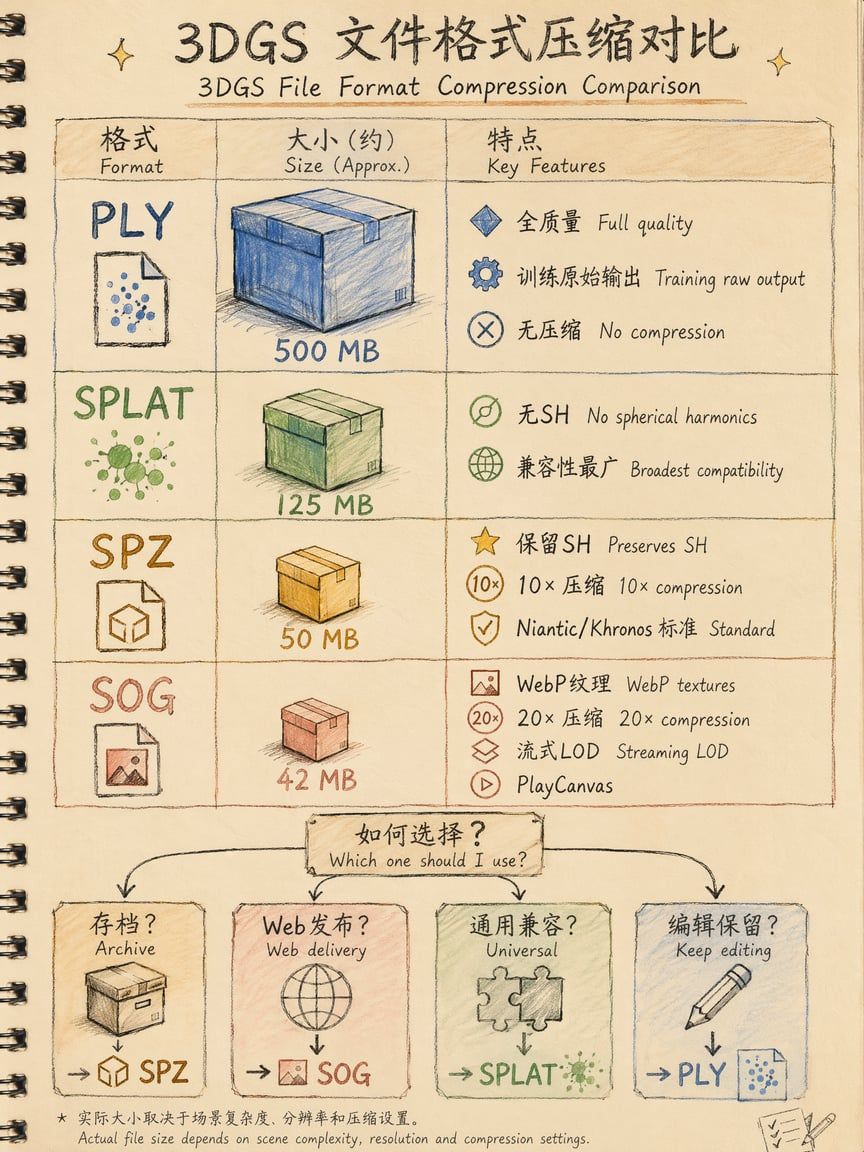
| Format | Developer | Typical Compression | Preserves SH | Streaming | Compatibility | Use Case |
|---|---|---|---|---|---|---|
| PLY | INRIA (original) | 1× (none) | ✅ Full | ❌ | All tools | Training output, archive, re-editing |
| Compressed PLY | PlayCanvas | ~4× | ❌ Drops higher SH | ❌ | Most viewers | Quick preview |
| SPLAT | Community | ~4× | ❌ DC color only | ❌ | Broadest | Universal compatibility |
| SPZ | Niantic | ~10× | ✅ Full | ❌ | Babylon.js 8+, Scaniverse, Polyvia3D | Archive, cross-platform sharing |
| SOG | PlayCanvas | ~12–20× | ✅ Full | ✅ LOD support | PlayCanvas, SuperSplat | Web publishing, large scenes |
Inktoys Judgment
Web publishing: choose SOG. Archiving: choose SPZ. Universal compatibility: choose SPLAT. Need to re-edit: keep PLY.
Decision tree:
What will you do with the file? ├── Put on web for others to view → SOG (smallest, streaming LOD) ├── Long-term archive / cross-platform sharing → SPZ (Khronos glTF standard track, full SH) ├── Send to someone with unknown viewer → SPLAT (broadest compatibility) └── Continue editing / retraining → PLY (lossless, all tools can read)SPZ Technical Details
SPZ is Niantic's open-source compression format released in 2024, incorporated into the Khronos glTF standard track in 2025 (KHR_gaussian_splatting_compression_spz extension). Its compression principles:
-
Quantization: Positions from 32-bit float → 24-bit fixed-point (~0.1mm precision for 2m scenes); rotations encoded as "smallest-three" 10-bit signed integers; SH coefficients quantized to 4–5 bits/channel
-
Column-based layout: Same attribute stored contiguously across all Gaussians, enabling gzip to find repetitive patterns
-
Gzip compression: Final general-purpose compression pass
Result: 500 MB PLY → ~50 MB SPZ, virtually no visual difference.
SOG Technical Details
SOG (Spatially Ordered Gaussians) is PlayCanvas's open-source format from 2025, designed specifically for web delivery:
-
Spatial ordering: Gaussians sorted by Morton code (Z-order curve)—spatially adjacent Gaussians are also adjacent in the file
-
Attribute imaging: All attributes "unrolled" into 2D images (one for positions, one for colors, one for SH...), then compressed with WebP lossy/lossless
-
Streaming LOD: Large scenes can be split into multiple SOG chunks, progressively loaded by distance (similar to 3D Tiles)
Result: 500 MB PLY → ~42 MB SOG, with progressive loading support for mobile.
When You Don't Need Compression
• Local rendering: If you only view in SuperSplat/PostShot on your own computer, PLY is fine
• Continuing training: Compressed formats can't be imported back into training tools
• Academic papers: Need bit-level reproducibility, keep PLY
Step-by-Step Operations
Step 1: Open File in SuperSplat
-
Open superspl.at/editor (no installation needed, runs in browser)
-
Drag in your .ply file (or .splat / .spz)
-
Wait for loading (500 MB PLY takes ~10–30 seconds depending on network and device)
Note: SuperSplat runs in-browser, subject to browser memory limits. If your PLY exceeds 2 GB, use SplatTransform CLI to crop first.
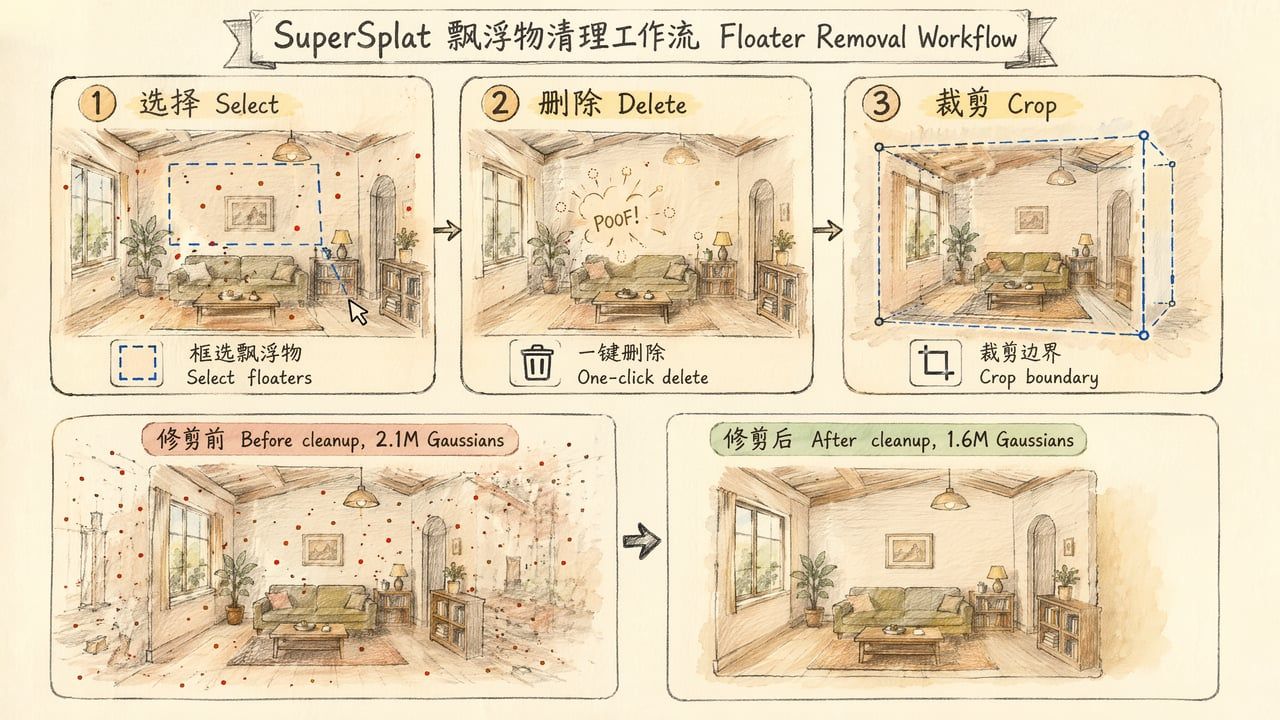
Step 2: Floater Removal
Floaters are the most common 3DGS training artifact—Gaussians suspended in mid-air, typically caused by:
• Motion-blurred photos included in training
• Reflective surfaces (mirrors, glass, metal)
• Under-covered training areas
• Sky/distant background regions
Methods:
Method A: Box/Lasso Selection (Recommended)
-
Rotate view to find floater-concentrated areas
-
Use Selection tool (shortcut R) to select floaters
-
Press Delete to remove selected Gaussians
-
Repeat until scene is clean
Method B: Filter by Attribute
-
Open Filter panel
-
Filter by opacity: many floaters have very low opacity (< 0.1)
-
Filter by size: abnormally large Gaussians are usually artifacts
-
Select filtered results → Delete
Method C: SplatTransform CLI Auto-Filter
npx splat-transform input.ply --filter-floaters output.plyCLI automatically detects and removes isolated floating Gaussians (based on spatial density analysis).
Rule of thumb: A clean scene typically requires removing 10–30% of Gaussians. If you're removing > 50%, the training quality has issues—go back to Chapter 08.
Step 3: Crop Boundaries
Training typically reconstructs the entire visible range, but you may only need a portion:
-
Use Crop tool to set bounding box
-
Adjust 6 faces to frame the area you want to keep
-
Confirm crop → all Gaussians outside boundary are removed
Typical scenarios:
• Object scan: Keep only the object, crop table and background
• Indoor scan: Crop sky outside windows (sky areas are usually full of artifacts)
• Street scan: Crop distant buildings (too far, poor reconstruction quality)
Step 4: Color Grading
SuperSplat provides basic color adjustments:
| Parameter | Effect | Typical Adjustment |
|---|---|---|
| Brightness | Overall lightness | +10–20% when training result is too dark |
| Contrast | Light-dark difference | Usually leave alone |
| Saturation | Color intensity | +10–15% when training result looks gray |
| Temperature | Warm-cool tendency | Pull warm if too blue, cool if too yellow |
| Tint | Green-magenta axis | Rarely needed |
Note: These adjustments are global—no local color control. For precise local color work, go back to Chapter 06 and handle at the source photo stage.
Step 5: Export & Compression
Option A: SuperSplat Built-in Export
-
Click Export
-
Select target format:
◦ PLY: Lossless export, preserves all data
◦ Compressed PLY: Drops higher-order SH, ~4× compression
◦ SPLAT: DC color only (no view-dependent color), ~4× compression
◦ SOG: PlayCanvas format, 12–20× compression, streaming LOD support
- Download file
Option B: SplatTransform CLI (Recommended for batch/fine control)
# Install npm install -g @nicedoc/splat-transform # Or use npx directly (no install needed)
# PLY → SOG (best for web) npx splat-transform input.ply -o output.sog
# PLY → SOG + Streaming LOD (large scenes) npx splat-transform input.ply -o output/ --lod \
--lod-chunk-count 512 \
--lod-chunk-extent 5
# PLY → SPZ (archive) pip install spz python -c "import spz; spz.convert('input.ply', 'output.spz')"
# PLY → SPLAT (universal compatibility) npx splat-transform input.ply -o output.splat
# Batch conversion for f in *.ply; do
npx splat-transform "$f" -o "${f%.ply}.sog" done
Option C: Niantic SPZ Browser Converter
No command line needed:
-
Open nianticlabs.github.io/spz
-
Drag in .ply file
-
Click Convert → Download .spz
-
Runs entirely in browser (WASM), files never uploaded to server
Limitation: Browser memory limit ~2 GB; use CLI for larger files.
Step 6: Verify Compression Quality
After compression, always verify visual quality hasn't noticeably degraded:
-
Side-by-side comparison: Open original PLY and compressed file in SuperSplat, screenshot from same angle
-
Critical angle checks: Focus on:
◦ High-frequency details (text, textures, edges)
◦ View-dependent effects (metallic reflections, glossy surfaces)—these degrade if SH was dropped
◦ Near/far transition areas
- File size verification: Confirm compressed file is within target platform's loading budget
Quality expectations:
| Format | Visual Loss | Where Differences Are Visible |
|---|---|---|
| SPZ | Nearly imperceptible | Subtle quantization noise at extreme zoom |
| SOG | Slight (WebP lossy) | High-frequency texture areas slightly blurred |
| SPLAT | Noticeable (SH dropped) | Metallic/glossy surfaces lose view-dependent color shifts |
| Compressed PLY | Noticeable (SH dropped) | Same as above |
SplatTransform Complete Command Reference
SplatTransform is the "Swiss Army knife" of 3DGS post-processing in 2026:
# Format conversion npx splat-transform input.ply -o output.sog
# PLY → SOG npx splat-transform input.ply -o output.splat
# PLY → SPLAT npx splat-transform input.ply -o output.csv
# PLY → CSV (data analysis) npx splat-transform input.ply -o output.glb
# PLY → glTF (3D standard) npx splat-transform input.ply -o viewer.html
# PLY → Standalone HTML viewer
# Cleanup & filtering npx splat-transform input.ply --filter-floaters -o clean.ply npx splat-transform input.ply --filter-cluster -o clean.ply
# SH pruning (reduce size while keeping some view-dependence) npx splat-transform input.ply --sh-bands 1 -o reduced.ply npx splat-transform input.ply --sh-bands 0 -o dc-only.ply
# Spatial transforms npx splat-transform input.ply --center -o centered.ply npx splat-transform input.ply --scale 0.5 -o half.ply npx splat-transform input.ply --rotate 0,90,0 -o rotated.ply
# Morton sort (improves rendering performance) npx splat-transform input.ply -M -o sorted.ply
# Merge multiple splats npx splat-transform a.ply b.ply c.ply -o merged.ply
# Statistics npx splat-transform input.ply -m
# Streaming LOD (large scene web publishing) npx splat-transform input.ply -o output-dir/ --lod \
--lod-chunk-count 512 \
--lod-chunk-extent 5
Common Errors & Troubleshooting
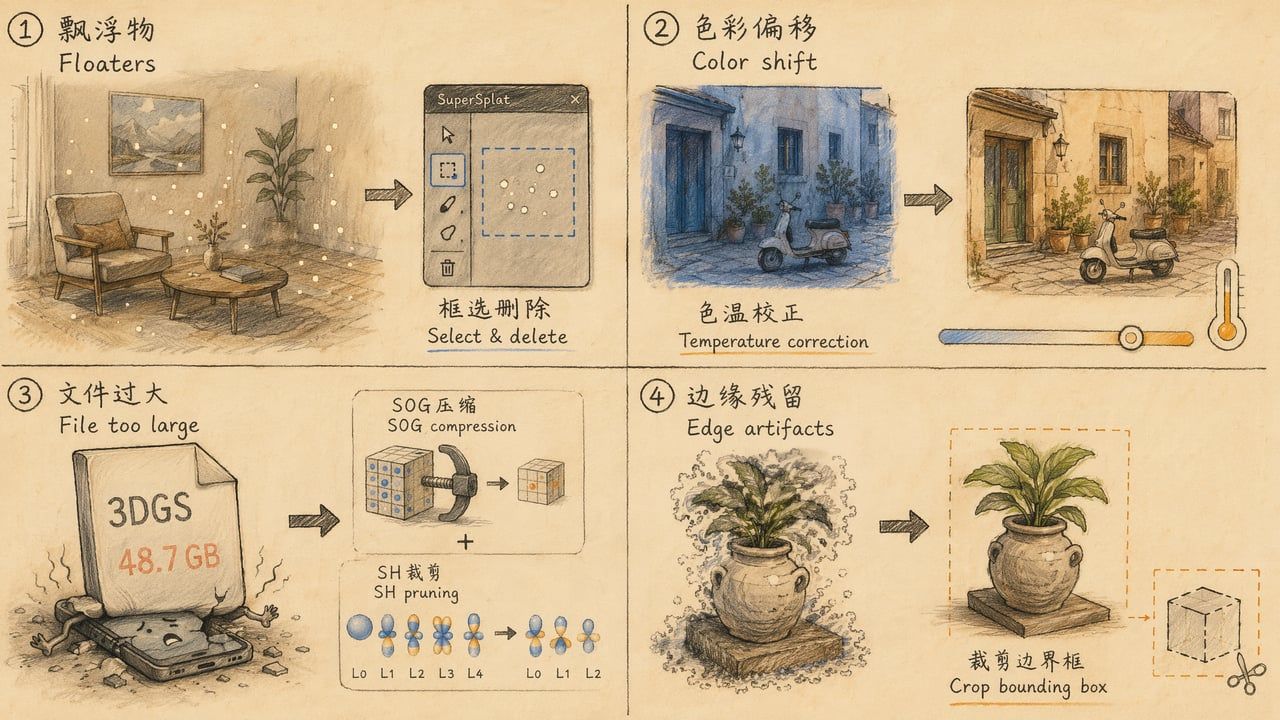
Error 1: Floaters Won't Go Away
Symptom: Deleted a batch, but more appear from a different angle.
Root cause: Floaters are distributed in 3D space; invisible from one angle may be obvious from another.
Fix:
• Check from at least 4 orthogonal directions (front/back/left/right/top/bottom)
• Use SplatTransform's --filter-floaters for automatic detection (density-based, more thorough than manual)
• If floaters exceed 30% of Gaussians, the problem is in training—go back to Chapter 08
Error 2: Color Banding After Compression
Symptom: SOG export shows visible color stepping in gradient areas.
Root cause: WebP lossy compression quantization step too large.
Fix:
• Increase WebP quality parameter in SplatTransform
• Switch to SPZ format (SPZ quantization strategy is friendlier to gradients)
• Keep higher SH bands (--sh-bands 2 instead of --sh-bands 0)
Error 3: File Still Too Large
Symptom: Used SOG compression but file is still > 100 MB.
Root cause: Too many Gaussians (typically > 5M) or full degree-3 SH retained.
Fixes (ranked by recommendation):
-
Prune SH degree: --sh-bands 1 (from 48 → 12 coefficients/Gaussian, halves size)
-
Remove low-contribution Gaussians: Sort by opacity, delete those < 0.05
-
Reduce total Gaussian count: Set max_num_splats cap during training
-
Use streaming LOD: Don't compress to single file; split into chunks for on-demand loading
File size formula:
SOG file size ≈ Gaussian count × (2 + SH_degree × 1.5) bytesError 4: Browser Crashes Loading SuperSplat
Symptom: Browser tab crashes or freezes after dragging in large PLY.
Root cause: Insufficient browser memory (Chrome single-tab typically limited to 2–4 GB).
Fix:
• Close other tabs to free memory
• Use SplatTransform CLI to crop/compress first, then import to SuperSplat
• Use 64-bit browser (Chrome/Edge)
• If PLY > 2 GB, must use CLI first
Error 5: View-Dependent Effects Disappear After Export
Symptom: Metallic surfaces and glossy objects look "flat" after compression, losing color shifts with viewing angle.
Root cause: You chose a format that drops spherical harmonics (SPLAT or Compressed PLY).
Fix:
• Switch to SPZ or SOG (both preserve full SH)
• If SPLAT format is required (compatibility needs), accept this loss—it's a format limitation
• Compromise: --sh-bands 1 (keeps basic view-dependence, much smaller than full degree-3)
Error 6: Merged Splats Have Wrong Coordinates
Symptom: After merging two PLYs, models overlap or are far apart.
Root cause: Different world coordinate origins from separate training runs.
Fix:
# Center each model first npx splat-transform a.ply --center -o a-centered.ply npx splat-transform b.ply --center -o b-centered.ply
# Translate/rotate one to align npx splat-transform b-centered.ply --translate 2,0,0 -o b-moved.ply
# Merge npx splat-transform a-centered.ply b-moved.ply -o merged.ply
Advanced Techniques
Technique 1: SH Degree vs. Quality Trade-off
Spherical Harmonics store view-dependent color in 3DGS. Higher degree = finer view-dependent effects but larger files:
| SH Degree | Coefficients/Gaussian | Storage Share | Visual Effect |
|---|---|---|---|
| 0 (DC only) | 3 | ~5% | Pure diffuse color, no view-dependence |
| 1 | 12 | ~20% | Basic directional color variation |
| 2 | 27 | ~45% | Finer reflection effects |
| 3 (full) | 48 | ~80% | Complete view-dependence, best for metal/gloss |
Decision guide:
• Scene has lots of metal/glass/glossy surfaces → Keep degree 3
• Scene is mostly diffuse materials (wood, walls, fabric) → Degree 1 is sufficient
• You just need a rough look → Degree 0 (smallest file)
Technique 2: Streaming LOD for Large Scenes
If your scene has > 5M Gaussians (typical outdoor/large indoor), single-file loading makes mobile users wait 30+ seconds. Streaming LOD solves this:
npx splat-transform large-scene.ply -o ./streamed/ --lod \
--lod-chunk-count 512 \
--lod-chunk-extent 5
Loading behavior:
-
Browser loads chunk-0.sog first (typically < 5 MB)—user immediately sees blurry panorama
-
Subsequent chunks load progressively by distance/importance
-
Full quality reached when all chunks loaded
This is PlayCanvas's "3D Tiles for Gaussian Splatting" approach.
Technique 3: Automated Post-Processing Script
#!/bin/bash # post-process.sh - One-click post-processing
INPUT=$1 OUTPUT_DIR=${2:-./output} BASENAME=$(basename "$INPUT" .ply)
mkdir -p "$OUTPUT_DIR"
echo "Step 1: Removing floaters..." npx splat-transform "$INPUT" --filter-floaters -o "$OUTPUT_DIR/${BASENAME}-clean.ply"
echo "Step 2: Morton reorder..." npx splat-transform "$OUTPUT_DIR/${BASENAME}-clean.ply" -M -o "$OUTPUT_DIR/${BASENAME}-sorted.ply"
echo "Step 3: Export SOG (web)..." npx splat-transform "$OUTPUT_DIR/${BASENAME}-sorted.ply" -o "$OUTPUT_DIR/${BASENAME}.sog"
echo "Step 4: Export SPZ (archive)..." python -c "import spz; spz.convert('$OUTPUT_DIR/${BASENAME}-sorted.ply', '$OUTPUT_DIR/${BASENAME}.spz')"
echo "Step 5: Stats..." npx splat-transform "$OUTPUT_DIR/${BASENAME}-sorted.ply" -m
echo "Done! Files in $OUTPUT_DIR/" ls -lh "$OUTPUT_DIR/${BASENAME}"*
Technique 4: Quantitative Quality Assessment
import torch from torchmetrics.image import PeakSignalNoiseRatio, StructuralSimilarityIndexMeasure
psnr = PeakSignalNoiseRatio() ssim = StructuralSimilarityIndexMeasure()
original_render = render(original_ply, camera) compressed_render = render(compressed_file, camera)
print(f"PSNR: {psnr(compressed_render, original_render):.2f} dB") print(f"SSIM: {ssim(compressed_render, original_render):.4f}")
# Thresholds: # PSNR > 35 dB → Nearly lossless # PSNR 30-35 dB → Slight loss, most people can't tell # PSNR < 30 dB → Noticeable loss, needs investigation
Technique 5: Export Strategy by Platform
| Target Platform | Recommended Format | Size Budget | Notes |
|---|---|---|---|
| Desktop browser | SOG | < 100 MB | Ample bandwidth, keep full SH |
| Mobile browser | SOG + Streaming LOD | First screen < 5 MB | Must stream, otherwise timeout |
| Native app (iOS/Android) | SPZ | < 50 MB | Scaniverse SDK native support |
| PlayCanvas project | SOG | As needed | Engine native support |
| Three.js project | KSPLAT / SPLAT | < 50 MB | Use @mkkellogg/gaussian-splats-3d |
| Babylon.js project | SPZ | < 50 MB | 8.0+ native support |
| Archive/backup | PLY + SPZ | Unlimited | PLY preserves full data, SPZ as compressed copy |
Technique 6: SuperSplat Studio Advanced Features
SuperSplat launched Studio mode in 2025–2026, going beyond basic editing:
• Annotations: Add text labels and info points to splat scenes
• Camera Paths: Set preset viewing paths to guide user exploration
• Post Effects: Tonemapping, Bloom, Vignette—cinematic post-processing
• Walk Mode: First-person navigation for architecture/interior showcases
• Custom Backgrounds: Replace skybox or set solid color backgrounds
• One-click Publish: Publish directly to superspl.at platform with shareable link
File Size Reference Table
Based on a typical indoor scene (2M Gaussians, degree-3 SH, trained from 100 photos):
| Stage | Format | File Size | Notes |
|---|---|---|---|
| Raw training output | PLY | 485 MB | 32-bit float, full degree-3 SH |
| After floater removal | PLY | 380 MB | ~20% Gaussians removed |
| SH pruned to degree 1 | PLY | 95 MB | From 48 → 12 coefficients/Gaussian |
| Compressed to SPLAT | .splat | 95 MB | DC color only, no SH |
| Compressed to SPZ | .spz | 48 MB | Full SH preserved, quantized |
| Compressed to SOG | .sog | 38 MB | WebP textures, full SH |
| SOG + Streaming LOD | folder | 38 MB (total) | Split into 8 chunks, first screen 4.5 MB |
From 485 MB to 38 MB: 12.8× compression, virtually lossless visual quality.
Inktoys Judgment
Post-processing is the highest ROI step in the entire 3DGS pipeline. 10–20 minutes of cleanup and compression transforms a "local-only" 500 MB file into a "loads in 3 seconds on mobile" 30 MB asset. Distributing without post-processing is like posting a RAW photo to social media—technically possible, but terrible experience.
The core principle of post-processing is singular: Within the target platform's loading budget, preserve as much visual information as possible.
• Target: desktop web → under 100 MB, SOG format
• Target: mobile web → under 30 MB (or streaming LOD), SOG format
• Target: archive → unlimited size, PLY + SPZ dual backup
• Target: send to client → SPZ (Khronos standard track, best future compatibility)
The 2026 format ecosystem has stabilized: SPZ is the archive standard, SOG is the web publishing standard, PLY is the editing standard. These three cover all scenarios—you don't need to worry about other formats.
What to Read Next
• Want to review training parameters → 08-training
• Post-processing done, ready to distribute → 11-distribution: Distribution & Display
• Want AI Agent to automate post-processing → 09-ai-agent: Training via AI Agents
• Want someone to run it for you → About Us · Contact
← Previous Chapter: 09 AI Agent 训练路径 Training via AI Agents → Next Chapter: 11 分发与展示 Distribution & Display