
stage 07
SfM 位姿估算
SfM Pose Estimation
Inktoys Engrave Everything — 3DGS Tutorial Series · Chapter 07 · SfM Pose Estimation
Concept & Positioning
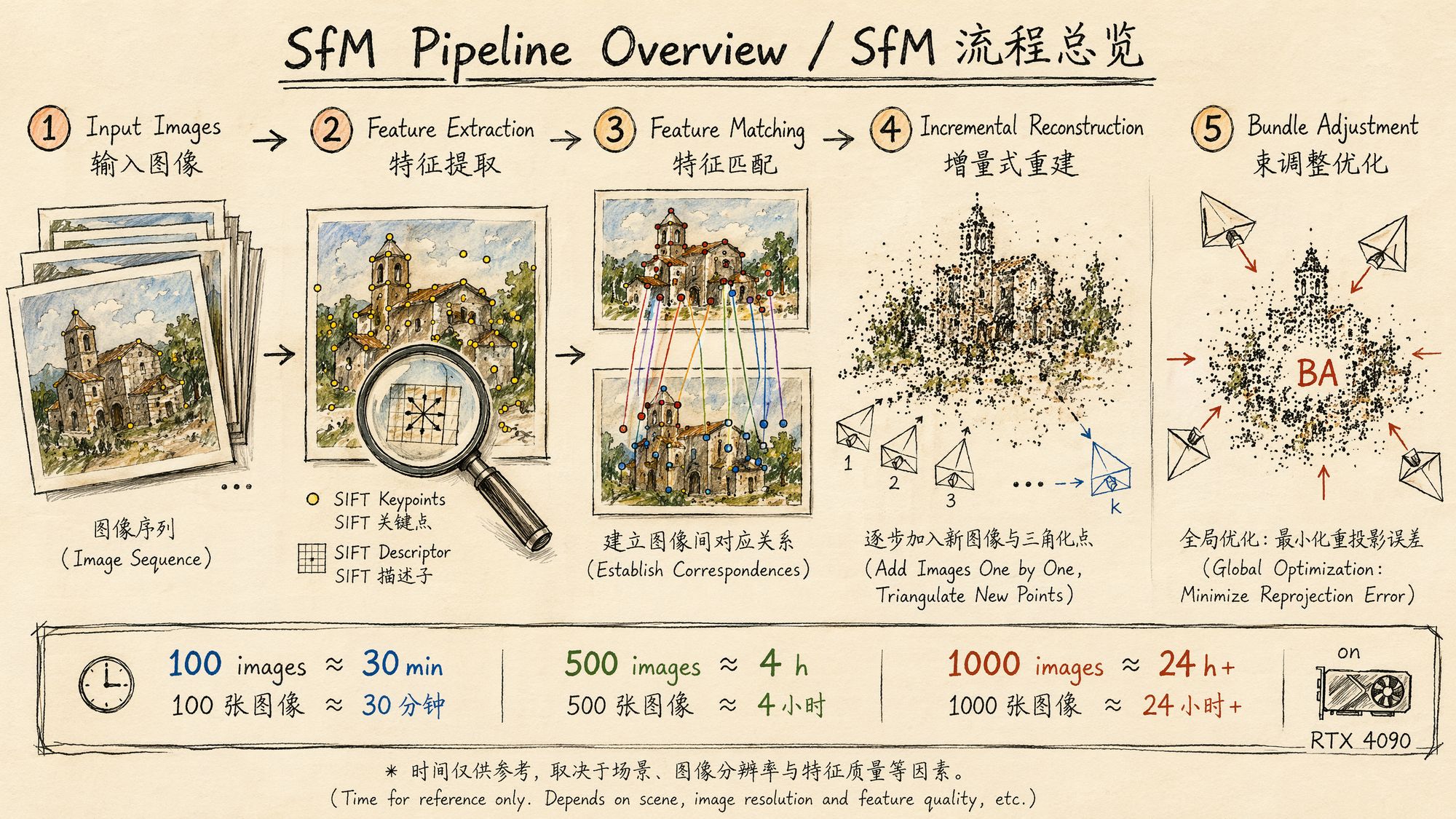
Structure-from-Motion (SfM) is the single most critical step in the entire 3DGS pipeline — there is nothing else that comes close. Its job: given a set of 2D images, simultaneously estimate the camera pose (position + orientation) for every image and a sparse 3D point cloud of the scene.
You can think of SfM as the "foundation" of 3DGS. If pose estimation goes wrong, no amount of downstream Gaussian optimization can save you — the trainer will try to explain the images using incorrect camera positions, and the result will be a blurry, ghosted, or completely collapsed model.
The core SfM algorithm pipeline:
-
Feature extraction: detect keypoints and compute descriptors in each image. The classic method is SIFT; modern methods include SuperPoint, DISK, and others.
-
Feature matching: establish correspondences between image pairs. This is the most computationally expensive step, with O(N²) complexity for exhaustive matching.
-
Geometric verification: use RANSAC to estimate the fundamental/essential matrix between image pairs and reject outliers.
-
Incremental reconstruction: starting from an initial image pair, progressively register new images, triangulate new 3D points, and run local Bundle Adjustment.
-
Global Bundle Adjustment: jointly optimize all camera parameters and 3D point positions to minimize reprojection error.
Outputs:
• cameras.bin / cameras.txt: camera intrinsics (focal length, principal point, distortion coefficients)
• images.bin / images.txt: per-image extrinsics (rotation matrix + translation vector)
• points3D.bin / points3D.txt: sparse 3D point cloud (typically thousands to tens of thousands of points)
These three files are the complete prerequisite input for 3DGS training.
Decision Points
Decision 1: Which SfM tool to choose?
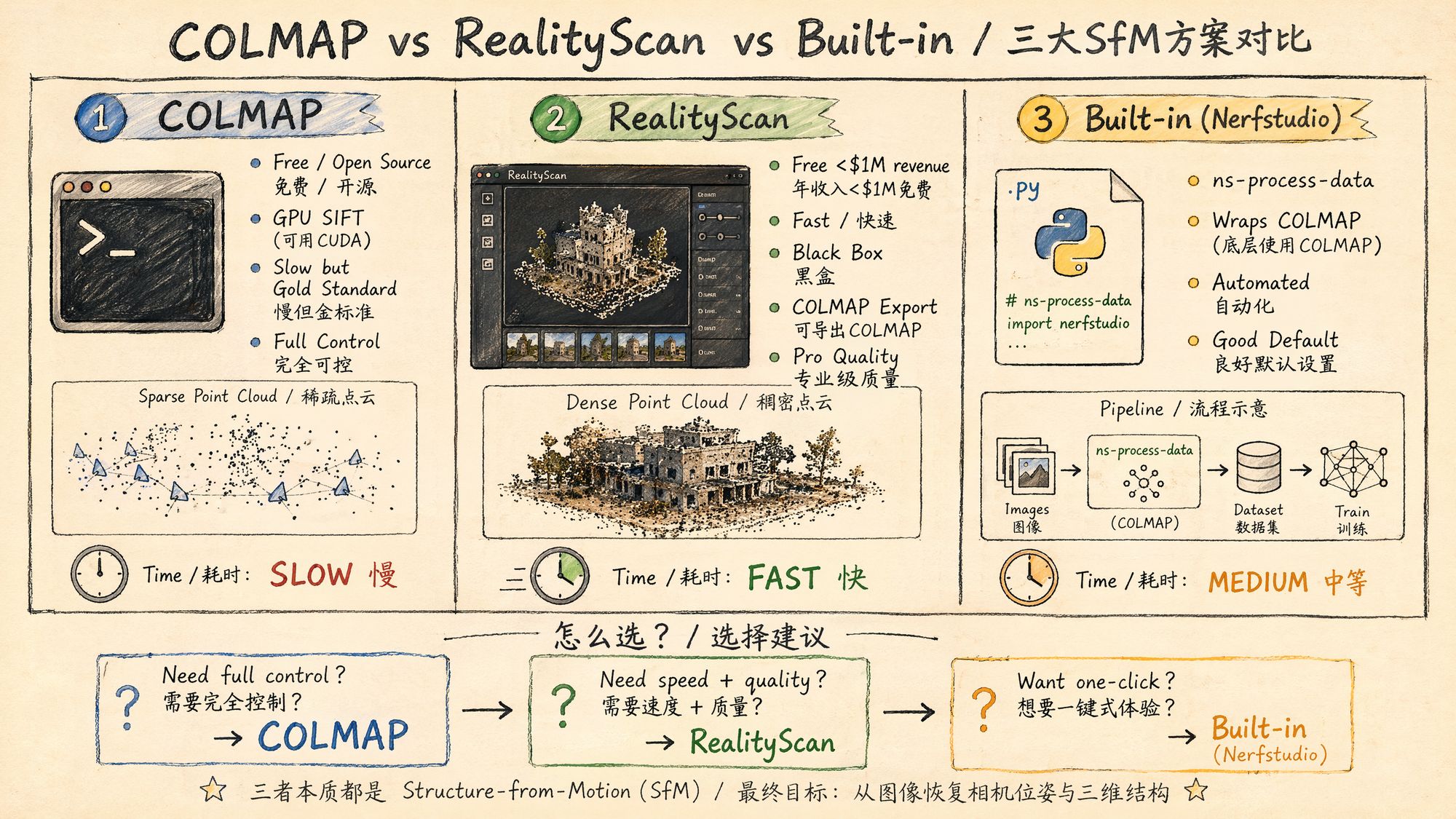
This is the single most important decision in this chapter. As of 2026, the three mainstream options are:
| Tool | Price | Speed | Quality | Control | Use case |
|---|---|---|---|---|---|
| COLMAP | Free / open source | Slow | Gold standard | Full control | Research, reproducibility, custom pipelines |
| RealityScan (formerly RealityCapture) | Free for revenue < $1M | Very fast | Industrial | Black box | Production, large-scale datasets, commercial projects |
| Nerfstudio built-in (ns-process-data) | Free / open source | Medium | Good | Automated | Rapid prototyping, one-click flow, learning |
Detailed comparison:
COLMAP 4.0 (released March 2026)
• Integrates GLOMAP (global SfM mapper); no longer needs to be installed separately
• GPU-accelerated SIFT feature extraction (CUDA)
• New Python bindings (pycolmap): programmatic control of the entire pipeline
• New structure-less registration fallback for unstructured images
• Supports GPU Bundle Adjustment (via cuDSS)
• Drawback: still slow. 100 images take ~30 minutes; 1000 images can take 24 hours or more
RealityScan 2.1.1 (updated April 2026)
• Formerly RealityCapture; renamed after the Epic Games acquisition
• Free for users with under $1M in annual revenue
• 10–50× faster than COLMAP on equivalent datasets
• Supports COLMAP-format export (cameras.txt / images.txt)
• Supports LiDAR and SLAM data import
• New CLI and gRPC automation interfaces
• Drawbacks: closed-source black box, Windows only, exported images need to be undistorted
Nerfstudio ns-process-data
• Essentially an automated wrapper around COLMAP
• One command does it all: video frame extraction → COLMAP SfM → data format conversion
• Auto-selects matching strategy and auto-undistorts
• Drawbacks: hard to debug when things go wrong; limited room for parameter tuning
Decision 2: Which matching strategy?
Feature matching is the most time-consuming step in SfM. Choosing the right matching strategy can shrink processing time from days to hours:
| Strategy | Complexity | Use case | COLMAP command |
|---|---|---|---|
| Exhaustive | O(N²) | < 100 images, maximum quality | exhaustive_matcher |
| Sequential | O(N×k) | Video frames, ordered capture | sequential_matcher |
| Vocab Tree | O(N×log N) | > 500 images, large scenes | vocab_tree_matcher |
| Spatial | O(N×k) | Images with GPS metadata | spatial_matcher |
Selection guide:
Number of images < 100? ├── Yes → Exhaustive matching (highest quality, acceptable time) └── No → Are images sequentially related (video frames)?
├── Yes → Sequential matching (overlap=10-20)
└── No → Number of images > 500?
├── Yes → Vocab tree matching
└── No → Exhaustive matching (still acceptable for 100-500 images)
Decision 3: Which camera model?
COLMAP supports several camera models; choosing the wrong one can cause reconstruction to fail:
| Camera model | # params | Use case |
|---|---|---|
| SIMPLE_PINHOLE | 3 (f, cx, cy) | Known focal length, no distortion |
| PINHOLE | 4 (fx, fy, cx, cy) | Known focal length, no distortion, non-square pixels |
| SIMPLE_RADIAL | 4 (f, cx, cy, k1) | Most phones/cameras (recommended default) |
| RADIAL | 5 (f, cx, cy, k1, k2) | Noticeable barrel/pincushion distortion |
| OPENCV | 8 | Wide-angle lenses, GoPro |
| OPENCV_FISHEYE | 8 | Fisheye lenses, Insta360 |
Recommended strategy:
• Phone capture → SIMPLE_RADIAL
• DSLR / mirrorless prime lens → SIMPLE_RADIAL or PINHOLE
• GoPro / action cam → OPENCV
• Fisheye / 360 cameras → OPENCV_FISHEYE
• Not sure → let COLMAP pick automatically (defaults to SIMPLE_RADIAL)
Decision 4: COLMAP or GLOMAP?
COLMAP 4.0 ships GLOMAP as an alternative mapper. The differences:
| Feature | COLMAP Incremental Mapper | GLOMAP (Global Mapper) |
|---|---|---|
| Reconstruction style | Incremental (add one image at a time) | Global (solve once) |
| Speed | Slow (especially on large datasets) | 2–5× faster |
| Robustness | Very high (validated step by step) | High (but more sensitive to noise) |
| Drift | Possible cumulative drift | No cumulative drift |
| Use case | General purpose, hard scenes | Large-scale, well-structured scenes |
Inktoys' recommendation: for the typical 3DGS single-object / small-scene capture (100–300 frames), the difference between the two is small. Default to COLMAP incremental mapping (more stable); if your dataset exceeds 500 images and the scene is regular, try GLOMAP for the speedup.
Operation Steps
Option A: Full manual COLMAP pipeline (recommended for learning)
This is the most transparent and controllable approach. You can inspect intermediate results at every step.
Step 1: Install COLMAP
# Ubuntu 22.04+ (recommended) sudo apt install colmap
# Or build from source (to get the latest 4.0 features) git clone https://github.com/colmap/colmap.git cd colmap mkdir build && cd build cmake .. -DCMAKE_CUDA_ARCHITECTURES=native make -j$(nproc) sudo make install
# Verify install colmap --version # COLMAP 4.0.x
Windows users: download prebuilt binaries from GitHub Releases, or use Docker.
macOS users: COLMAP has no GPU acceleration on macOS (no CUDA), so it will be much slower. We recommend Linux or WSL2.
Step 2: Prepare the directory structure
project/ ├── images/
# All input images (JPEG/PNG) ├── database.db
# COLMAP database (auto-generated) ├── sparse/
# Sparse reconstruction output │
└── 0/
# First reconstruction model │
├── cameras.bin │
├── images.bin │
└── points3D.bin └── dense/
# Dense reconstruction (not needed for 3DGS, can skip)
Step 3: Feature extraction
colmap feature_extractor \
--database_path ./database.db \
--image_path ./images/ \
--ImageReader.camera_model SIMPLE_RADIAL \
--ImageReader.single_camera 1 \
--SiftExtraction.use_gpu 1 \
--SiftExtraction.max_image_size 3200 \
--SiftExtraction.max_num_features 8192
Parameter notes:
| Parameter | Meaning | Recommended value |
|---|---|---|
| camera_model | Camera distortion model | SIMPLE_RADIAL (most cases) |
| single_camera | Whether all images come from the same camera | 1 (must be 1 when shot on the same device) |
| use_gpu | Use GPU to accelerate SIFT | 1 (when an NVIDIA GPU is available) |
| max_image_size | Maximum image size (long-edge pixels) | 3200 (balance between quality and speed) |
| max_num_features | Max features extracted per image | 8192 (default, usually enough) |
Key note: single_camera 1 tells COLMAP that all images share the same intrinsics. If your images come from different devices or different focal lengths, you must set this to 0. But for typical 3DGS scenes (same phone/camera throughout), setting it to 1 significantly improves accuracy and speed.
Step 4: Feature matching
# Option A: Exhaustive matching (< 100 images) colmap exhaustive_matcher \
--database_path ./database.db \
--SiftMatching.use_gpu 1 \
--SiftMatching.max_ratio 0.8 \
--SiftMatching.max_distance 0.7
# Option B: Sequential matching (video frames) colmap sequential_matcher \
--database_path ./database.db \
--SiftMatching.use_gpu 1 \
--SequentialMatching.overlap 15 \
--SequentialMatching.loop_detection 1 \
--SequentialMatching.vocab_tree_path ./vocab_tree_flickr100K_words256K.bin
# Option C: Vocab tree matching (> 500 images) colmap vocab_tree_matcher \
--database_path ./database.db \
--SiftMatching.use_gpu 1 \
--VocabTreeMatching.vocab_tree_path ./vocab_tree_flickr100K_words256K.bin \
--VocabTreeMatching.num_images 100
Vocab tree file download:
# Pretrained vocab tree provided by COLMAP wget https://demuc.de/colmap/vocab_tree_flickr100K_words256K.binMatching parameter tuning:
| Parameter | Meaning | Default | Tuning advice |
|---|---|---|---|
| max_ratio | Lowe's ratio test threshold | 0.8 | Lowering to 0.7 reduces false matches but also reduces correct ones |
| max_distance | Descriptor distance threshold | 0.7 | Raising to 0.8 increases match count (low-texture scenes) |
| overlap | Sequential matching window size | 10 | 15–20 recommended for video frames |
| loop_detection | Whether to detect loop closures | 0 | Must be enabled for orbit-style capture |
Step 5: Sparse reconstruction (Mapper)
# Incremental reconstruction (default, recommended) colmap mapper \
--database_path ./database.db \
--image_path ./images/ \
--output_path ./sparse/ \
--Mapper.ba_refine_focal_length 1 \
--Mapper.ba_refine_extra_params 1 \
--Mapper.min_num_matches 15
# Or use GLOMAP (global, faster) glomap mapper \
--database_path ./database.db \
--image_path ./images/ \
--output_path ./sparse/
Key Mapper parameters:
| Parameter | Meaning | Recommended value |
|---|---|---|
| ba_refine_focal_length | Refine focal length during BA | 1 (EXIF focal length may be inaccurate) |
| ba_refine_extra_params | Refine distortion parameters | 1 |
| min_num_matches | Minimum matches required to register an image | 15 (lower → register more images, but more risk) |
| init_min_tri_angle | Minimum triangulation angle for the initial pair | 4.0 (degrees) |
Step 6: Inspect the reconstruction
# View reconstruction stats colmap model_analyzer \
--path ./sparse/0/
# Example output: # Cameras: 1 # Images: 247 (registered: 243) # Points: 45,892 # Mean reprojection error: 0.72px # Mean track length: 4.3
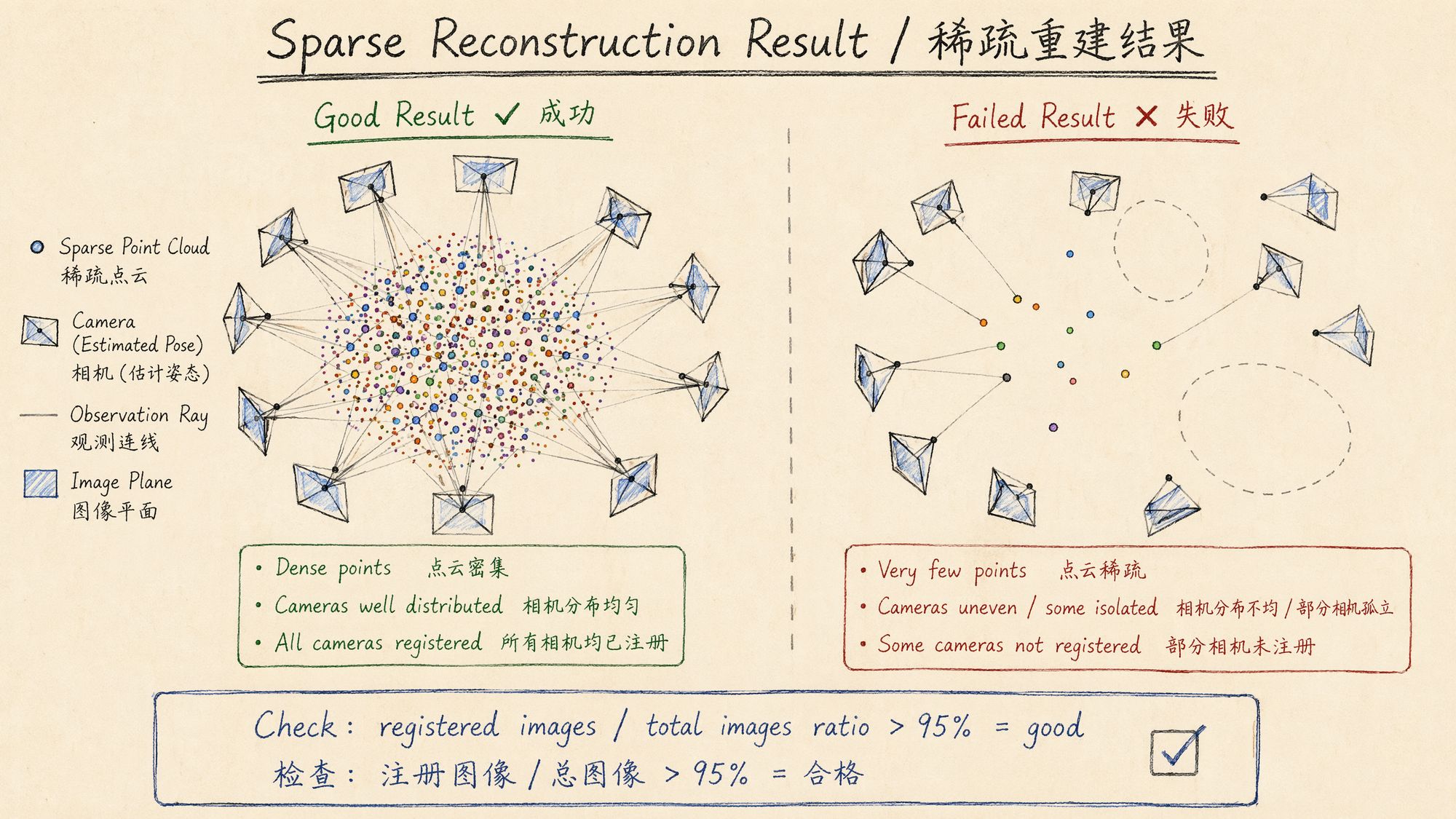
Key metrics to evaluate:
| Metric | Excellent | Acceptable | Needs investigation |
|---|---|---|---|
| Registration rate (registered/total) | > 98% | > 90% | < 85% |
| Mean reprojection error | < 0.8px | < 1.2px | > 1.5px |
| Mean track length | > 4.0 | > 3.0 | < 2.5 |
| Point cloud size | > 30000 | > 10000 | < 5000 |
Step 7: Image undistortion (required for 3DGS)
Most 3DGS training frameworks require the input images to be undistorted. COLMAP can do this in a single step:
colmap image_undistorter \
--image_path ./images/ \
--input_path ./sparse/0/ \
--output_path ./undistorted/ \
--output_type COLMAP \
--max_image_size 2000
This produces:
undistorted/ ├── images/
# Undistorted images ├── sparse/
# Updated sparse model (intrinsics become PINHOLE) │
├── cameras.bin │
├── images.bin │
└── points3D.bin └── stereo/
# Stereo matching data (can be ignored)
The undistorted sparse/ directory is the direct input for 3DGS training.
Option B: Nerfstudio one-click flow (recommended for production)
If you train with Nerfstudio / gsplat, the simplest approach is the built-in data processing command:
# From an image folder ns-process-data images \
--data ./images/ \
--output-dir ./processed/ \
--num-downscales 2 \
--colmap-feature-type sift-gpu
# From a video file ns-process-data video \
--data ./input.mp4 \
--output-dir ./processed/ \
--num-frames-target 300 \
--colmap-feature-type sift-gpu
What ns-process-data does:
-
(For video) extract frames with FFmpeg
-
Call COLMAP for feature extraction + matching + reconstruction
-
Auto-undistort
-
Generate transforms.json (Nerfstudio-format camera parameters)
-
Generate multi-resolution images (for training acceleration)
Output structure:
processed/ ├── images/
# Original-resolution undistorted images ├── images_2/
# 1/2 resolution ├── images_4/
# 1/4 resolution ├── images_8/
# 1/8 resolution ├── colmap/
# Raw COLMAP output │
└── sparse/0/ ├── transforms.json
# Nerfstudio-format camera parameters └── dataparser_transforms.json
Option C: RealityScan workflow
RealityScan (formerly RealityCapture) provides industrial-grade SfM performance, an order of magnitude faster than COLMAP.
Basic workflow
-
Import images: File → Add Images (drag-and-drop supported)
-
Align: Workflow → Align Images (handles feature extraction + matching + reconstruction automatically)
-
Inspect: review the alignment report and confirm every image was registered successfully
-
Export to COLMAP format:
◦ Export → COLMAP (native support added in 2.1.1)
◦ Or Export → Bundler → convert to COLMAP format
RealityScan CLI automation
# RealityScan 2.1.1 CLI example RealityScan -addFolder ./images/ \
-align \
-exportColmap ./output/sparse/ \
-quit
Things to watch out for
• RealityScan-exported images are undistorted, but filenames may differ from the originals
• Verify that the exported camera model is PINHOLE (it should be after undistortion)
• Some versions may require a manual coordinate-system adjustment on export
• The free version applies a watermark (only on mesh exports; COLMAP-format export is unaffected)
Option D: pycolmap Python script (recommended for automation)
The COLMAP 4.0 Python bindings let you drive the entire SfM pipeline from Python:
#!/usr/bin/env python3 """ 07_sfm_pipeline.py Inktoys · SfM pose estimation automation script Uses pycolmap to run the full pipeline from feature extraction to sparse reconstruction """
import pycolmap from pathlib import Path import shutil import time
class SfMPipeline:
def __init__(self, image_dir: str, output_dir: str,
camera_model: str = "SIMPLE_RADIAL",
single_camera: bool = True,
matching_strategy: str = "auto"):
"""
Args:
image_dir: Input image directory
output_dir: Output directory
camera_model: Camera model
single_camera: Whether all images come from the same camera
matching_strategy: "exhaustive", "sequential", "vocab_tree", "auto"
"""
self.image_dir = Path(image_dir)
self.output_dir = Path(output_dir)
self.db_path = self.output_dir / "database.db"
self.sparse_dir = self.output_dir / "sparse"
self.camera_model = camera_model
self.single_camera = single_camera
self.matching_strategy = matching_strategy
self.output_dir.mkdir(parents=True, exist_ok=True)
self.sparse_dir.mkdir(parents=True, exist_ok=True)
def count_images(self) -> int:
"""Count input images"""
extensions = {".jpg", ".jpeg", ".png", ".tiff", ".tif"}
count = sum(1 for f in self.image_dir.iterdir()
if f.suffix.lower() in extensions)
return count
def auto_select_matching(self) -> str:
"""Auto-select matching strategy based on image count"""
n = self.count_images()
if n <= 100:
return "exhaustive"
elif n <= 500:
return "sequential"
# Assume video frames
else:
return "vocab_tree"
def extract_features(self):
"""Step 1: feature extraction"""
print(f"[1/4] Feature extraction ({self.count_images()} images)...")
t0 = time.time()
pycolmap.extract_features(
database_path=str(self.db_path),
image_path=str(self.image_dir),
camera_model=self.camera_model,
camera_params="",
# Read automatically from EXIF
single_camera=self.single_camera,
sift_options=pycolmap.SiftExtractionOptions(
use_gpu=True,
max_image_size=3200,
max_num_features=8192,
)
)
print(f"
Done in {time.time()-t0:.1f}s")
def match_features(self):
"""Step 2: feature matching"""
strategy = self.matching_strategy
if strategy == "auto":
strategy = self.auto_select_matching()
print(f"[2/4] Feature matching (strategy: {strategy})...")
t0 = time.time()
matching_options = pycolmap.SiftMatchingOptions(
use_gpu=True,
max_ratio=0.8,
max_distance=0.7,
)
if strategy == "exhaustive":
pycolmap.match_exhaustive(
database_path=str(self.db_path),
sift_options=matching_options,
)
elif strategy == "sequential":
pycolmap.match_sequential(
database_path=str(self.db_path),
sift_options=matching_options,
sequential_options=pycolmap.SequentialMatchingOptions(
overlap=15,
loop_detection=True,
)
)
elif strategy == "vocab_tree":
pycolmap.match_vocab_tree(
database_path=str(self.db_path),
sift_options=matching_options,
vocab_tree_options=pycolmap.VocabTreeMatchingOptions(
vocab_tree_path="./vocab_tree_flickr100K_words256K.bin",
num_images=100,
)
)
print(f"
Done in {time.time()-t0:.1f}s")
def reconstruct(self):
"""Step 3: incremental reconstruction"""
print("[3/4] Incremental reconstruction...")
t0 = time.time()
mapper_options = pycolmap.IncrementalMapperOptions()
mapper_options.ba_refine_focal_length = True
mapper_options.ba_refine_extra_params = True
mapper_options.min_num_matches = 15
maps = pycolmap.incremental_mapping(
database_path=str(self.db_path),
image_path=str(self.image_dir),
output_path=str(self.sparse_dir),
options=mapper_options,
)
print(f"
Done in {time.time()-t0:.1f}s")
print(f"
Produced {len(maps)} model(s)")
return maps
def analyze_result(self) -> dict:
"""Step 4: analyze the reconstruction"""
print("[4/4] Analyzing reconstruction...")
model_path = self.sparse_dir / "0"
if not model_path.exists():
print("
No reconstruction model was produced!")
return {"success": False}
reconstruction = pycolmap.Reconstruction()
reconstruction.read(str(model_path))
num_images = len(reconstruction.images)
num_registered = sum(1 for img in reconstruction.images.values()
if img.registered)
num_points = len(reconstruction.points3D)
# Compute mean reprojection error
total_error = 0
total_obs = 0
for point in reconstruction.points3D.values():
total_error += point.error * len(point.track.elements)
total_obs += len(point.track.elements)
mean_error = total_error / max(total_obs, 1)
# Compute mean track length
track_lengths = [len(p.track.elements) for p in reconstruction.points3D.values()]
mean_track = sum(track_lengths) / max(len(track_lengths), 1)
total_input = self.count_images()
registration_rate = num_registered / total_input * 100
result = {
"success": True,
"total_images": total_input,
"registered_images": num_registered,
"registration_rate": registration_rate,
"num_points": num_points,
"mean_reprojection_error": mean_error,
"mean_track_length": mean_track,
}
print(f"
Total images: {total_input}")
print(f"
Registered: {num_registered} ({registration_rate:.1f}%)")
print(f"
3D points: {num_points}")
print(f"
Mean reprojection error: {mean_error:.2f}px")
print(f"
Mean track length: {mean_track:.1f}")
# Quality verdict
if registration_rate >= 95 and mean_error < 1.0:
print("
Excellent — proceed to training")
elif registration_rate >= 85 and mean_error < 1.5:
print("
Acceptable, but inspect the unregistered images")
else:
print("
Insufficient quality — investigate")
return result
def undistort(self):
"""Undistort images (required before 3DGS training)"""
print("[Extra] Undistorting images...")
undistorted_dir = self.output_dir / "undistorted"
undistorted_dir.mkdir(exist_ok=True)
pycolmap.undistort_images(
output_path=str(undistorted_dir),
input_path=str(self.sparse_dir / "0"),
image_path=str(self.image_dir),
output_type="COLMAP",
max_image_size=2000,
)
print(f"
Output: {undistorted_dir}")
print("
Undistortion complete; ready for 3DGS training")
def run(self):
"""Run the full SfM pipeline"""
print("=" * 60)
print("Inktoys · SfM pose estimation")
print("=" * 60)
total_start = time.time()
self.extract_features()
self.match_features()
self.reconstruct()
result = self.analyze_result()
if result.get("success") and result.get("registration_rate", 0) > 85:
self.undistort()
total_time = time.time() - total_start
print(f" Total time: {total_time/60:.1f} minutes")
print("=" * 60)
return result
if __name__ == "__main__":
import argparse
parser = argparse.ArgumentParser(description="3DGS SfM pose estimation")
parser.add_argument("images", help="Input image directory")
parser.add_argument("output", help="Output directory")
parser.add_argument("--camera-model", default="SIMPLE_RADIAL",
choices=["SIMPLE_PINHOLE","PINHOLE","SIMPLE_RADIAL",
"RADIAL","OPENCV","OPENCV_FISHEYE"])
parser.add_argument("--matching", default="auto",
choices=["exhaustive","sequential","vocab_tree","auto"])
parser.add_argument("--multi-camera", action="store_true",
help="Images come from multiple different cameras")
args = parser.parse_args()
pipeline = SfMPipeline(
args.images, args.output,
camera_model=args.camera_model,
single_camera=not args.multi_camera,
matching_strategy=args.matching,
)
pipeline.run()
Usage:
# Basic usage (auto-select matching strategy) python 07_sfm_pipeline.py ./images/ ./sfm_output/
# Force sequential matching (video frames) python 07_sfm_pipeline.py ./frames/ ./sfm_output/ --matching sequential
# GoPro wide-angle lens python 07_sfm_pipeline.py ./gopro_frames/ ./sfm_output/ --camera-model OPENCV
# Mixed multi-camera capture python 07_sfm_pipeline.py ./mixed_images/ ./sfm_output/ --multi-camera
COLMAP GUI for visual inspection
The CLI is better suited for automation, but the COLMAP GUI is invaluable for debugging and validation:
# Launch GUI colmap gui
# Or open an existing project directly colmap gui --database_path ./database.db --image_path ./images/
What to check in the GUI:
- Reconstruction → 3D view:
◦ Does the point cloud form a sensible scene shape?
◦ Are the cameras distributed sensibly (orbiting an object or aligned along a path)?
◦ Are there any clearly stray cameras (points that flew away)?
- Database → Match Matrix:
◦ Is the match matrix densely populated near the diagonal (sequential data)?
◦ Are there obvious match holes (some images sharing no matches with others)?
- Statistics:
◦ Are matches per image distributed evenly?
◦ Are there any images with abnormally low match counts?
Processing time reference
Measured on RTX 4090 + i9-13900K + 64GB RAM:
| # images | Resolution | Matching | Feature extraction | Matching | Reconstruction | Total |
|---|---|---|---|---|---|---|
| 50 | 4000×3000 | Exhaustive | 30s | 2min | 1min | ~4min |
| 100 | 4000×3000 | Exhaustive | 1min | 8min | 5min | ~15min |
| 200 | 4000×3000 | Exhaustive | 2min | 30min | 15min | ~50min |
| 300 | 4000×3000 | Sequential | 3min | 10min | 20min | ~35min |
| 500 | 4000×3000 | Sequential | 5min | 20min | 45min | ~1.5h |
| 1000 | 4000×3000 | Vocab tree | 10min | 1h | 3h | ~4.5h |
| 2000 | 4000×3000 | Vocab tree | 20min | 3h | 12h | ~16h |
Speed-up tips:
-
**Lower **max_image_size: dropping from 3200 to 2000 cuts ~40% of the time with little quality loss
-
**Lower **max_num_features: 8192 → 4096 makes matching faster
-
Use GLOMAP: 2–5× faster on large datasets (>500 images)
-
Use GPU matching: ensure use_gpu=1
-
Use sequential instead of exhaustive matching: 10×+ speedup on ordered data
Common errors & troubleshooting
Error 1: many images fail to register
Symptoms: registration rate < 80%, many images skipped.
Triage steps:
# See which images failed to register colmap model_analyzer --path ./sparse/0/ \Common causes and fixes:
| Cause | Diagnosis | Fix |
|---|---|---|
| Insufficient overlap | Adjacent-frame view change > 30° | Capture intermediate angles, or reduce frame interval |
| Too little texture | Blank walls, sky, solid colors | Add textured objects to the scene, or change scene |
| Motion blur | Check whether unregistered frames are blurry | Drop blurry frames (see Chapter 05) |
| Large exposure differences | Unregistered frames clearly under/overexposed | Color-grade for consistency (see Chapter 06) |
| Repetitive structures | Symmetric buildings, repeating textures | Add matching constraints, use sequential matching |
Error 2: reconstruction splits into multiple models
Symptoms: the sparse/ directory contains multiple subfolders (0/, 1/, 2/…), each containing only a subset of the images.
Cause: some images don't share enough matches, so the scene gets fragmented.
Fixes:
# 1. Try merging models colmap model_merger \
--input_path1 ./sparse/0/ \
--input_path2 ./sparse/1/ \
--output_path ./sparse/merged/
# 2. If they can't be merged, check for matching gaps # Usually a stretch of the capture path has no overlap
# 3. Increase the matching window or use exhaustive matching colmap exhaustive_matcher --database_path ./database.db
# 4. Re-run the mapper colmap mapper \
--database_path ./database.db \
--image_path ./images/ \
--output_path ./sparse_retry/
Error 3: reprojection error too high
Symptoms: mean reprojection error > 1.5px.
Common causes:
- Wrong camera model: a wide-angle lens that used SIMPLE_RADIAL
◦ Fix: switch to OPENCV or RADIAL
- Focal length changes: zoomed during capture
◦ Fix: set single_camera 0 so each image gets its own focal length
- Rolling shutter: the "jello" effect on phone video
◦ Fix: lower the frame extraction rate (avoid fast-motion frames)
- Poor image quality: compression artifacts, noise
◦ Fix: use higher-quality source images
Error 4: point cloud shape is clearly wrong
Symptoms: in the GUI, the point cloud doesn't match reality (twisted, flipped, stretched).
Triage:
# Check whether camera distribution makes sense import pycolmap import numpy as np
reconstruction = pycolmap.Reconstruction() reconstruction.read("./sparse/0/")
# Extract all camera positions positions = [] for img in reconstruction.images.values():
if img.registered:
# Camera position = -R^T * t
R = img.rotmat()
t = img.tvec
pos = -R.T @ t
positions.append(pos)
positions = np.array(positions)
# Inspect camera distribution print(f"Cameras: {len(positions)}") print(f"X range: [{positions[:,0].min():.2f}, {positions[:,0].max():.2f}]") print(f"Y range: [{positions[:,1].min():.2f}, {positions[:,1].max():.2f}]") print(f"Z range: [{positions[:,2].min():.2f}, {positions[:,2].max():.2f}]")
# If the range on any axis is unusually large or small, the reconstruction has problems # In a normal orbit capture, cameras should roughly lie on a circle/ellipse
Error 5: COLMAP hangs or runs out of memory
Symptoms: the matching stage runs out of memory, or it runs for hours with no progress.
Fixes:
# 1. Reduce image resolution --SiftExtraction.max_image_size 2000
# Down from 3200
# 2. Reduce feature count --SiftExtraction.max_num_features 4096
# Down from 8192
# 3. Switch to a more efficient matching strategy # Exhaustive → sequential or vocab tree
# 4. Restrict GPU memory usage --SiftMatching.gpu_index 0
# Pin a specific GPU
# 5. Process in batches (very large datasets) # Split images into subsets, reconstruct each, then merge
Error 6: missing EXIF focal length
Symptoms: COLMAP warns "No EXIF data found" or the focal length estimate is unreasonable.
Fix:
# Inspect EXIF exiftool -FocalLength -FocalLengthIn35mmFormat ./images/*.jpg \Common-device focal length reference (in pixels, based on a 4000px-wide image):
| Device | Equivalent focal length (mm) | Pixel focal length (4000px wide) |
|---|---|---|
| iPhone 15 Pro main | 24mm | ~2667 |
| iPhone 15 Pro telephoto | 77mm | ~8556 |
| iPhone 15 Pro ultra-wide | 13mm | ~1444 |
| Samsung S24 Ultra main | 23mm | ~2556 |
| Sony A7 + 35mm prime | 35mm | ~3889 |
| GoPro Hero 12 (Linear) | 19mm | ~2111 |
Advanced techniques
Tip 1: replace SIFT with deep-learning features
COLMAP defaults to SIFT, but in some hard scenes (low texture, repetitive structures, large viewpoint changes), deep-learning features perform better:
# DISK + LightGlue (requires hloc) pip install hloc
# hloc workflow python -m hloc.extract_features \
--image_dir ./images/ \
--output_dir ./features/ \
--model disk
python -m hloc.match_features \
--features ./features/ \
--output_dir ./matches/ \
--model lightglue
# Import matches into the COLMAP database python -m hloc.import_into_colmap \
--database_path ./database.db \
--features ./features/ \
--matches ./matches/
# Then run the COLMAP mapper as usual colmap mapper \
--database_path ./database.db \
--image_path ./images/ \
--output_path ./sparse/
DISK + LightGlue vs SIFT:
| Scene | SIFT registration rate | DISK+LightGlue registration rate |
|---|---|---|
| Textured outdoor | 98% | 99% |
| Low-texture indoor | 75% | 92% |
| Large viewpoint change (>45°) | 60% | 85% |
| Repetitive structures | 70% | 80% |
| Night / low-light | 50% | 78% |
Tip 2: lock focal length when intrinsics are known
If you know the camera's focal length precisely (e.g. via calibration), tell COLMAP not to optimize it:
colmap mapper \
--database_path ./database.db \
--image_path ./images/ \
--output_path ./sparse/ \
--Mapper.ba_refine_focal_length 0 \
--Mapper.ba_refine_extra_params 0
This improves reconstruction stability when the focal length is known and accurate, but if it's wrong, it will instead cause failure.
Tip 3: handle symmetric / repetitive structures
Symmetric buildings or repeating textures are SfM's nemesis — the algorithm cross-matches similar features at different positions.
Mitigations:
-
Use sequential matching: only match adjacent frames, avoiding long-range mismatches
-
**Increase **min_num_matches: from 15 to 30, demanding stronger match evidence
-
**Lower **max_ratio: from 0.8 to 0.7 for a stricter ratio test
-
Manually specify match pairs: when you know which images should match
# Manually specify match pairs (advanced) # Create match_list.txt with one image-pair per line echo "frame_001.jpg frame_002.jpg" > match_list.txt echo "frame_002.jpg frame_003.jpg" >> match_list.txt # ...
colmap matches_importer \
--database_path ./database.db \
--match_list_path ./match_list.txt \
--match_type pairs
Tip 4: convert COLMAP output to 3DGS training formats
Different 3DGS training frameworks expect different input formats:
"""Convert COLMAP output to various 3DGS-framework input formats"""
import pycolmap import numpy as np import json from pathlib import Path
def colmap_to_transforms_json(colmap_path: str, output_path: str):
"""Convert to Nerfstudio / instant-ngp transforms.json format"""
reconstruction = pycolmap.Reconstruction()
reconstruction.read(colmap_path)
# Read camera intrinsics
camera = list(reconstruction.cameras.values())[0]
frames = []
for img_id, img in reconstruction.images.items():
if not img.registered:
continue
# COLMAP uses a world-to-camera transform
# transforms.json expects camera-to-world (c2w)
R = img.rotmat()
t = img.tvec
# c2w = [R\
Inktoys' Take
On SfM tool selection, here's what my actual experience looks like:
I use COLMAP for 90% of my projects and RealityScan for 10%. Not because COLMAP is better — RealityScan is in fact stronger on both speed and robustness — but because when COLMAP fails I can debug it, whereas when RealityScan fails I can only swap parameters and roll the dice.
My standard workflow:
-
First attempt: run Nerfstudio's ns-process-data one-click. If registration > 95%, go straight to training.
-
If that fails: run COLMAP manually, inspecting each stage's output. The problem is usually in the matching stage — either too few matches (insufficient texture), or too many false matches (repetitive structures).
-
If COLMAP also fails: check input image quality (back to Chapters 05–06), or try DISK+LightGlue instead of SIFT.
-
Large-scale projects (>500 frames): go straight to RealityScan, then export COLMAP format. Time is money.
On the obsession with "perfect poses":
A lot of people pour endless time into chasing 100% registration and < 0.5px reprojection error. My experience: 95% registration plus < 1.0px error is enough. 3DGS training itself has some tolerance for pose noise — it compensates small pose errors by adjusting Gaussian positions during optimization.
But there's one absolute red line: never let bad poses sneak in. A single image registered to a completely wrong position is far more damaging than ten unregistered images. If you suspect any image's pose is wrong, drop it rather than risk it.
In one sentence: SfM is the foundation of 3DGS. The foundation doesn't have to be perfect, but it absolutely cannot have cracks. Better to register fewer images than to let bad poses contaminate training.
Further reading
• Schönberger, J. L. & Frahm, J. M. (2016). "Structure-from-Motion Revisited." CVPR. — original COLMAP paper
• Schönberger, J. L. et al. (2016). "Pixelwise View Selection for Unstructured Multi-View Stereo." ECCV. — COLMAP MVS
• Pan, Z. et al. (2024). "Global Structure-from-Motion Revisited." ECCV. — GLOMAP paper
• Lindenberger, P. et al. (2023). "LightGlue: Local Feature Matching at Light Speed." ICCV.
• Tyszkiewicz, M. et al. (2020). "DISK: Learning Local Features with Policy Gradient." NeurIPS.
• COLMAP official documentation: https://colmap.github.io/
• pycolmap API documentation: https://github.com/colmap/colmap (Python bindings section)
• Nerfstudio data processing documentation: https://docs.nerf.studio/