
stage 04
素材整理与归档
Asset Organization & Archival
The First Hour Back at the Studio
The first hour after a shoot is the most critical. Your memory is freshest, the SD card hasn't been formatted, all information is intact. Execute in this order:
| Step | Action | Time | Tool |
|---|---|---|---|
| 1 | Insert SD card into reader, do not format | — | — |
| 2 | Create project folder (following naming convention) | 2 min | Manual / script |
| 3 | Copy all original files to 00_raw/ | 5–15 min | rsync / robocopy |
| 4 | Verify file integrity (MD5 / SHA256) | 3–5 min | md5sum / TeraCopy |
| 5 | Sync to NAS (second local backup) | 10–30 min | Synology Drive / rsync |
| 6 | Start cloud upload (third off-site backup) | Background | Backblaze B2 / rclone |
| 7 | Confirm all 3 backups exist, then format SD card | 1 min | Manual verification |
| 8 | Fill in meta.yaml | 5 min | Text editor |
Iron rule: Never format the SD card until all 3 backup copies are verified. We've seen too many people "copy and format" only to discover the copy was interrupted, files corrupted, or the path was wrong.
Project Directory Structure
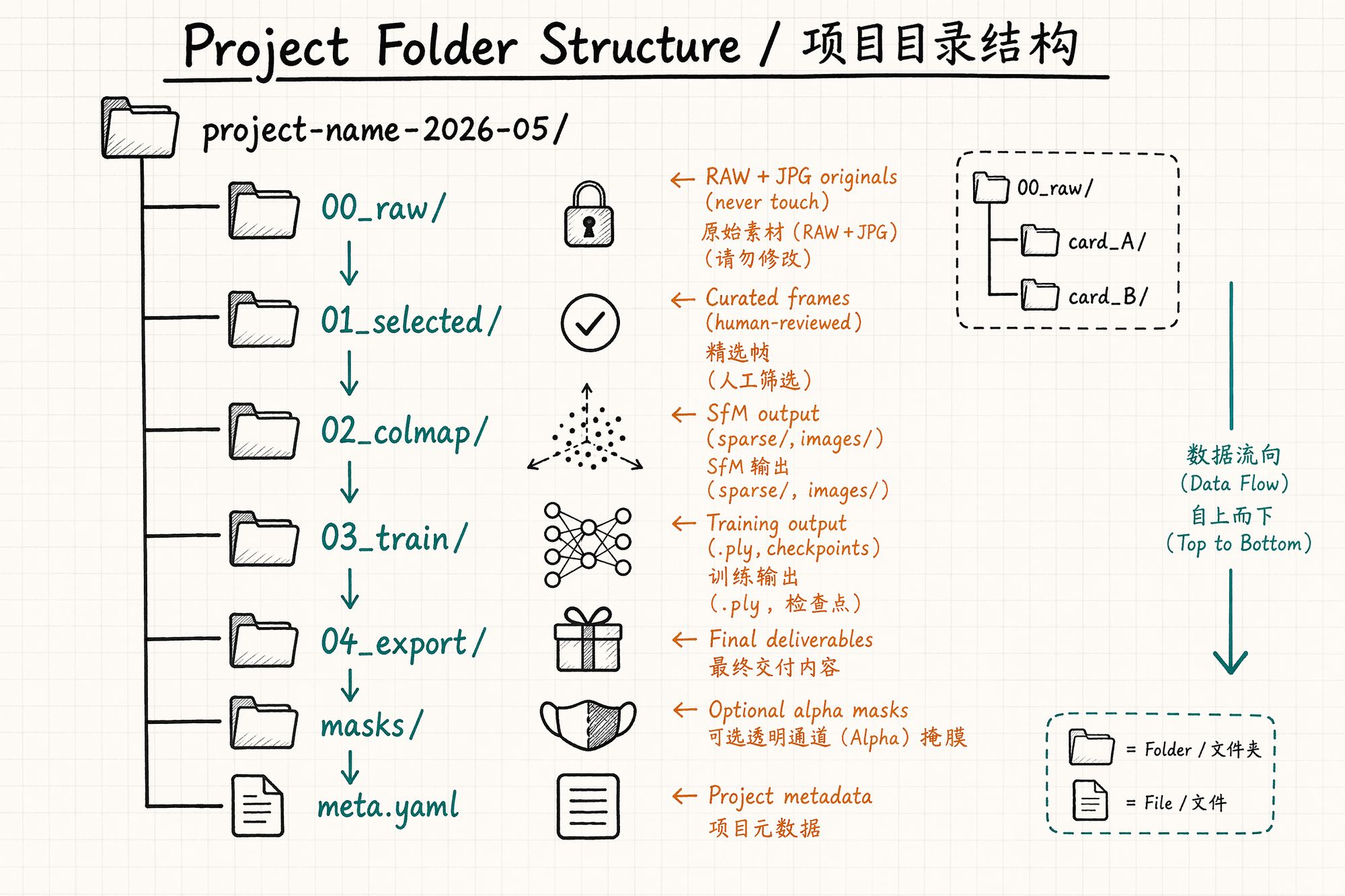
Every 3DGS project uses a unified directory structure. Regardless of project size, use the same template — six months later, opening any project folder, you'll know what's in each directory within 3 seconds.
Standard Directory Template
{project-name}_{YYYYMMDD}_{device}/ │ ├── 00_raw/
├── card_a/
# Full contents of SD card A │
│
├── DSC_0001.ARW │
│
├── DSC_0001.JPG │
│
└── ... │
└── card_b/
# SD card B (if applicable) │ ├── 01_selected/
# Human-curated frames for training │
├── 001.jpg │
├── 002.jpg │
└── ...
# Renamed to sequential numbers │ ├── 02_colmap/
# COLMAP SfM output │
├── sparse/
# Sparse reconstruction │
│
└── 0/ │
│
├── cameras.bin │
│
├── images.bin │
│
└── points3D.bin │
├── images/
# Images used by COLMAP (symlink to 01_selected) │
└── database.db │ ├── 03_train/
# Training output │
├── point_cloud/
# .ply files at various iterations │
│
├── iteration_7000/ │
│
└── iteration_30000/ │
├── cameras.json │
└── cfg_args │ ├── 04_export/
# Final deliverables │
├── scene.ply
# Compressed final model │
├── scene.splat
# Web format │
└── viewer_config.json │ ├── masks/
# Optional: semantic segmentation masks │
├── 001_mask.png │
└── ... │ ├── meta.yaml
# Project metadata └── README.md
# Project notes (optional)
Directory Rules
| Rule | Explanation |
|---|---|
| 00_raw/ is read-only | Once original files are in, never modify, delete, or rename them. This is your "negative" |
| Numeric prefix ordering | 00_ → 01_ → 02_ → 03_ → 04_ reflects data flow direction |
| One project per root folder | Never mix multiple projects in the same directory |
| Symlinks over copies | 02_colmap/images/ should be a symbolic link to 01_selected/, not a copy (saves space + prevents version drift) |
Naming Convention
File naming is the most easily overlooked yet most far-reaching decision. A good naming convention lets you find anything across 500 projects using just ls or Finder search.
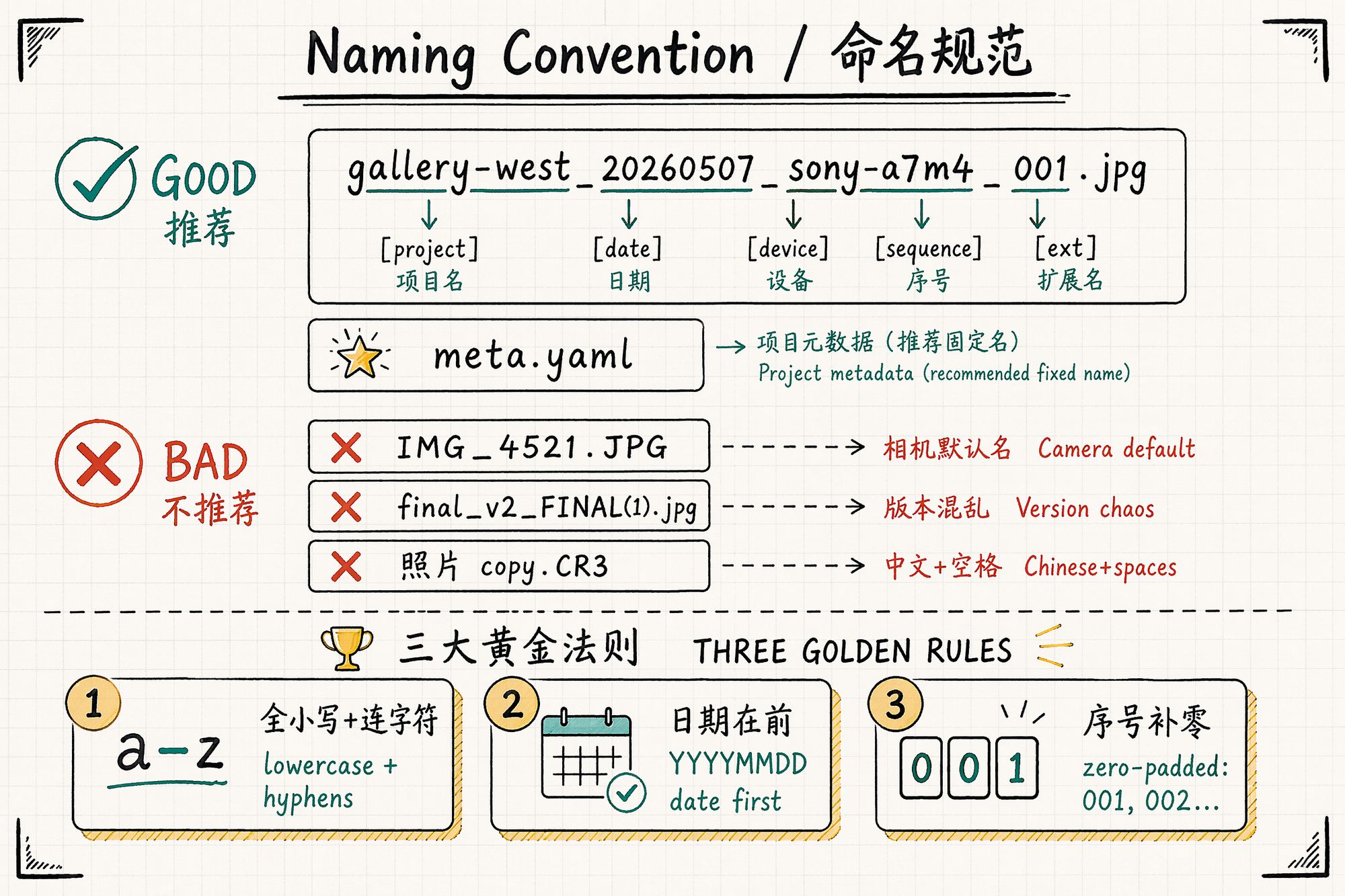
Project Folder Naming
Format: {project-name}{date}{device}
gallery-west_20260507_sony-a7m4/ temple-roof_20260510_dji-mini4pro/ product-vase_20260512_iphone16pro/Rules:
• All lowercase, words separated by hyphens -
• Date as YYYYMMDD — alphabetical sort = chronological sort
• Device shorthand — distinguishes multiple shoots on the same day
• No spaces, no CJK characters, no special characters (&, #, ()) — they create endless problems in command lines and scripts
Selected Frame Naming
Files in 01_selected/ are uniformly renamed to zero-padded sequential numbers:
001.jpg, 002.jpg, 003.jpg, ... 150.jpgWhy not keep original filenames? Because:
• Camera default names (DSC_0001) will collide when merging multiple cards
• Original names don't reflect capture order (if you shot from multiple angles in batches)
• COLMAP and training scripts are sensitive to filename sorting — sequential numbers are safest
Preserve the mapping: Record 001.jpg → DSC_4521. ARW correspondence in meta.yaml or a separate mapping.csv for traceability.
EXIF Metadata: Invisible to You, Critical to the Algorithm
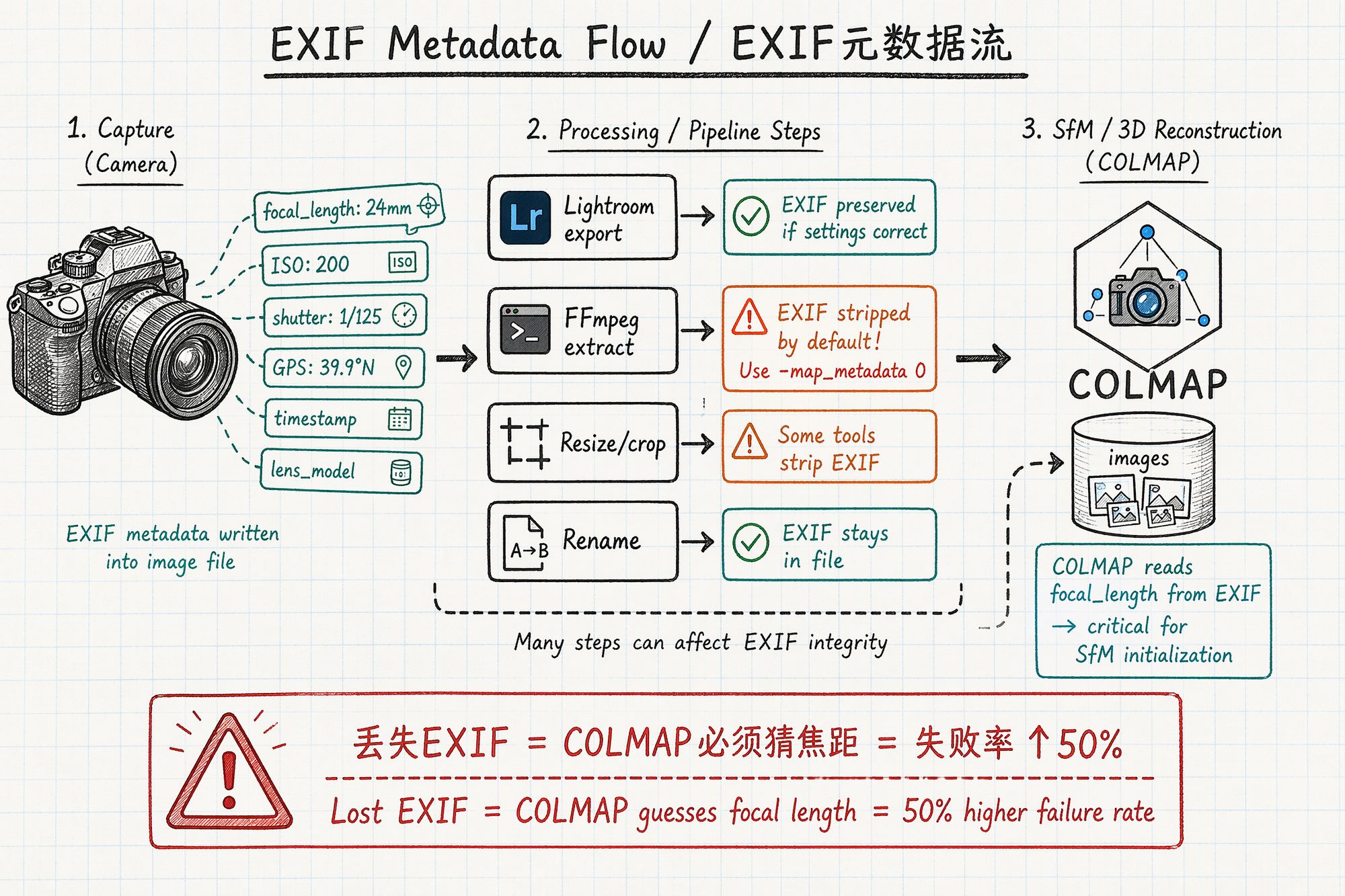
EXIF (Exchangeable Image File Format) is hidden information embedded in every photo. You can't see it, but COLMAP's very first step is reading it.
Key EXIF Fields COLMAP Depends On
| Field | COLMAP usage | Consequence if lost |
|---|---|---|
| FocalLength | Initializes camera intrinsic matrix | Must input manually; SfM failure rate +50% |
| FocalLengthIn35mmFilm | Calculates equivalent focal length | Same as above |
| Make / Model | Queries preset distortion parameters | Distortion correction inaccurate |
| ImageWidth / ImageHeight | Determines image dimensions | Intrinsic calculation errors |
| GPSLatitude / GPSLongitude | Initial position estimate for large scenes | Large-scene SfM converges slowly |
Which Operations Destroy EXIF
| Operation | EXIF preserved? | Solution |
|---|---|---|
| Camera-direct JPG/RAW | ✅ Fully preserved | — |
| Lightroom export JPG | ✅ Default preserved | Confirm "Include All Metadata" is checked |
| Photoshop "Save As" | ⚠️ Partially lost | Use "Export As" with metadata checkbox |
| FFmpeg frame extraction | ❌ Stripped by default | Add -map_metadata 0 flag |
| Python PIL/Pillow save | ❌ Stripped by default | Pass original EXIF via exif parameter |
| WeChat/messaging transfer | ❌ Compressed + stripped | Always use original files, never transfer via chat apps |
| Web download (right-click save) | ❌ Usually lost | Obtain original files from source |
| macOS Preview → Export | ⚠️ Partially lost | Verify with ExifTool |
Essential ExifTool Commands
# View key EXIF for a single photo exiftool -FocalLength -ISO -ShutterSpeed -Make -Model photo.jpg
# Batch check all photos in folder for focal length exiftool -FocalLength -r ./01_selected/ \3-2-1 Backup Strategy
The 3-2-1 backup rule was originally invented by photographers to protect film negatives. Its core is extremely simple:
• 3 copies of your data
• 2 different storage media types
• 1 off-site copy
Practical Implementation
| Copy | Storage location | Media type | Sync method | Recovery speed |
|---|---|---|---|---|
| Copy 1 (working) | Laptop / workstation SSD | NVMe SSD | Manual import | Instant |
| Copy 2 (local backup) | Synology NAS / external HDD | HDD (RAID 1) | rsync auto-sync | Minutes |
| Copy 3 (off-site) | Backblaze B2 / cloud storage | Cloud | rclone scheduled task | Hours |
Backup Priority by Stage
| Stage | Data | Replaceability | Backup priority |
|---|---|---|---|
| 00_raw | Original RAW + JPG | ❌ Irreplaceable (reshoot cost extreme) | ★★★★★ Highest |
| 01_selected | Curated frames | ⚠️ Can re-select from 00_raw | ★★★★ |
| 02_colmap | SfM output | ✅ Can recompute (1–4 hours) | ★★★ |
| 03_train | Training output .ply | ✅ Can retrain (30min–2h) | ★★ |
| 04_export | Final deliverables | ✅ Can re-export from 03_train | ★★ |
| meta.yaml | Project metadata | ❌ Memory fades, irreplaceable | ★★★★★ Highest |
Core principle: 00_raw/ and meta.yaml are irreplaceable — they must have full 3-copy coverage. Intermediate outputs (02, 03, 04) can be recomputed, so backup priority is lower — but if your training takes over 4 hours, include those too.
rsync Backup Script Example
#!/bin/bash # Daily auto-sync to NAS SOURCE="/Users/liyang/3dgs-projects/" DEST="nas:/volume1/3dgs-backup/"
rsync -avz --progress --checksum \
--exclude="03_train/point_cloud/iteration_7000/" \
"$SOURCE" "$DEST"
# After sync, trigger cloud upload rclone sync "$DEST" backblaze:3dgs-archive/ \
--transfers 8 \
--checkers 16 \
--log-file=/var/log/rclone-3dgs.log
meta.yaml: The Project's Memory
meta.yaml is the entire project's "brain." It records all information that cannot be inferred from the files themselves — shooting conditions, decision rationale, known issues. Six months later, this file is more valuable than any photo.
Complete Template
# === Project Info === project: "Chaoyang Gallery West Hall" date: 2026-05-07 subject_type: scene/interior client: "XX Gallery" operator: "Li Yang"
# === Equipment === device:
camera: "Sony A7M4"
lens: "FE 24mm f/1.4 GM"
focal_length_mm: 24
accessories:
- "CPL polarizing filter"
- "Carbon fiber tripod"
sd_cards:
- slot_a: "SanDisk Extreme Pro 128GB"
- slot_b: "Sony Tough 64GB"
# === Capture Settings === settings:
aperture: "f/8"
shutter: "1/125s"
iso: 200
white_balance_k: 5500
hdr: true
format: "RAW + JPG"
# === Environment === environment:
weather: "Overcast"
lighting: "Natural diffuse + gallery spots (turned off)"
temperature_c: 22
humidity_pct: 45
# === Capture Statistics === capture:
total_raw: 823
selected: 186
rejected_reasons:
- "Blurry: 47 frames"
- "Pedestrians in frame: 12"
- "Exposure anomaly: 5"
duration_minutes: 95
path_direction: "Counter-clockwise"
start_time: "09:05"
end_time: "10:40"
# === Known Issues === known_issues:
- "Display case B3 glass reflection severe, CPL used but residual remains"
- "Emergency light at corridor end cannot be turned off, 4000K warm"
- "Marble floor reflection visible at low angles"
# === Post-Processing Notes === post_notes:
- "White balance unified correction +150K (on-site was cool)"
- "Display case areas need mask processing"
- "Corridor transition zone: recommend additional density (next visit)"
# === Training Parameters (fill after training) === training:
software: "gsplat 1.5.0"
iterations: 30000
train_time_minutes: 45
final_psnr: 28.7
final_ssim: 0.92
model_size_mb: 287
notes: "Iteration 7000 already decent; 30000 mainly improves fine detail"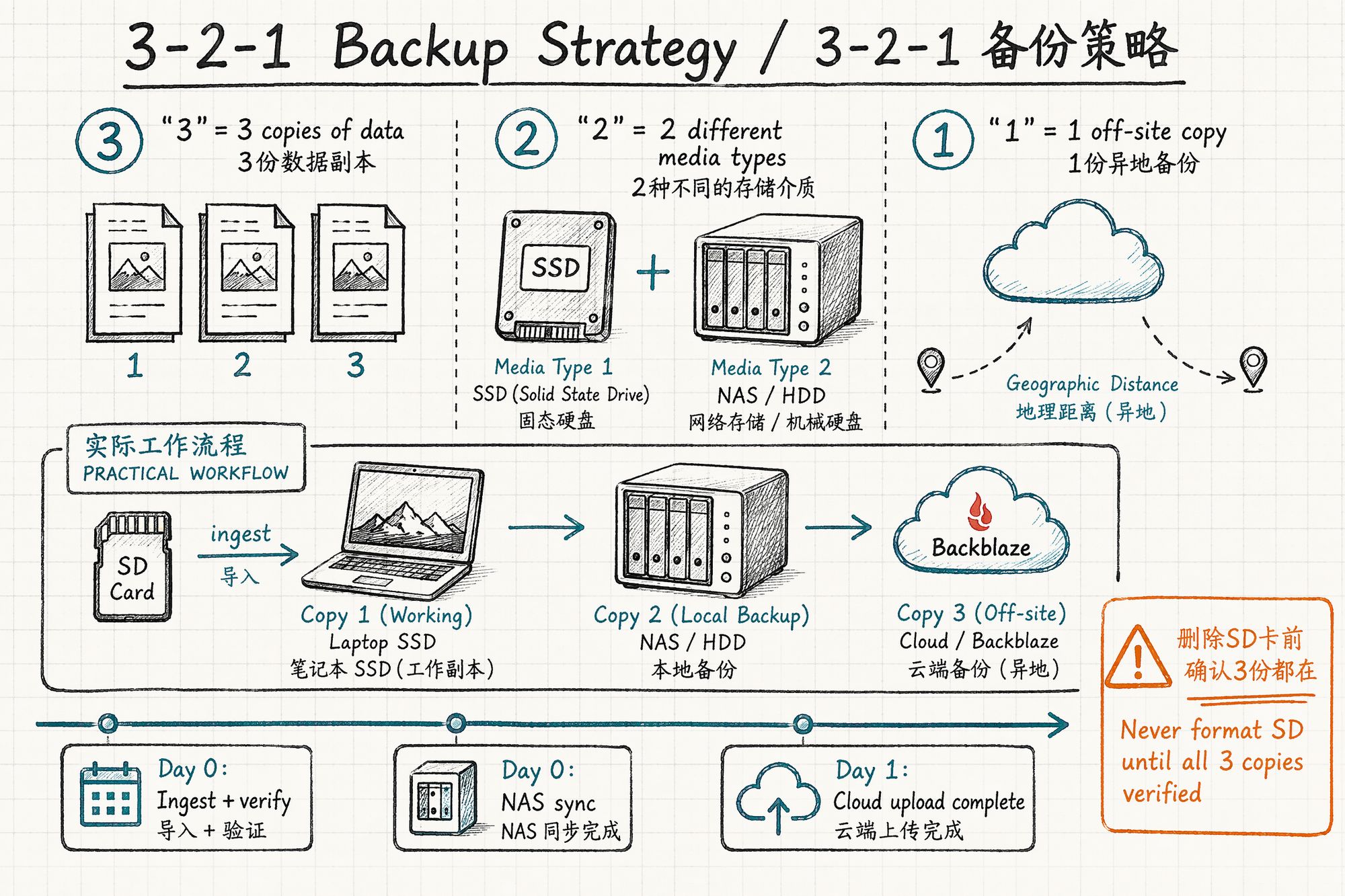
Three Principles for meta.yaml
-
Fill it on shoot day — Memory decays. In the first hour back, while you still remember "display case B3 had problems," write it down immediately.
-
Record decision rationale, not just outcomes — Don't just write "selected: 186." Write rejected_reasons. Six months later you need to know why you deleted those 600+ frames.
-
Known issues must be documented — This is the greatest gift to your future self (or the colleague who inherits the project). "Emergency light at corridor end is warm" — if you don't write it down, that information vanishes forever.
Common Mistakes & Troubleshooting
| Mistake | Consequence | Prevention |
|---|---|---|
| Format SD card immediately after copy | Cannot recover if files corrupted | Confirm 3 backups + MD5 verification first |
| Multiple projects in one folder | Filename collisions, COLMAP ingests wrong images | Strict one-project-per-folder |
| CJK characters or spaces in names | Scripts crash, paths break | All lowercase + hyphens |
| Forgot to preserve EXIF | COLMAP cannot initialize focal length | ExifTool spot-check before ingestion |
| Backup on single drive only | Drive failure = total loss | 3-2-1 strategy |
| Procrastinate on meta.yaml | Forget shoot details within two weeks | Fill same day, make it a mandatory workflow step |
| Copy 01_selected into 02_colmap | Wastes space + version drift | Use symbolic links ln -s |
Next Steps
• Assets are video, need frame extraction → Enter 05-Frame Extraction & Quality Filtering
• Photo colors inconsistent → Enter 06-Color Grading & White Balance Unification
• Ready to train → Enter 08-Training
• ← Previous chapter: 03-Camera Settings & On-Site Operation