
stage 01
主体分类与拍摄策略
Subject Taxonomy & Capture Strategy
The Decision Before the Shutter Matters 10× More
70% of 3DGS failures happen before capture, not during training. This chapter doesn't teach you how to press the shutter — it helps you see your subject clearly first. "Shooting a building" means completely different things for a three-story villa versus a traditional courtyard house.
Three Questions This Chapter Answers
-
What category does my subject belong to? What are the typical boundaries of this category?
-
Does my current equipment match this subject?
-
What's the most common failure for this subject type, and how do I avoid it in advance?
Five Subject Categories
All capturable subjects fall into 5 categories. Each has subtypes that determine specific strategy.
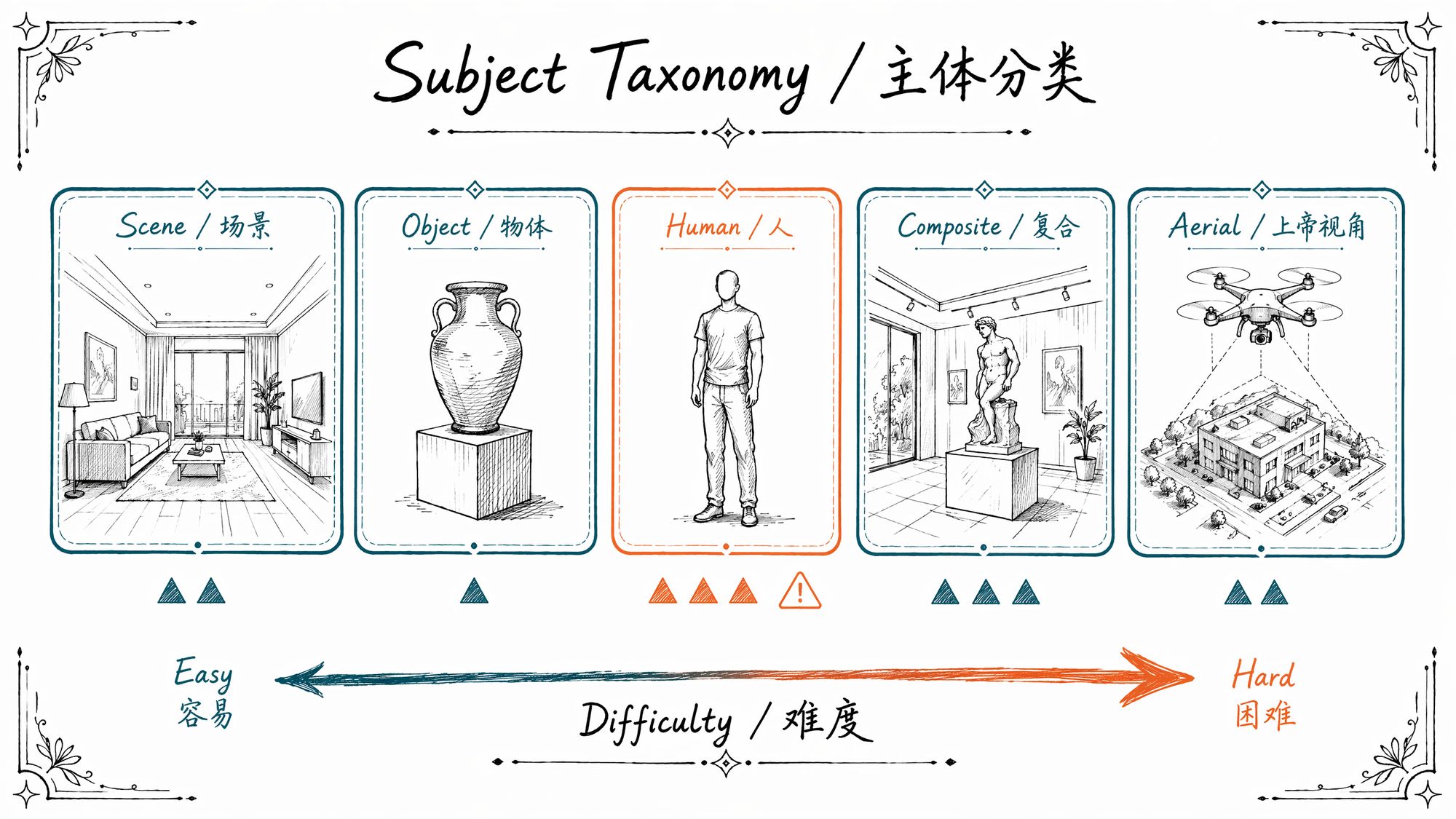
Category A · Scene
Definition: An environment where you need to walk through, look around, and experience parallax.
| Subtype | Typical examples | Key challenges |
|---|---|---|
| Interior space | Living room, gallery, shop, museum hall | Mixed lighting (warm tungsten + cool LED), mirrors, glass cases |
| Building exterior | Villa, temple, public building | Insufficient viewing height (only lower half covered), adjacent occlusion |
| Natural landscape | Forest, rocks, coastline | Leaves moving in wind (creates floaters), light changes every 3-5 minutes |
| Urban block | Old streets, commercial district | Pedestrians/vehicles entering frame, signage reflections |
| Complex heritage | Ancient architecture, archaeological site | High detail density, single capture session 200-500 photos |
Category B · Object
Definition: A single independently observable object that can be captured by orbiting around it.
| Subtype | Typical examples | Key challenges |
|---|---|---|
| Products | Clothing, appliances, furniture | Reflective surfaces, thin edges (collars, handles) |
| Artifacts | Sculptures, models, crafts | High color saturation, fine texture reproduction |
| Macro objects | Jewelry, electronic components | Extremely shallow DoF (~3mm in-focus band at f/2.8) |
| Reflective objects | Glassware, metalware, glazed ceramics | Specular highlights shift with viewpoint |
| Vehicles / large industrial | Cars, machinery, equipment | Large volume (needs 3-5m radius) + mirror-like paint |
Category C · People & Living Subjects
Definition: Subjects that move, breathe, blink, or shift involuntarily.
| Subtype | Typical examples | Key challenges |
|---|---|---|
| Full body | Fashion, action poses | Requires multi-camera synchronized shutter (single camera ✗) |
| Head closeup | Character face, model head | Blink interval ~4 seconds, skin micro-movements |
| Animals | Pets, horses, livestock | Completely uncontrollable movement |
Category D · Composite / Fragmented Space
Definition: Objects embedded in scenes, scenes containing featured objects, or non-contiguous spaces that need stitching.
| Subtype | Typical examples | Key challenges |
|---|---|---|
| Scene + object | Sculpture in exhibition hall | Balancing depth-of-field between primary and secondary subjects |
| Multi-room stitching | Full apartment / villa | Transition zones between rooms need ≥30% overlap |
| Multi-perspective fusion | Same object from ground + aerial | Aligning different scales (needs ≥20 shared feature points) |
| Temporal stitching | Same location, different lighting | Consistency nearly impossible to guarantee, not recommended |
Category E · Aerial / God's Eye View
Definition: Large-scale subjects requiring overhead coverage, captured by drone.
| Subtype | Typical examples | Key challenges |
|---|---|---|
| Building rooftops | Villa roofs, factory tops | Must combine with ground capture for facades |
| Urban bird's eye | Old town districts, campuses | Large datasets (500-2000 photos), long processing time |
| Industrial facilities | Power stations, steel structures, construction sites | Complex geometry + metallic reflections |
| Natural terrain | Hills, valleys, coastlines | Vegetation wind movement, shadow changes |
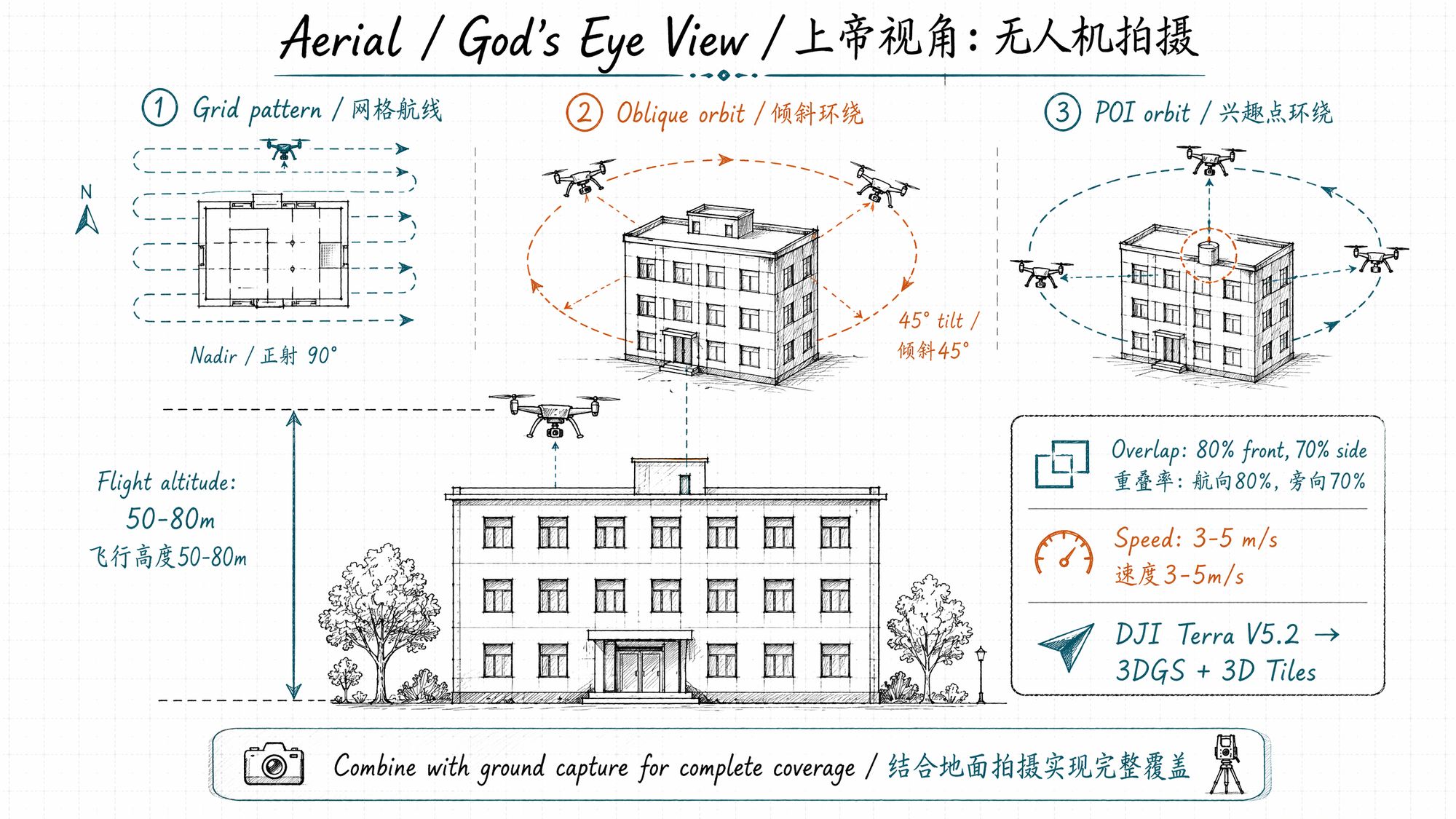
Key Drone Capture Parameters (2026 DJI Terra V5.2 Workflow):
| Parameter | Recommended value |
|---|---|
| Flight altitude | 50-80m (buildings) / 80-120m (districts) |
| Front overlap | ≥80% |
| Side overlap | ≥70% |
| Flight speed | 3-5 m/s |
| Camera tilt | Nadir 90° + Oblique 45° (two flights) |
| Typical dataset | Single building 300-500 photos / district 1000-2000 photos |
| Processing tool | DJI Terra V5.2 → Gaussian Splatting + 3D Tiles output |
| Processing speed | ~500 photos/hour (RTX 4090) |
DJI Terra V5.2 is the first mainstream tool in 2026 to integrate Gaussian Splatting fusion reconstruction into a drone workflow. It outputs both PLY (for downstream editing) and 3D Tiles (for Cesium web-based LOD streaming), supporting the full DJI Matrice 4E + Zenmuse P1 (45MP full-frame) pipeline.
Device × Subject Decision Matrix
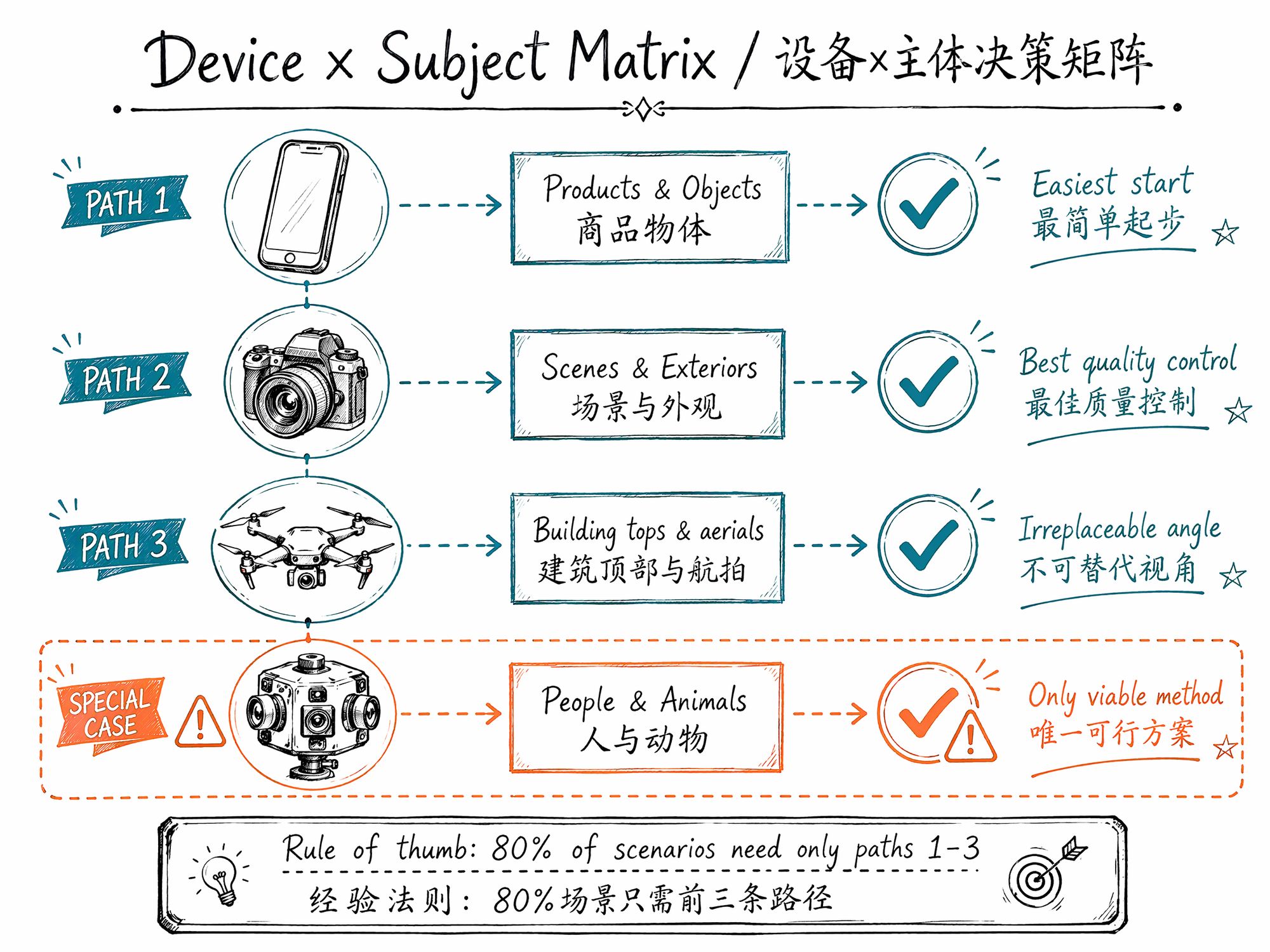
Three Golden Rules (covers 80% of scenarios):
- Phone for products and small objects
-
DSLR/mirrorless for scenes and building exteriors
-
Drone for building tops and large-area aerial views
Other combinations solve specific pain points — don't chase full equipment coverage from the start.
Complete Decision Matrix:
| Subject \ Device | Phone | DSLR/Mirrorless | Drone | 360° Camera | Action Cam | Multi-cam Array |
|---|---|---|---|---|---|---|
| Interior space | ▲▲ Use ultra-wide | ▲ Recommend 24-35mm | ✗ Indoor no-fly | ▲▲ Stitching issues | ▲▲▲ Distortion | ▲▲ |
| Building exterior | ▲▲▲ Height limit | ▲▲ Telephoto helps | ▲ Recommended | ▲▲ Ground floor only | ▲▲▲ | ▲▲ |
| Natural landscape | ▲▲▲ Wind | ▲▲ IS critical | ▲▲ Recommended | ▲▲▲ | ▲▲▲ | ▲▲▲ |
| Urban block | ▲▲▲ Pedestrians | ▲▲▲ Same | ▲▲ | ▲▲▲ | ▲▲▲ | ▲▲▲ |
| Products | ▲ Recommended start | ▲ Better light control | ✗ | ✗ | ✗ | ▲ |
| Sculptures/crafts | ▲ | ▲ | ✗ | ✗ | ✗ | ▲ |
| Macro objects | ▲▲ Needs clip lens | ▲ Macro lens | ✗ | ✗ | ✗ | ▲▲ |
| Reflective objects | ▲▲▲ Specular shift | ▲▲▲ CPL filter | ✗ | ✗ | ✗ | ▲▲▲ |
| Vehicles | ▲▲▲ Paint | ▲▲ CPL filter | ▲▲ Top view | ▲▲ | ▲▲▲ | ▲▲ |
| Full body portrait | ✗ Movement | ✗ Movement | ✗ | ✗ | ✗ | ▲▲ Only viable |
| Head closeup | ▲▲▲ | ▲▲▲ | ✗ | ✗ | ✗ | ▲ |
| Animals | ✗ | ✗ | ✗ | ✗ | ✗ | ▲▲ |
| Scene + object | ▲▲ | ▲ Recommended | ▲▲ | ▲▲▲ | ▲▲▲ | ▲▲ |
| Aerial overview | ✗ | ✗ | ▲ Recommended | ✗ | ✗ | ✗ |
Difficulty: ▲ Easy / ▲▲ Medium / ▲▲▲ Hard / ✗ Not recommended
Radius & Trajectory: The Fundamental Difference Between Objects and Scenes
Objects: Spherical Orbit
Subject at center, camera follows a spherical trajectory, lowering elevation with each ring.
Ideal Coverage Parameters:
| Orbit | Rings | Photos per ring | Angular interval |
|---|---|---|---|
| Upper hemisphere (overhead → horizontal) | ≥2 rings | 24-36 photos | 10-15° |
| Equator (horizontal) | 1 ring (densest) | ≥36 photos | 10° |
| Lower hemisphere (horizontal → looking up) | ≥1 ring | 18-24 photos | 15-20° |
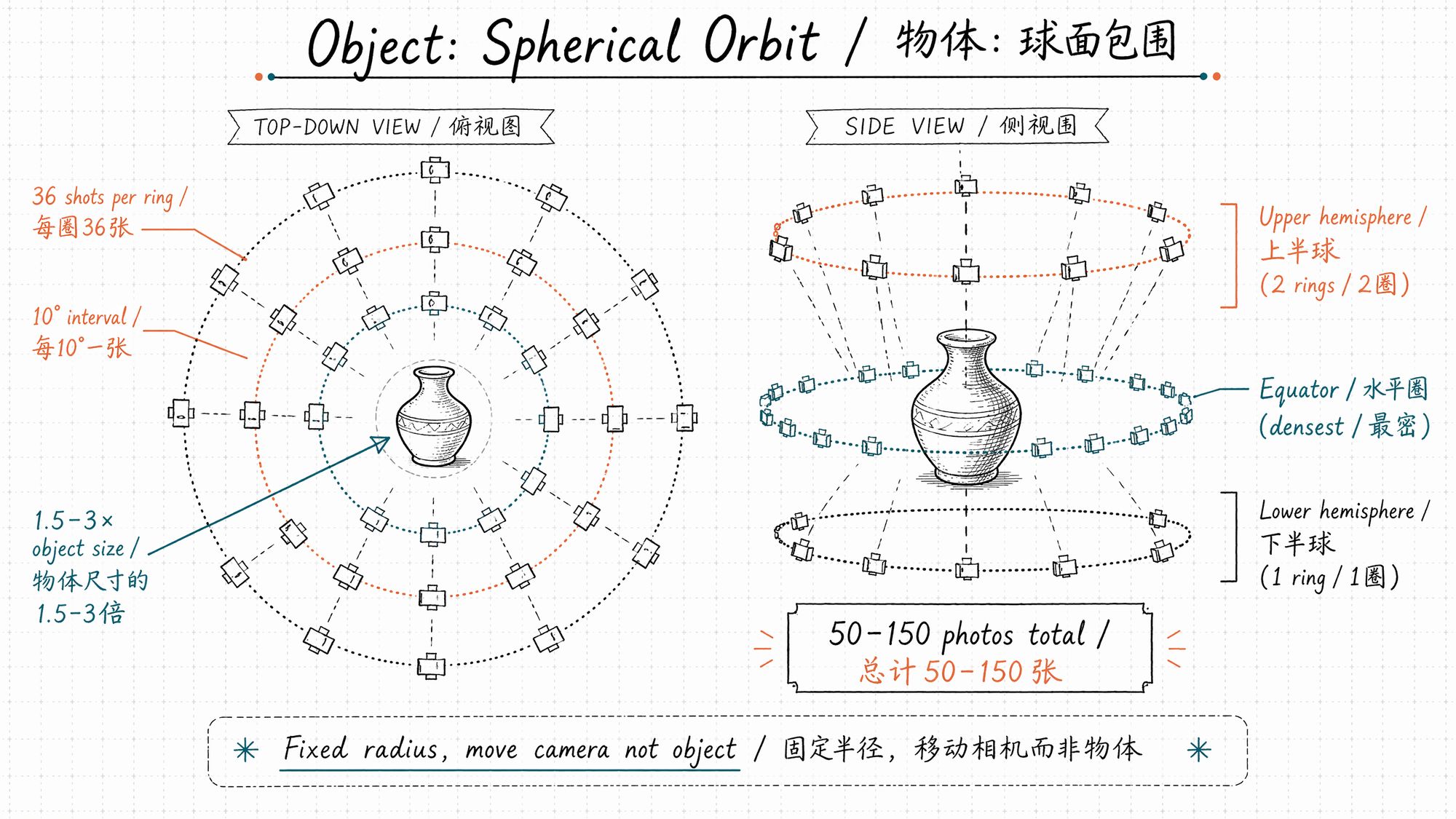
• Total: 50-150 photos
• Radius: 1.5-3× the object's longest dimension, held constant throughout
• Key principle: Move the camera, never the object. If the object moves, all previously captured photos are invalidated.
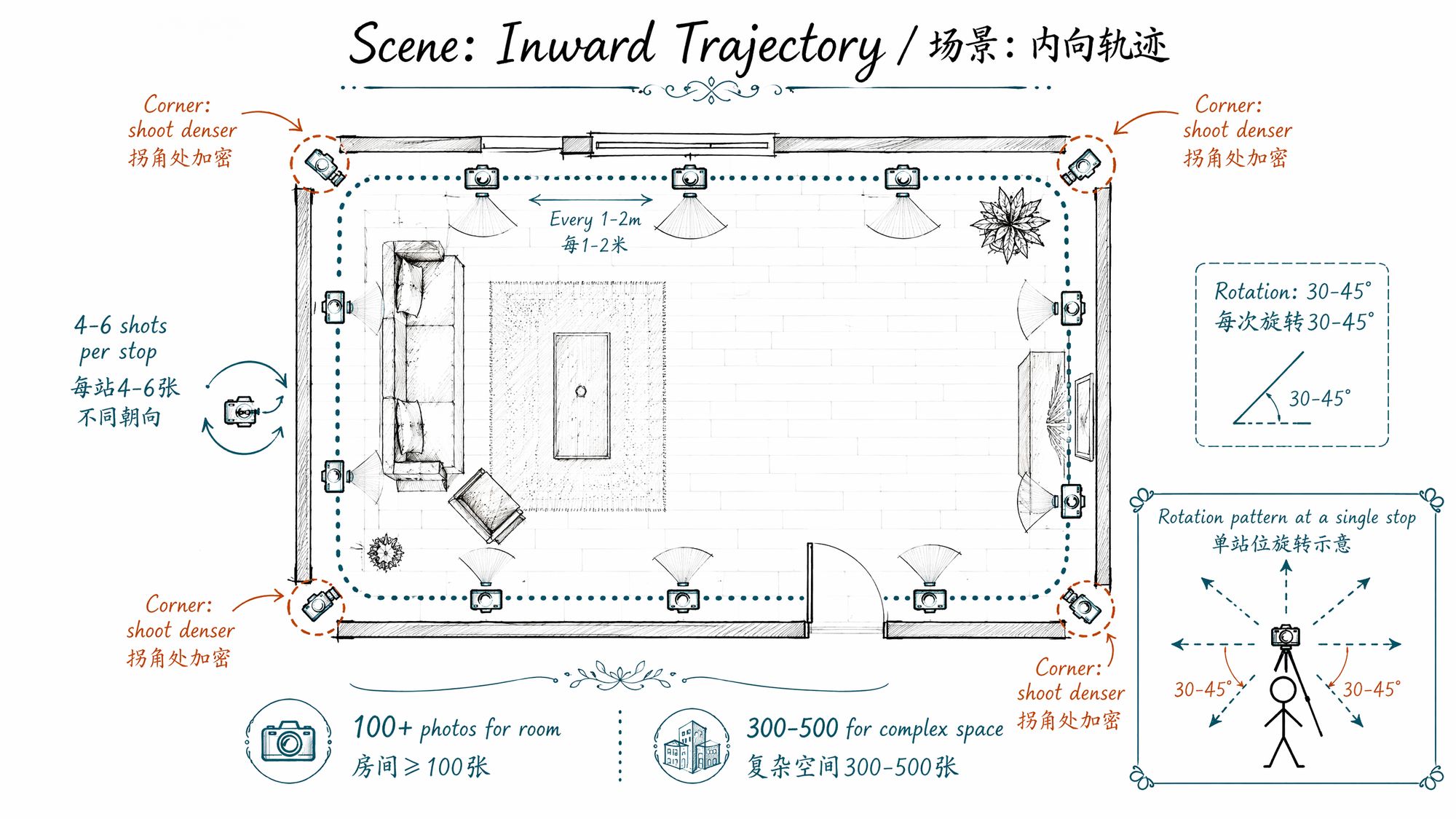
Scenes: Inward Trajectory
You're inside the scene, camera moves along interior paths, changing orientation at each stop.
Ideal Coverage Parameters:
| Parameter | Standard |
|---|---|
| Capture interval | Every 1-2 meters, take a group |
| Photos per group | 4-6 at different orientations |
| Rotation angle | 30-45° per turn, avoid large jumps |
| Key node density | Corners, doorways, stairwells at 2× density |
| Total count | Room ≥100 photos, complex space 300-500 |
| Adjacent frame overlap | ≥70% content overlap between consecutive shots |
Composite Spaces: Separate Then Combine
Split "exhibition hall + sculpture" into two capture sessions:
-
Capture the sculpture using object strategy (spherical orbit, 50-80 photos)
-
Capture the hall using scene strategy (inward trajectory, 100-200 photos)
-
Train the two datasets separately or merge for combined training
Never mix capture strategies. Mixed capture confuses SfM pose estimation — the algorithm cannot determine whether you're orbiting an object or walking through a scene.
Five Most Common Failures
Failure 1: Museum Display Case Glass
Glass registers as air during SfM (no feature points), but reflections become floating artifacts during training.
Solution:
• Capture two separate photo sets: before glass and behind glass, train separately
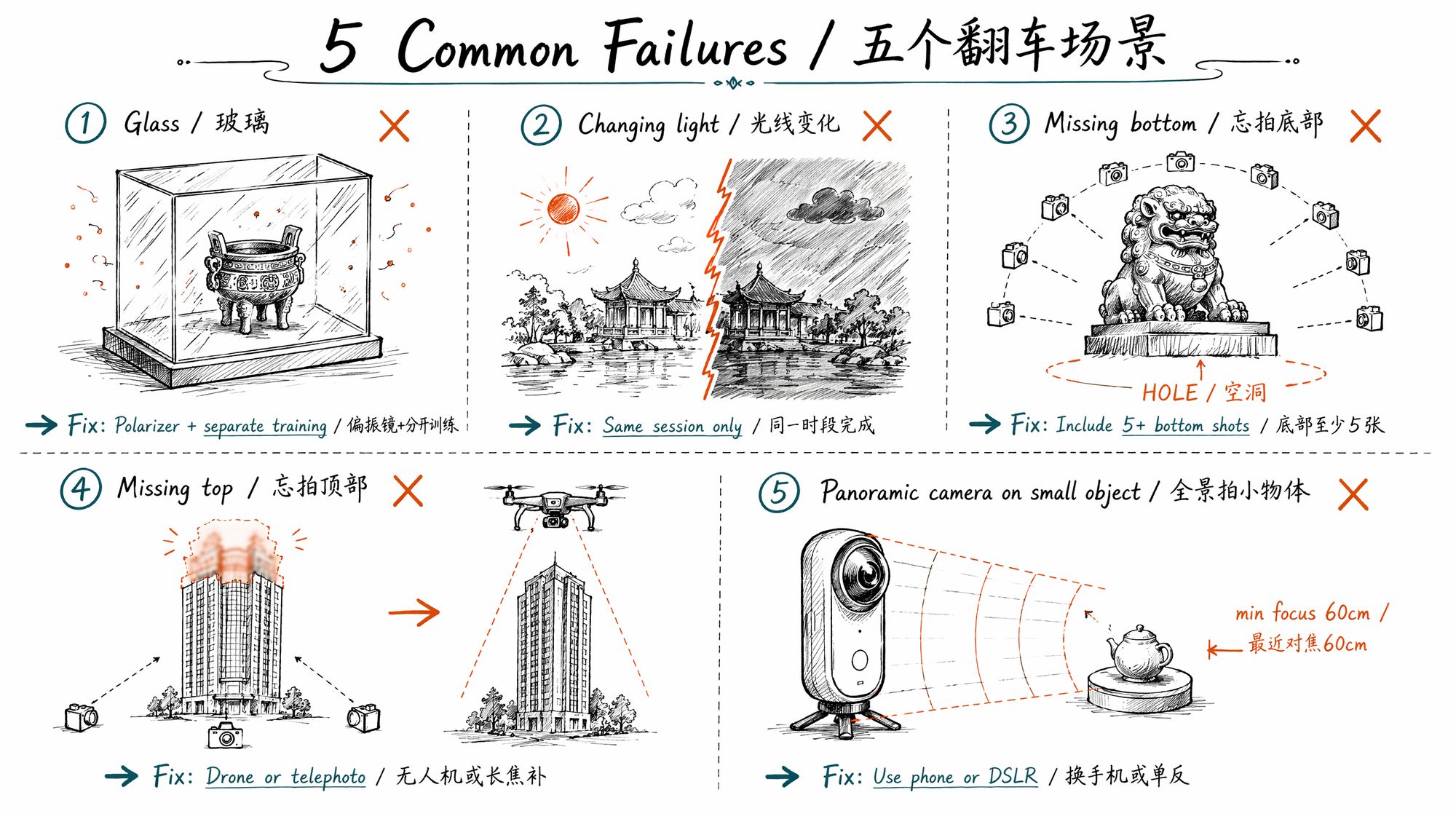
• Use a CPL polarizing filter to suppress reflections (rotate until reflections are darkest)
• Post-process in SuperSplat: manually remove Gaussians in the glass region
Failure 2: Sunset at the Beach — Continuously Changing Light
3DGS assumes constant scene illumination. During sunrise/sunset, color temperature shifts every 2-3 minutes. Passing clouds drop exposure by 2-3 stops instantly.
Solution:
• Complete all capture under constant lighting (overcast is ideal, or within 2 hours of noon)
• If sunset capture is unavoidable, finish all collection within 15 minutes
• Apply consistency correction in post using methods from 06-Color Grading
Failure 3: Forgot the Product's Bottom
30 photos of the front, zero of the bottom. Training produces a black hole underneath.
Solution:
• Every object capture must include ≥5 overhead/bottom-view shots
• Place the object on a transparent acrylic stand, shoot from below
• Even if you don't plan to display the bottom — capture it anyway. The void will "infect" adjacent areas
Failure 4: Forgot the Building's Top
200 photos from ground level, but no angles on the roof or under the eaves. The entire upper portion collapses into blur.
Solution:
• Use a drone for top-down and 45° oblique angles (DJI Mini 4 Pro is sufficient)
• Without a drone, use 70-200mm telephoto from a distance to capture upper details
• Shoot from upper-floor windows of an adjacent building (if accessible)
Failure 5: 360° Camera on a Small Object
360° cameras (e.g., Insta360 X4) have a minimum focus distance of ~60cm. Objects under 30cm will be severely out of focus, appearing as blurry textures.
Solution:
• 360° cameras suit large spaces (≥3m × 3m), not objects
• For small objects, use a phone or DSLR + 50mm/macro lens
• KIRI Engine's object scanning mode is specifically optimized for guiding capture of objects <50cm
Example: Minimum Dataset Structure for Objects
my-object-2026-05/ ├── raw/
├── DSC0001.ARW │
├── DSC0001.JPG │
└── ... (52 files) ├── selected/
# Curated 50 photos (manually filtered) │
├── 001.jpg
# Naming: three-digit sequential │
├── 002.jpg │
└── ... (50 files) ├── masks/
# Optional: background removal alpha masks │
├── 001_mask.png │
└── ... └── meta.yaml
# Capture metadata
Recommended meta.yaml fields:
subject: "Song Dynasty celadon bowl" date: 2026-05-07 device: "Sony A7M4 + FE 35mm f/1.8" lighting: "single softbox, 5600K daylight balance" radius_meters: 0.6 photo_count: 52 orbit_rings: 3 angles_per_ring: [18, 20, 14] notes: "6 overhead shots of bottom; front color temp 200K cool, batch corrected in Lightroom"Next Steps
• Ready to start capturing → Enter 02-Scouting & Capture Planning
• Want camera parameters first → Enter 03-Camera Parameters & Field Operations
• See real results → Gallery · Creator Picks
• Want to skip SfM with cloud processing → Enter 08-Training